Give Your AI Agent Live Web Context in One Call
A hands-on tutorial: wire an AI agent to fresh web results with one Exa search-and-extract call on Monid, and feed grounded context straight back into its answer.
Copy this line to your agent to give your agent live web search.
set up https://monid.ai/SKILL.md and use exa to search the live web and extract page content for an agent
You can give an AI agent live web context with a single call: send a question to Exa's /search endpoint on Monid, ask it to inline the page contents, and pipe the clean text straight back into the model. One request does the searching and the extracting, so your agent gets fresh, readable sources without a scraper, a search key, or an HTML parser anywhere in the loop. Monid is the OpenRouter for agent tools: one integration and one balance reach over a thousand tools across search, scraping, enrichment, and social data. This walkthrough builds one research step an agent can call whenever its training data runs out, and every command is copy-paste ready.
TL;DR
- A model's weights are frozen at training time, so any question about this week needs an outside fetch. Exa's
/searchon Monid is that fetch. - The
contentsfield turns search into search-and-extract: one call returns ranked URLs plus the actual page text, so you skip the separate scrape step most stacks bolt on. - Ask for
text,highlights, or a per-sourcesummaryand you hand the model exactly what fits its context window instead of raw HTML. - Filters like
type,category, andstartPublishedDaterun server-side, so a "what changed this week" query stays tight and cheap. - Monid ships as an MCP server, so an agent can discover, inspect, and run this step itself. Billing is per call, so a research tool that runs all day stays in single-digit dollars.
The worked example: an agent that needs this week's answer
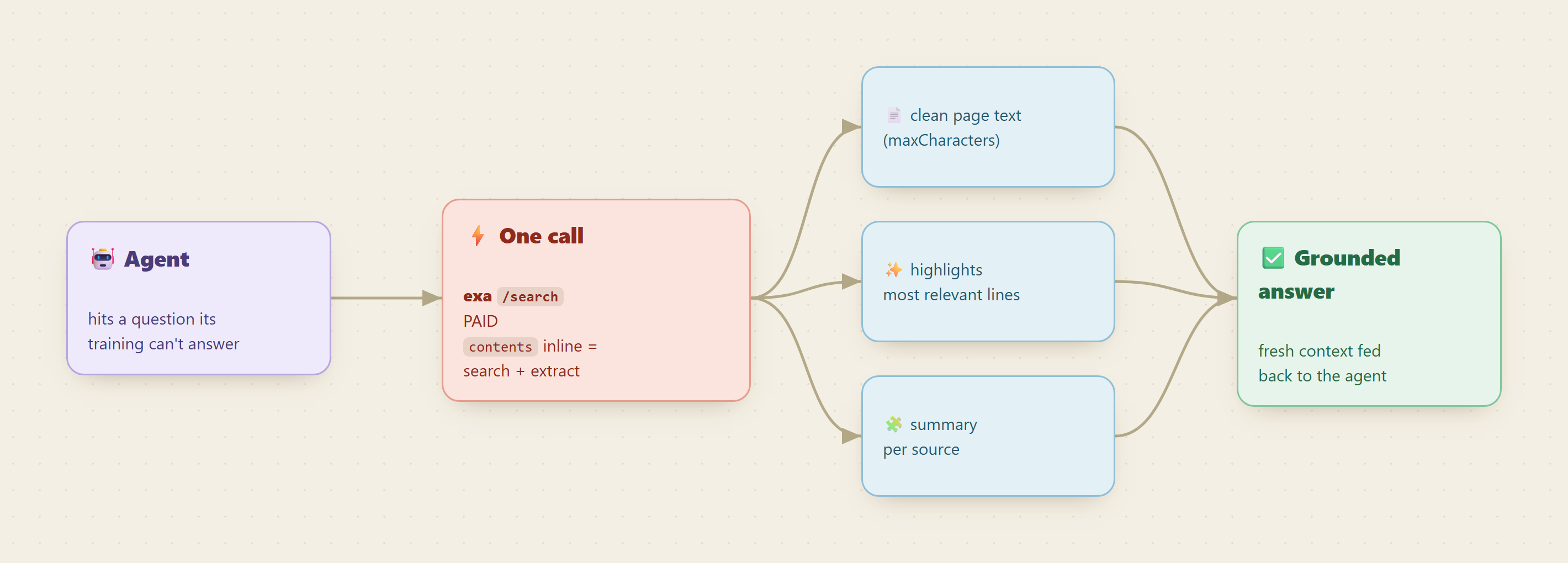
Picture an agent fielding "What did the latest OpenAI DevDay announce?" Its weights were frozen months ago, so it either guesses or admits it does not know. The fix is a research step: the moment the agent hits a question outside its training window, it calls out for fresh sources, reads them, and answers from what it just read. That is exactly the shape of one Exa search-and-extract call.
📖 See also Which MCP Server Gives an AI Agent Live Web Data?
Why one endpoint instead of a search API plus a scraper
The usual way to build this is two vendors: a search API to get URLs, then a scraping or extraction service to turn each URL into text a model can read. That means two keys, two bills, two failure modes, and a lot of glue for retries, rate limits, and messy HTML. Exa collapses both halves into one request. Its /search does neural and keyword retrieval and, when you set the contents field, returns the cleaned page body in the same response. Your agent never sees raw markup and never touches a second service.
Set up once
For agents
Grab an API key at app.monid.ai, then paste this to your agent and hand it the key:
set up https://monid.ai/SKILL.md
It learns the whole discover, inspect, run workflow itself. More details in the agent quickstart.
For humans
npm install -g @monid-ai/cli
monid keys add --label main --key <your-api-key>
More details in the CLI quickstart.
Step 1: Find the endpoint
Search the catalog for the capability. Discovery is free and returns endpoints ranked with provider, description, price, and a verified tag.
monid discover -q "web search content extraction"
# -> exa /search      (verified, search + extract in one call)
#    exa /contents     (verified, extract when you already have URLs)
#    plus other extractors, ranked
The top hit, exa /search, is the one you want for an agent that starts from a question rather than a list of links.
Step 2: Read the schema before you spend
Inspect the endpoint to see its real input fields and current price. This step is free, and it is where you confirm field names instead of guessing them.
monid inspect -p exa -e /search
# -> input schema + per-call price (free)
The fields that matter for an agent research step:
query: the natural-language question. This is the only required field.type: retrieval mode, frominstantandfastup throughneural,deep, anddeep-reasoning. Defaultautopicks for you; reach for a deeper mode when the question is broad.numResults: how many sources to pull back, from 1 to 100. Keep it small for an agent, since a few strong sources beat a wall of text.category: narrow tonews,research paper,company,financial report, and more when the question has an obvious shape.startPublishedDateandendPublishedDate: ISO date-time bounds that keep a "this week" query from surfacing year-old pages.includeDomainsandexcludeDomains: whitelist or blacklist sources to trust.contents: the field that makes this one call instead of two. It carriestext(optionally withmaxCharacters),highlights(the most relevant lines for a sub-query), andsummary(a per-source condensation).
There is also outputSchema, which asks Exa to synthesize a single structured JSON object across all the sources it read. That is the difference between handing your model a pile of pages and handing it a filled-in answer.
Step 3: Make the one call
This is the only step that bills. Pass the agent's question as query, cap the pull with numResults, scope it to fresh news, and set contents so the response already carries readable text.
monid run -p exa -e /search \
  -i '{"query": "OpenAI DevDay 2026 announcements",
       "type": "neural",
       "category": "news",
       "numResults": 5,
       "startPublishedDate": "2026-07-01T00:00:00Z",
       "contents": {"text": {"maxCharacters": 1500},
                    "highlights": {"query": "new products announced", "numSentences": 2}}}' \
  -w
# -> five recent news URLs, each with up to 1500 chars of clean body text
#    and the two sentences most relevant to "new products announced",
#    plus a costDollars breakdown for the request
The -w flag waits inline so the call returns the results in one shot, which is what an agent tool wants. Setting maxCharacters keeps each source inside a slice of the context window, and the highlights sub-query pre-selects the lines worth reading, so the model spends its attention on signal.
Step 4: Feed the results back to the model
The payload from step 3 is already model-ready. Each result carries the URL, the title, the extracted text, and the highlights, so you concatenate them into a context block and prepend it to the agent's prompt:
Sources (fetched live):
[1] <title> (<url>)
<highlights and text>
[2] ...

Using only the sources above, answer: What did OpenAI DevDay 2026 announce?
Cite each claim with its [n].
Now the model answers from what it just read, and every claim traces to a URL you can show. If you would rather skip the prompt plumbing entirely, set outputSchema on the call and Exa returns a structured object (say, {announcements: [...], date, source_urls}) that your code drops straight into the response.
📖 See also extracting page content for RAG
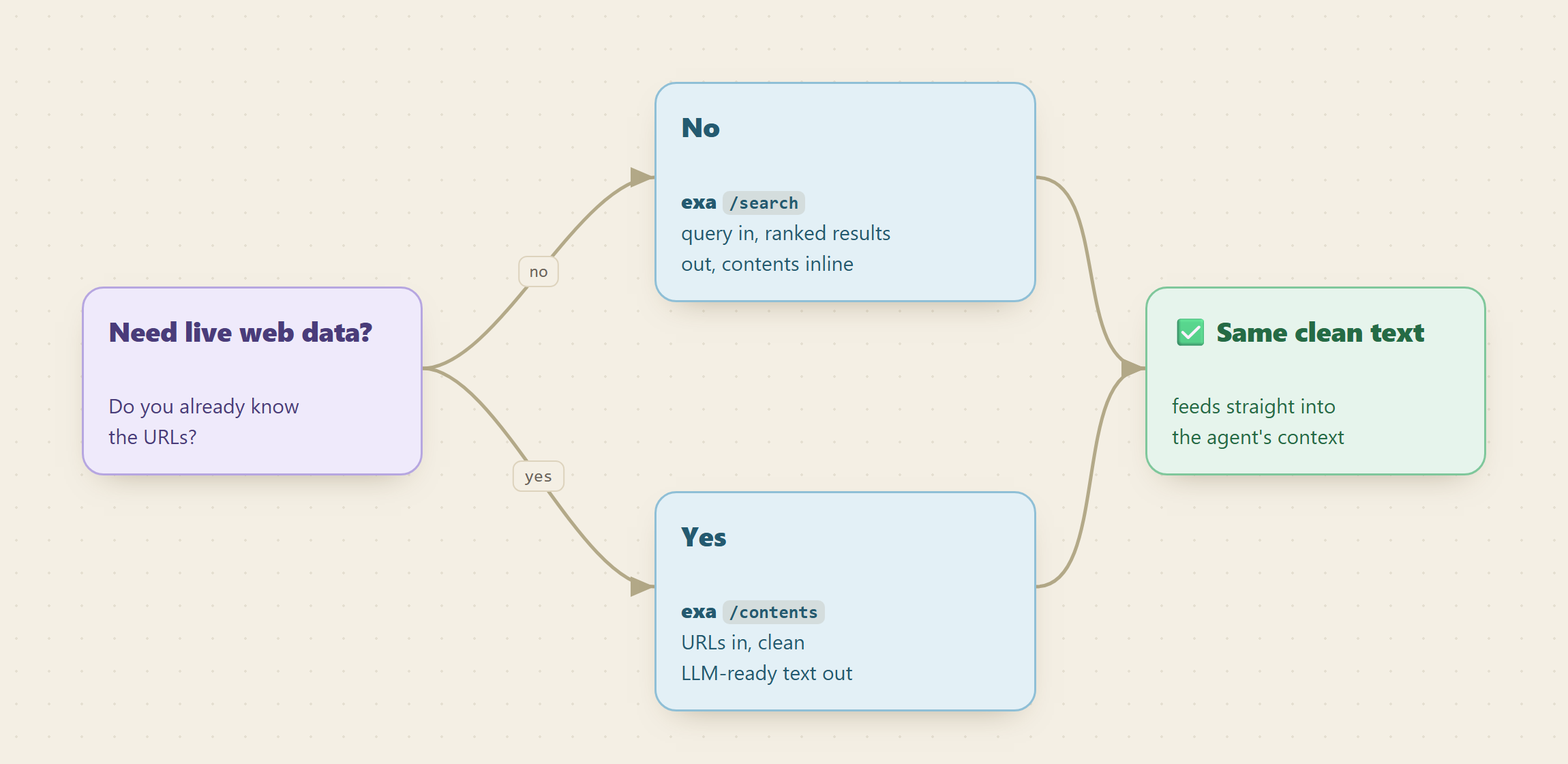
When you already have the URLs: /contents
Sometimes the agent is not searching, it is following a link a user pasted or a citation it found earlier. For that, Exa's /contents endpoint takes a list of urls and returns the same clean text, highlights, and summary, no query needed. It handles JavaScript-rendered pages and PDFs, so it is the extract half of the pipeline on its own, at a lower per-call rate than a full search.
monid run -p exa -e /contents \
  -i '{"urls": ["https://openai.com/blog/devday-2026"],
       "text": {"maxCharacters": 2000},
       "summary": {"query": "key announcements"}}' \
  -w
# -> clean body text plus a one-paragraph summary for that URL
What a research tool costs
Both endpoints bill per call, not per token or per page, so the cost of a research step is a flat, predictable unit you know before you run it. A single /search with inline contents is one charged call regardless of how many results you asked for, and /contents is cheaper still because it skips the retrieval half. An agent that fires a handful of research calls per session stays in fractions of a cent to a few cents per session, and a tool running those all day lands in single-digit dollars. Current per-endpoint pricing lives at monid.ai/tools, and because inspect shows the price before you run, there are no surprises. Widen numResults or reach for a deep search mode when a question is hard, keep it lean when it is not, and the bill tracks the work.
FAQ
Do I need an Exa API key, a search key, and a scraper? No. You integrate Monid once and fund one pay-as-you-go balance. That single wallet reaches Exa's search and extraction endpoints, so there is no separate key for retrieval and none for parsing.
How does one call do both search and extraction?
Exa's /search takes a contents object alongside the query. Set it and the response includes the cleaned page text, highlights, or a summary for each result, so the searching and the reading happen in the same request.
How do I keep results fresh instead of stale?
Use startPublishedDate (and optionally endPublishedDate) to bound the window, and set category to news for current events. Both filters run server-side, so the agent only ever sees pages from the range you asked for.
Can the agent run this itself? Yes. Monid ships as an MCP server, so an agent handed a question it cannot answer from memory can discover the endpoint, inspect the schema, and make the call on its own. See monid.ai/SKILL.md.
Try it
Run a free monid discover for "web search content extraction", inspect exa /search to confirm the fields and price, then make one call with contents set on a question you know the answer to. If the extracted text lines up with what you would find opening the pages yourself, wrap it as your agent's research tool and let the model call it whenever its training runs out. Start at monid.ai.