LinkedIn Profiles, Emails Included, Behind One Integration
Scrape LinkedIn profiles and discover verified work emails from one integration on Monid, billed per result with the price shown before you run.

Copy this line to your agent to find LinkedIn profiles with verified work emails.
set up https://monid.ai/SKILL.md and use apify to scrape LinkedIn profiles and discover work emails for a list of people
You can pull a full LinkedIn profile and the person's likely work email from a single integration on Monid, billed per result at roughly a cent and a half, with the price visible before you run and no LinkedIn login anywhere in the loop. Monid is the OpenRouter for agent tools: one integration and one balance reach over a thousand tools across web scraping, people enrichment, social data, and search. The LinkedIn corner of that catalog is unusual because the useful part is rarely the headline. It is the email attached to it, and the endpoints below treat that email as a first-class output rather than an afterthought.
TL;DR
dev_fusion/linkedin-profile-scraperturns a list of profile URLs into structured records with work history, education, skills, and discovered email addresses and phone numbers, billed per result.- Do not have the URLs?
harvestapi/linkedin-profile-search-by-namesearches by first and last name with location, company, and school filters, then flips into a "Full + email search" mode in the same call. - For a whole org,
harvestapi/linkedin-company-employeeswalks employees and returns emails with SMTP validation, so a bounced address is filtered before it reaches you. - When you only need public profile fields and no email, TikHub fetches a profile by URL for a fraction of the per-call cost.
- None of these need a LinkedIn account, cookies, or an app review. The provider owns the scraping infrastructure; you own one balance.
Why the email is the hard part
LinkedIn's own product surface never hands you an email. The official Marketing and Talent APIs are built for authorized apps acting on behalf of a logged-in member, and personal contact details sit behind that member's own privacy settings. That is the correct design for LinkedIn, and it is why every recruiter, founder, and sales team that actually needs to reach a person ends up somewhere else: a standalone email finder bolted onto a separate profile scraper, two vendors, two bills, and a brittle handoff between them where the name matches but the email does not.
The endpoints on Monid collapse that handoff. Email discovery runs inside the same call that scrapes the profile, so the address you get back is tied to the exact record it came from. That is the whole angle: profile and email as one row, not two systems you have to reconcile.
Set up once
For agents
Grab an API key at app.monid.ai, then paste this to your agent and hand it the key:
set up https://monid.ai/SKILL.md
It learns the whole discover, inspect, run workflow itself. More details in the agent quickstart.
For humans
npm install -g @monid-ai/cli
monid keys add --label main --key <your-api-key>
More details in the CLI quickstart.
From a URL: scrape and enrich in one call
If you already have profile URLs, dev_fusion/linkedin-profile-scraper is the direct path. Its input is a single field, profileUrls, an array of the people you want. No auth cookies, no session juggling. One result comes back per URL, billed per result.
monid run -p apify -e /dev_fusion/linkedin-profile-scraper \
  -i '{"profileUrls": ["https://www.linkedin.com/in/williamhgates"]}'
# -> Run ID: 01HXYZ...

monid runs get -r 01HXYZ... -o profiles.json
# -> COMPLETED: one full record per URL,
#    contact fields included where discoverable
Each record is deep enough to act on without a second lookup:
- Identity and headline: name, current title, summary, location, and profile images.
- Full work history with company intelligence: every role plus the employer's industry, website, size range, and founded year, which is what lets you segment a list by company stage rather than just title.
- Education, skills, certifications, publications, patents, and recommendations: the raw material for scoring fit before you ever send a message.
- Enriched contact details: discovered email addresses and, where available, phone numbers.
That last bullet is the reason to reach for this endpoint over a plain scraper. The enrichment step runs automatically, so a profile that resolves to a findable work address arrives with the address already attached.

No URL? Search by name, then ask for the email
Often you have a name and a rough context, not a link. harvestapi/linkedin-profile-search-by-name takes firstName and lastName and narrows with real filters: locations, currentCompanies and pastCompanies as company URLs, schools, currentJobTitles, and industryIds. A strictSearch flag keeps you from drowning in near-matches.
The field that matters most is profileScraperMode. It has three settings, and they map cleanly to how much you want to spend:
- Short returns search-page summaries and headlines, enough to confirm you found the right person.
- Full opens each profile and pulls the complete detail set.
- Full + email search does everything Full does, then applies email-finding heuristics to surface a contact address.
monid run -p apify -e /harvestapi/linkedin-profile-search-by-name \
  -i '{"profileScraperMode": "Full + email search",
       "firstName": "Satya", "lastName": "Nadella",
       "currentCompanies": ["https://www.linkedin.com/company/microsoft"],
       "strictSearch": true, "maxItems": 5}'
Because billing is per result, maxItems and maxPages are your cost dial. Set maxItems low while you tune the filters, then open it up once the search returns the right people. A free schema check with monid inspect -p apify -e /harvestapi/linkedin-profile-search-by-name shows every filter and the current price before you commit a cent.
Scaling to a whole company, with the address actually checked
Sourcing a team rather than a person is a different shape, and harvestapi/linkedin-company-employees is built for it. It walks a company's employees with filters for job title, seniority, function, location, and years at the company, and it offers the same three-mode ladder up to full profile with email discovery. Its edge is validation: emails come back with SMTP validation, meaning the mailbox is checked to exist before the row lands in your output. On a list of a few hundred people, that is the difference between a clean send and a bounce rate that hurts your sending domain.
When you do not need an email at all, do not pay for one. TikHub exposes a plain profile fetch, /api/v1/linkedin/web_v2/get_user_profile, that takes a profile URL and returns the public fields per call for a fraction of the enrichment cost. It is the right tool for a quick identity check or for hydrating a profile you already emailed through another channel.
Every endpoint above is cookie-free, which is the property that keeps this repeatable rather than a one-off. Which LinkedIn scraper API to use, and why the cookie route ends badly makes that comparison directly.
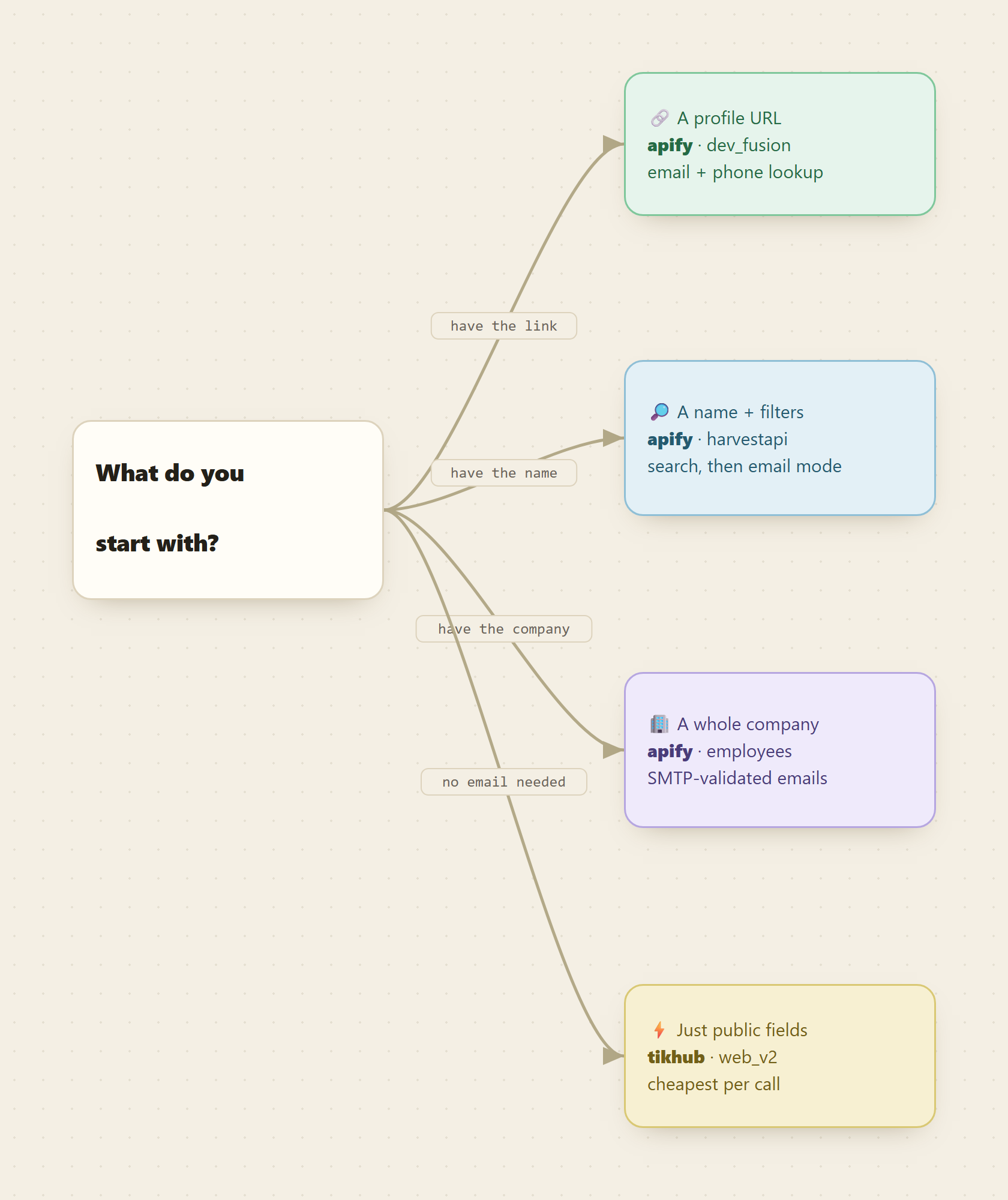
Which endpoint fits which starting point
| You start with | Endpoint | Emails? | Billing |
|---|---|---|---|
| Profile URLs | apify /dev_fusion/linkedin-profile-scraper | discovered | per result |
| A name and filters | apify /harvestapi/linkedin-profile-search-by-name | opt-in mode | per result |
| A company to source | apify /harvestapi/linkedin-company-employees | SMTP-validated | per result |
| Just public fields, no email | tikhub /api/v1/linkedin/web_v2/get_user_profile | none | per call |
A free monid discover search returns these ranked with provider, description, current price, and a verified tag, so you never pick blind. Current per-endpoint prices live at monid.ai/tools.
What a real sourcing pass costs
Put numbers on it. Say you search 200 candidates by name in "Full + email search" mode, then enrich 50 confirmed profiles by URL. Both stages bill per result at roughly a cent and a half each, so the whole pass lands in single-digit dollars, and you paid for exactly the rows you kept. No seat license, no monthly minimum, no second contract with an email-finder vendor, because the finding happens inside the same call. Scale the shape to a few thousand rows and it is still spend you approve without a meeting.
Because Monid also ships as an MCP server, this runs agent-shaped too. An agent handed "find the heads of data at these ten companies and get their emails" can search the catalog, route the company-employees endpoint for sourcing and the profile scraper for enrichment, and hand back a validated list from one integration.
FAQ
Do I need a LinkedIn account or developer app? No. You integrate Monid once and fund one pay-as-you-go balance. The providers on Apify handle LinkedIn access, proxies, and the parsing that breaks whenever the site changes.
How reliable are the discovered emails? Email discovery is heuristic, so it finds an address where a findable one exists rather than guaranteeing one for every profile. The company-employees endpoint adds SMTP validation, which checks the mailbox exists before returning it, cutting bounces on larger lists.
What if I have the name but not the profile URL?
Use the search-by-name endpoint with firstName, lastName, and filters like company and location, set to "Full + email search". It finds the profile and attempts the email in one call.
How is this priced? Per result on the Apify endpoints, per call on the TikHub lookup, from a fraction of a cent to roughly a cent and a half, always shown before anything bills. Every current price is listed at monid.ai/tools.
Try it
Run a free search for the LinkedIn data you need, inspect the endpoint that matches your starting point, and pull five profiles you can verify by hand. If the emails and fields check out, open up the filters and scale the pass. Start at monid.ai.