Which LinkedIn Scraper Actually Returns Emails?
A fair, endpoint-by-endpoint comparison of four LinkedIn scrapers on Monid on one question: which one hands back a real, deliverable email.

Copy this line to your agent to find LinkedIn profiles with deliverable emails.
set up https://monid.ai/SKILL.md and use apify to scrape LinkedIn profiles and return SMTP-validated emails
Only one of the four common LinkedIn endpoints actually returns an email that has been checked to exist: harvestapi/linkedin-company-employees, the only one that runs SMTP validation before the row reaches you. The other three sit on a ladder: two discover an address but never verify it, and one returns no email at all. That distinction matters more than any feature list, because a scraper that "returns emails" and one that returns emails you can send to are not the same product. This compares those four on that single axis, run against the live catalog on Monid, the pay-per-call tool layer for AI agents where all four are one integration away.
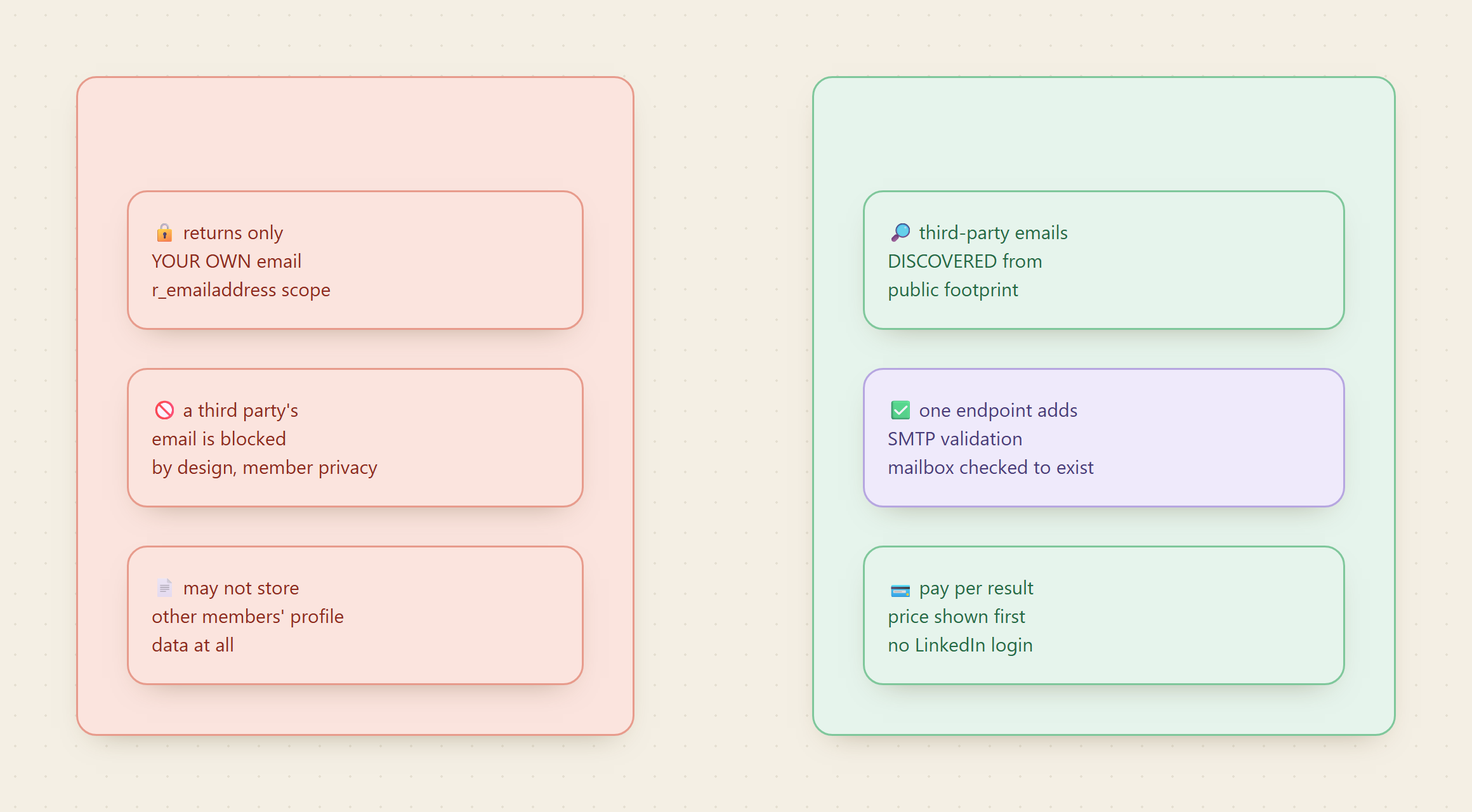
The honest framing: LinkedIn will never hand you a third party's email
Start with what LinkedIn itself allows, because it explains why any of these tools exist. LinkedIn's official Primary Contact API returns an email, but only the email of the member who authenticated your app, retrieved with their consent through the r_emailaddress scope. You cannot ask it for anyone else. LinkedIn's Profile API docs go further and state you may never even store profile data for members other than the authenticated one. That is deliberate privacy design, and it is correct.
So the moment your job is "reach a person who did not sign into my app," the official surface is a dead end, and every recruiter and sales team ends up at a third-party scraper. The fair question is not whether to use one. It is which one does the email part honestly.
📖 See also exporting Apollo leads safely by API if Apollo is where your list already lives.
Set up once
For agents
Grab an API key at app.monid.ai, then paste this to your agent and hand it the key:
set up https://monid.ai/SKILL.md
It learns the whole discover, inspect, run workflow itself. More details in the agent quickstart.
For humans
npm install -g @monid-ai/cli
monid keys add --label main --key <your-api-key>
More details in the CLI quickstart.
The email deliverability ladder
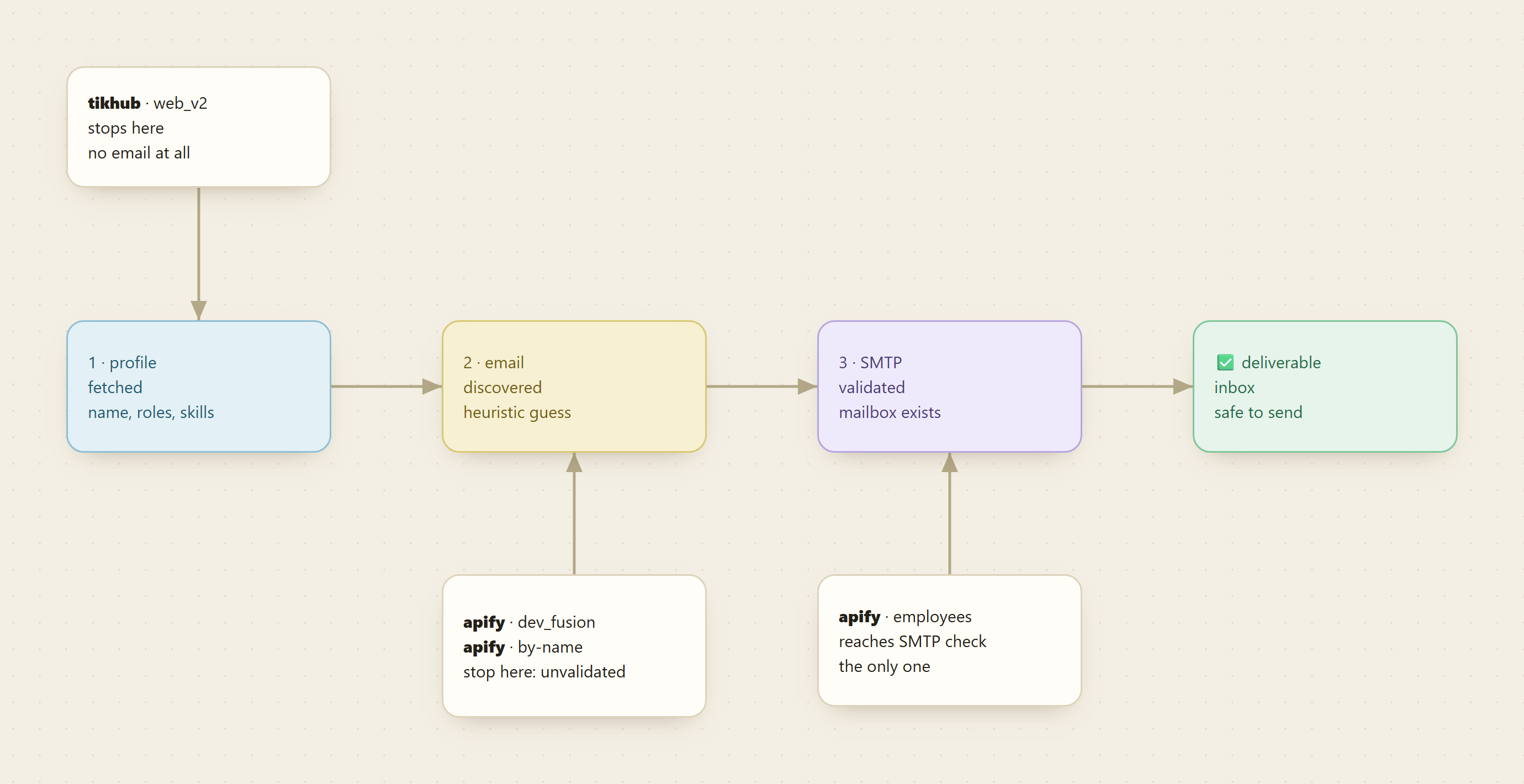
Getting a usable email is three stages, not one: discover the address, confirm the mailbox accepts it, then send. Each endpoint stops at a different rung, and where it stops is the whole comparison.
tikhub web_v2: no email, and that is fine
TikHub's /api/v1/linkedin/web_v2/get_user_profile is the honest baseline. Inspect it and the input is a single query parameter, url, and the summary says exactly what it does: fetch a member's public profile. There is no email field anywhere in it, discovered or otherwise. On the deliverability ladder it stops at rung one.
That is not a knock. It is a GET call at the lowest price in this group, and when all you need is a name, headline, and current role to confirm identity, paying for email discovery you will not use is waste. Just do not reach for it expecting a contact address, because it does not pretend to have one.
apify dev_fusion: always enriches, never validates
dev_fusion/linkedin-profile-scraper on Apify is the opposite stance. Its input is a single field, profileUrls, an array of the people you want, and there is no mode switch to toggle. Every run enriches: the returned record carries full work history, company intelligence, education, skills, and, crucially, discovered email addresses and phone numbers by default.
That makes it the strongest coverage play when you already hold URLs: contact fields and profile in one row with zero configuration. The caveat, and the reason it is not this piece's winner, is that the schema describes discovery, not verification. There is no SMTP step, so the address is a heuristic best guess and some fraction of a cold list will bounce. It reaches rung two of the ladder and stops.
apify harvestapi search-by-name: email is opt-in, still unverified
Do not have the URL, only a name? harvestapi/linkedin-profile-search-by-name takes firstName and lastName and narrows with real filters: locations, currentCompanies and pastCompanies as company URLs, schools, currentJobTitles, industryIds, plus a strictSearch flag. The email behavior lives in one field, profileScraperMode, an enum with three values:
- Short returns search-page summaries, enough to confirm you found the right person.
- Full opens each profile for the complete detail set.
- Full + email search does Full, then applies email-finding heuristics to surface an address.
So email here is a deliberate opt-in, not a default, which is a genuine advantage: you only pay for discovery on the searches where you want it. But like dev_fusion, the schema describes discovery, not an SMTP check. It also stops at rung two. Its edge over dev_fusion is not verification, it is that it starts from a name instead of requiring a URL you may not have.
apify harvestapi company-employees: the only one that verifies
harvestapi/linkedin-company-employees is built for sourcing a whole org, with the deepest filter set of the four: job title, seniority level (from Entry Level to CXO), function, industry, headcount band, years at company, and recently-changed-jobs, plus exclusion filters for all of them. It offers the same three-mode ladder up to full profile with email discovery.
The line that decides this comparison is in its own summary: the email discovery capability performs independent email searches with validation checks, including SMTP validation. That is the mailbox being pinged to confirm it exists before the row lands in your output, the difference between a clean send and a bounce rate that damages your sending domain. It is the only one of the four to reach rung three. If "returns emails" means "returns emails I can actually send," this is the answer.
Side by side, on the email question only
| Endpoint | Starts from | Email behavior | Verified? | Billing |
|---|---|---|---|---|
tikhub /web_v2/get_user_profile | a profile URL | none | not applicable | per call |
apify dev_fusion/linkedin-profile-scraper | profile URLs | always discovered | no | per result |
apify harvestapi/linkedin-profile-search-by-name | a name plus filters | opt-in mode | no | per result |
apify harvestapi/linkedin-company-employees | a company | opt-in mode, SMTP-validated | yes | per result |
A free monid discover returns these ranked with provider, description, current price, and a verified tag, and a free monid inspect shows every field before you spend. Current per-endpoint prices live at monid.ai/tools.
What the winner actually costs to run
Say you source a target company for validated contacts. Point the employees endpoint at the org, filter to the seniority and function you want, cap the run, and pick Full + email search:
monid inspect -p apify -e /harvestapi/linkedin-company-employees   # free: see modes + price
monid run -p apify -e /harvestapi/linkedin-company-employees \
  -i '{"companies": ["https://www.linkedin.com/company/stripe"],
       "profileScraperMode": "Full + email search",
       "seniorityLevelIds": ["220", "300"],
       "functionIds": ["8"], "maxItems": 25}'
# -> Run ID: 01HXYZ...
monid runs get -r 01HXYZ... -o employees.json
Billing is per result, so maxItems is your cost dial: keep it small while you tune filters, then open it up. A validated list of a few dozen directors lands in single-digit dollars, and every address has already survived an SMTP check. No seat license, no separate email-finder contract, because the verification happens inside the same call. Scale to a few thousand rows and it is still spend you approve without a meeting.
The honest caveat: the winner is not always the right tool
"Which returns real emails" has one answer, but "which should I run" depends on what you hold:
- You have URLs and want maximum contact coverage in one pass: dev_fusion wins. It returns emails and phone numbers with no mode fiddling, and you can validate the addresses downstream yourself.
- You have a name and a rough context, not a link: search-by-name wins, because neither of the others starts from a name.
- You are sourcing a company and want to send safely: company-employees wins outright, because it is the only one that verifies.
- You need no email at all, just a fast public identity check: tikhub wins on price.
Because Monid also ships as an MCP server, an agent handed "find the heads of data at these ten companies and get deliverable emails" can route this itself: company-employees for validated sourcing, dev_fusion for URL-based enrichment, all from one balance.
This post answers one question, deliverable emails, across four endpoints. For the wider decision, which endpoint fits which LinkedIn job at all, and how to avoid the account ban that ends most cookie-based approaches, the guide to LinkedIn scraper APIs covers the full set.
FAQ
Can LinkedIn's official API give me someone else's email? No. The Primary Contact API returns only the authenticated member's own address, and the Profile API forbids storing other members' data. Third-party contact discovery has to come from a scraper.
Which endpoint returns verified emails?
Only harvestapi/linkedin-company-employees, which adds SMTP validation to confirm the mailbox exists before returning the row.
Do dev_fusion and search-by-name return bad emails, then? They return discovered addresses using heuristics, which are useful but unverified, so validate them yourself before a large cold send. They win on coverage and on starting from a name, not on deliverability.
How is all this priced?
Per result on the Apify endpoints, per call on the TikHub lookup, always shown by a free monid inspect before anything bills. Current prices are at monid.ai/tools.
Try it
Run a free monid discover for LinkedIn contact data, inspect the endpoint that matches what you hold, and pull a handful of rows you can check by hand. If you need addresses you can send to today, start with the validated employees endpoint. Everything begins at monid.ai.