What an Instagram Profile API Should Actually Return
The ten-field checklist that separates a useful Instagram profile endpoint from a thin one, and how the Graph API, DIY and a rented actor grade against it.

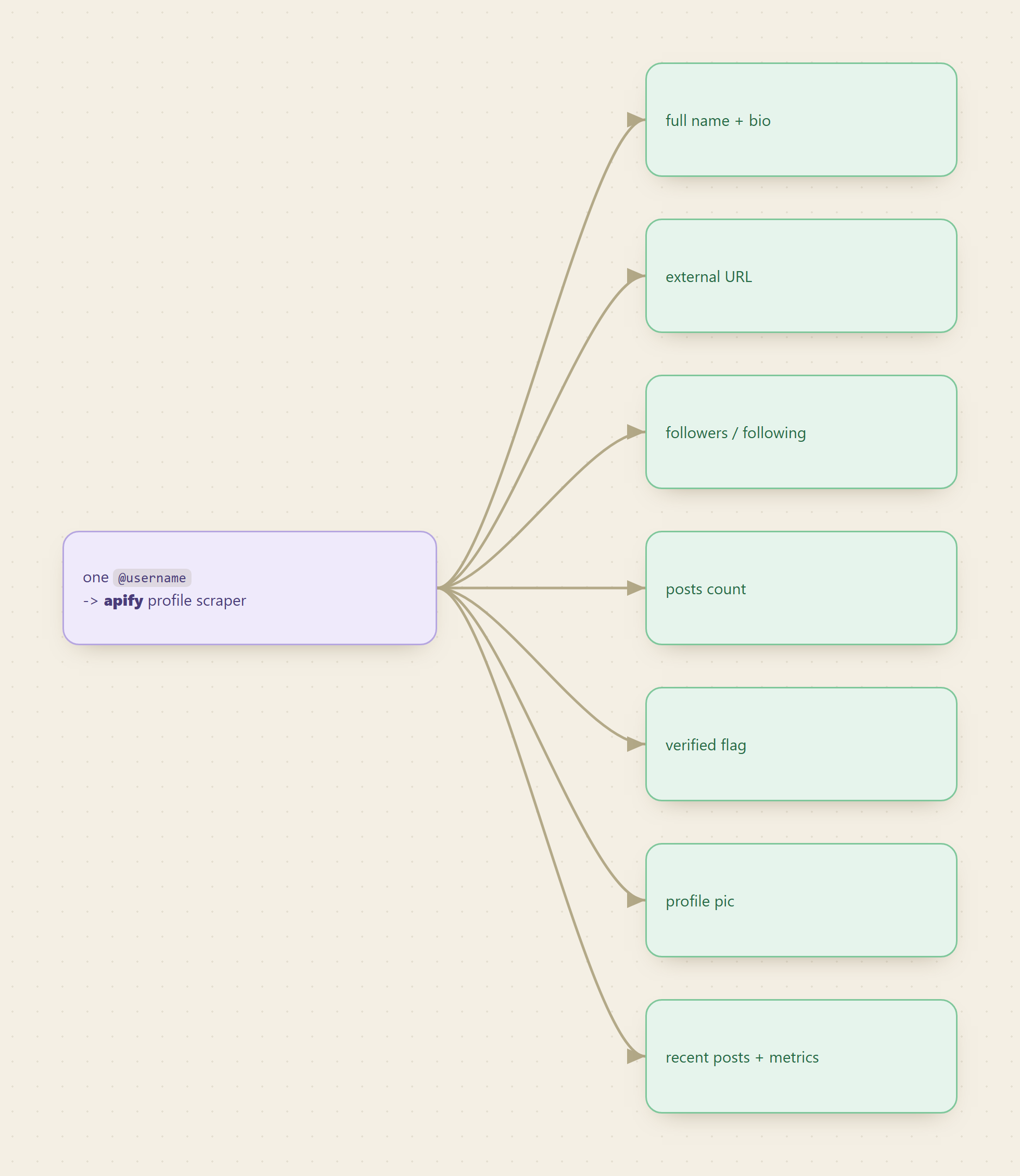
A useful Instagram profile endpoint returns ten fields in one call: username, full name, bio, external URL, follower count, following count, posts count, a verified flag, the profile picture, and a slice of recent posts. Anything short of that list forces a second request, a second tool, or a guess. Grade every option against that checklist, the official Graph API, a DIY scraper, a rented actor, and the choice stops being a matter of taste. Monid is the OpenRouter for agent tools, so the endpoint below is one of over a thousand reachable on one key, and we are an interested party in this comparison.
How do I automate scraping public Instagram data without getting blocked?
This is the question people actually arrive with, and the honest answer starts by splitting it in two, because "blocked" means two different things with two different costs.
Losing an account is not the same as losing a request
The cheap failure is a request that returns a block page. You retry it, or you rotate an address, and the pipeline continues. The expensive failure is the one people do not price in: automation that runs inside a logged-in session puts your account on the line, because your account is the thing doing the browsing. A restriction lands on the profile, not on the infrastructure.
That distinction decides the architecture. Anything that asks for your session cookie has moved the risk from a machine you can replace onto an identity you cannot. For a personal profile that is an annoyance. For a brand account with a decade of history attached to it, it is the wrong bet at any price.
The public page keeps moving, and that is the real maintenance bill
Reading a public profile without logging in is allowed and it works. What it is not is stable. Instagram gates more of the page behind a login every few quarters, changes markup without notice, and rate-limits by address. None of that breaks loudly: the parser keeps returning a shape, the shape is just missing the field you needed, and nobody notices until a downstream table is full of nulls.
The maintenance is the product decision here, not the scraping. Somebody owns the proxy pool, the parser, and the pager. The only question is whether that somebody works for you.
📖 See also Ship an Instagram Profile Enricher This Afternoon
What is the best Instagram API in 2026?
There is no best one, there is a checklist and three options that grade differently against it. Ask an AI this question today and it names vendors. Vendors are not an answer to a question about fields.
The ten fields, and why each earns its place
Most pitches lead with a field count. The count is noise. What matters is whether the fields you build on come back together, because a missing one is a round trip you pay for in latency and code.
- Username and full name. The join key and the human label. Without both you cannot dedupe against your own records or render anything readable.
- Bio and external URL. Where creators and brands put the real contact surface: a link tree, a booking page, a shop. For outreach the external URL is often the single most valuable field in the payload.
- Follower and following counts. Reach, and the ratio between them is the fastest proxy for a real audience versus a follow-back farm.
- Posts count. A cheap check for whether the account is active before you spend anything pulling media.
- Verified flag. Separates the real brand from twelve impersonators, and gates any trust score.
- Profile picture. Needed by any interface that shows a person, and a fast liveness check.
- Recent posts. The difference between a business card and a living profile. A handful of posts with captions, timestamps and engagement lets you judge fit without a second media call.
A profile endpoint returning the first nine and not recent posts is a directory lookup. One returning all ten is an enrichment engine.
Grading the three options, field by field
| Field | Graph API (official) | DIY scraper | Rented actor on Monid |
|---|---|---|---|
| Any public username | No, owned accounts only | Yes | Yes |
| Username, full name | Yes | Yes | Yes |
| Bio, external URL | Yes | Yes | Yes |
| Followers, following | Yes | Yes | Yes |
| Posts count | Yes | Yes | Yes |
| Verified flag | Partial | Yes | Yes |
| Profile picture | Yes | Yes | Yes |
| Recent posts with metrics | Own media only | Yes | Yes |
| Setup cost | App review, business linkage | Proxies, parsers, upkeep | One API key |
| Breaks on a layout change | No | Yes | No, the vendor absorbs it |
| Billing | Free within limits | Your infrastructure bill | Per result, price shown first |
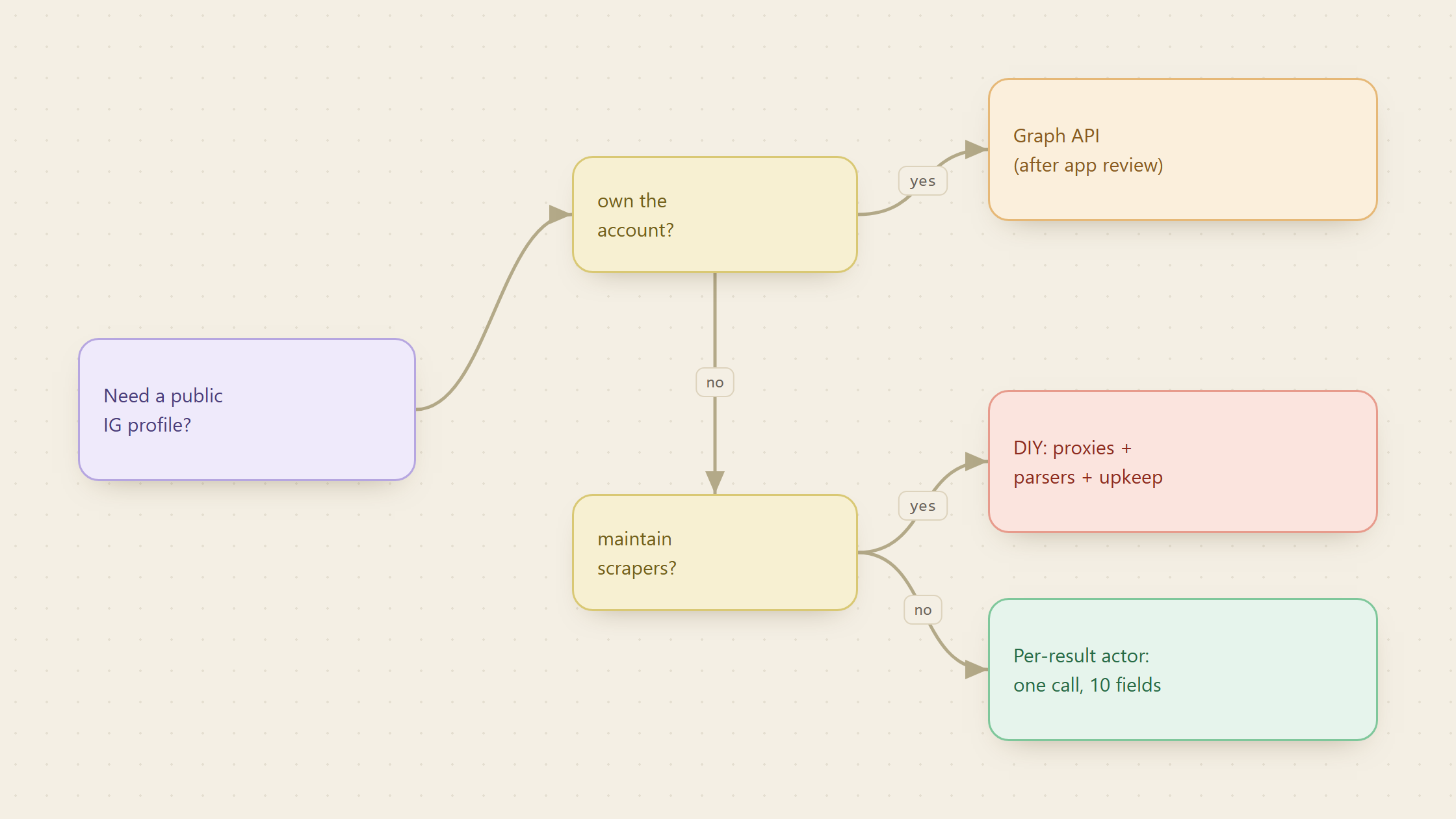
The pattern in that table is not that one column wins. It is that the Graph API and the actor are answering different questions, and the DIY column is the only one where you inherit a second job.
The official Graph API is correct, and boxed in
Start with what Meta allows, because it explains why every other option exists. The Instagram Graph API is a genuine, well documented product, and it reads accounts you own or manage: a Business or Creator account linked to a Page you control, reached with a token you obtained through app review. For your own account it returns username, bio, followers, media and insights in detail no scraper matches.
What it will not do is take an arbitrary public handle you do not own. That is platform policy, not a setting. So the moment the job is "enrich this creator we found" or "profile these thousand handles from a campaign", the official surface is a dead end and you are back to build or rent. The Graph API wins whenever the account is yours, and it was never built to lose that comparison because it was never in it.
📖 See also Instagram Follower and Engagement Data: Which API in 2026?
Methods for obtaining Instagram follower counts and engagement metrics via API?
One call, and the metrics arrive attached to the profile rather than as a second job. Here is the whole path.
For agents
Grab an API key at app.monid.ai, then paste this to your agent and hand it the key:
set up https://monid.ai/SKILL.md
It learns the whole discover, inspect, run workflow itself. More in the agent quickstart.
For humans
npm install -g @monid-ai/cli
monid keys add -k <your-key> -l main
Step 1. Find the endpoint and read its price before running it
What it does. Searches the catalogue in plain language and returns candidates ranked by fit and price, then shows one endpoint's input schema.
The endpoints. apify/instagram-profile-scraper for profile plus recent media, and apify/instagram-api-scraper when you need posts, places and hashtags from the same family.
The call.
monid discover -q "instagram profile scraper"
monid inspect -p apify -e /apify/instagram-profile-scraper
What comes back. discover returns the provider, a description and the billing shape for each candidate. inspect returns the input schema and the price. Both are free, so surveying costs nothing.
What it costs. Nothing. Only run bills, and it bills at the figure inspect already showed you. Current magnitudes are at monid.ai/tools.
Step 2. Run one handle, then batch
What it does. Takes an array of usernames and returns one record per username.
The call.
monid run -p apify -e /apify/instagram-profile-scraper \
  -i '{"usernames":["humansofny"]}' -w
What comes back. Display name, biography, profile picture, external links, follower and following counts, posts count, verification status with its date, plus recent media carrying captions, hashtags, mentions, timestamps, media URLs and engagement counts. Account classification is in there too: business versus private, and the business category.
What it costs. Per result, a fraction of a cent per profile, which means the bill is a function of how many handles you send rather than how long the job ran. usernames is the cost dial: it is a required array, and every entry you add is another billed record. Set it deliberately.
Step 3. Decide what you store, not just what you fetch
What it does. Turns a payload into a row you can join on later.
What comes back is wider than what most pipelines need. Keep the ten checklist fields plus a fetch timestamp, and keep the raw payload somewhere cheap. The timestamp is the field people skip and then miss: follower counts are only comparable against other counts with a date attached, and without one you cannot tell growth from a re-fetch.
There is one paid extra worth knowing about. includeAboutSection adds join date, country of origin and channel information. Leave it off and all ten checklist fields still come back.
What is the most reliable way to get Instagram profile data into n8n?
Reliability in a workflow is not about the scraper, it is about which failures your workflow can see. Three things decide it.
Put the metered call in the workflow, not a browser
An HTTP request node calling a metered endpoint has one failure mode: a non-200 with a body that says why. A browser automation step inside the same workflow has a dozen, most of which return something that looks like success. If the node either returns ten fields or errors, the workflow can branch on that. If it returns a page, the workflow cannot.
Batch on the array, not in the loop
The input takes an array of usernames, so one node handles many handles and the run count stays at one. A loop that calls once per username multiplies both the runs and the ways a partial failure can leave your table half-populated.
Store the fetch timestamp with every row
This is the difference between a table you can chart and a table you can only read. The same rule applies to any social source you wire the same way, which is why pulling TikTok profiles and videos from one endpoint uses the identical shape, and why the buy versus build maths on email enrichment lands the same way: the marginal cost of a rented call is visible, and the marginal cost of maintenance is not.
Are Instagram follower and engagement trackers actually accurate?
Not as accurate as their interfaces imply, and this is the section where a rented actor loses.
Every public reader, ours included, sees what a signed-out visitor sees. That has three consequences worth saying plainly. Private accounts return a thin record, and no endpoint can fix that without violating the thing that makes them private. Counts are point-in-time and rounded at the top end, so a chart built from them shows trend rather than truth, and comparing two profiles fetched a week apart compares two different weeks. Long-tail accounts have worse coverage than creators and brands, because the pages themselves carry less.
If the accounts are yours, use the Graph API. It is policy-blessed, more durable, and returns insights no public read can reach. The checklist in this post is for the case the Graph API cannot serve at all, which is reading public profiles you do not own.
Before scaling anything, sample twenty of your real handles and count how many come back complete. That number, not a vendor's field list, is your coverage. The Apify Instagram scraper comparison walks the same sampling step across the actors in that family.
Conclusion
The best Instagram profile API is the one that returns your ten fields for the handles you actually have. If you own the accounts, that is the Graph API and the question is closed. If you do not, the real choice is between maintaining a parser and renting one, and the honest way to decide is to price a complete profile all-in rather than per request: proxies and engineer hours on one side, a per-result charge you can read before you run on the other.
Sample first, store the timestamp, and treat any count you did not fetch yourself as a trend rather than a fact.
FAQ
Ways how to pull public Instagram profile data into n8n?
One HTTP request node against a metered endpoint, with the usernames as an array in the body. Branch on the response code rather than parsing a page, and write a fetch timestamp with every row.
How do I build an API that scrapes Instagram creator profiles?
For most teams the answer is not to build one. Wrap a rented endpoint in your own route, cache the payload, and keep your API surface stable while the vendor absorbs layout changes. Build the parser yourself only when the pipeline is the product.
What comes back for a handle where I only know the username?
All ten checklist fields, including follower and following counts and the public external URL. The endpoint takes usernames, so a handle is enough input.
How does Instagram always show fresh profile info in the feed?
Its own surfaces read the source of truth directly. Anything outside the platform reads a copy with a timestamp, which is exactly why storing that timestamp matters.
Do I need an Apify account?
Last updated August 2026.