How to Find a Free ElevenLabs Alternative
Build a shortlist of voice tools and check which free option fits your script, usage and export needs.
Find voice tools to compare, then test the free option against your own script. Paste this into your agent:
Set up https://monid.ai/SKILL.md and use Monid to find alternatives to ElevenLabs, then help me screen them for free text to speech and export requirements.
One prompt starts your shortlist · review each candidate before choosing
Creators and marketers searching for an "elevenlabs alternative free" often face the same practical wall: a free allowance has to cover the actual script and the finished audio export, not just a preview. A short sample and a full narration are different jobs.
Opening a dozen tabs gives you names, but each page uses different words for free access, usage limits and downloads. A product directory can also list general AI software alongside dedicated voice tools, so a familiar name on a list is not a pass.
This guide builds a real shortlist using Monid, the tool layer for agents, then shows how to screen each candidate and listen to the same script. The GetApp lookup supplies names and comparison data; it does not establish that every candidate offers free speech, suitable rights or a downloadable file.
Here is a slice of the actual lookup on November 20, 2026. The entries are names returned in its summary.top array, not a ranking of free voice generators.
| Candidate returned | What the lookup establishes | Next decision |
|---|---|---|
| Fliki | Listed as an alternative | Check free speech and export |
| ChatGPT | Listed as an alternative | Check whether its audio workflow fits |
| Synthesia | Listed as an alternative | Check whether video or audio is the needed output |
| Eden AI | Listed as an alternative | Check access and the speech workflow |
How to find a free ElevenLabs alternative
Start with the job your recording must perform, then collect candidates before deciding which free offer fits. Monid can retrieve a GetApp alternatives page for the product you name; a person still needs to check the current offer and judge the audio. An endpoint is a specific tool action that accepts an input and returns a response.
Step 1. Define the finished recording
Write down the script length, language, intended audience and whether you need a downloadable audio file. Add the use you intend, such as an internal demo, a public video or client work: those uses need different rights checks. A free preview in a browser does not by itself answer the download or permission question.
Choose a short representative passage for your first listening test. Include one proper name, a sentence with a natural pause and a phrase whose pronunciation matters. Use the exact same text for each candidate so the script does not change the comparison. Keep your full script out of the initial search until you have chosen where to test it.
Step 2. Set up the lookup
For an agent, get a key at app.monid.ai and paste the opening prompt. For a terminal, install the CLI and add your key:
npm install -g @monid-ai/cli
monid keys add -k <your-api-key> -l main
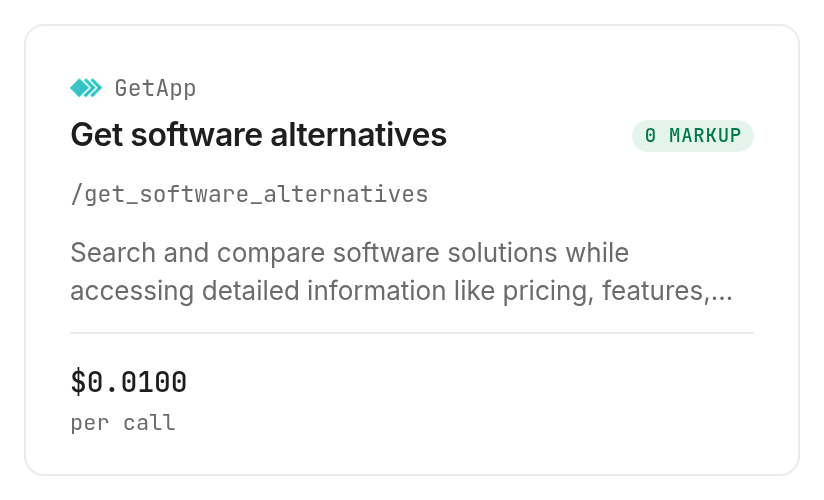
The tool catalog and GetApp tools page show the available lookup actions. Discover and inspect are free; the alternatives lookup is billed per call at $0.01 (Verified 2026-11-20). A call returns a source response, so save it before turning it into a spreadsheet.
Step 3. Request candidates
Give your agent the product page path all-software/a/elevenlabs and ask for names from the returned alternatives summary. The path is the part of the GetApp product URL after the domain; it identifies which product the source should compare. Ask the agent to retain the source and retrieval date beside each name.
monid discover -q "elevenlabs alternative free" -l 10
monid inspect -p getapp -e /get_software_alternatives
monid run -p getapp -e /get_software_alternatives --query '{"slug":"all-software/a/elevenlabs"}' -w
The final command makes one paid request. The response contains data.alternativesData.listing.summary.top, an array of names and product paths, as well as other listing data. The test completed with a provider response of 200 and a recorded cost of $0.01 (Verified 2026-11-20). The returned page is a discovery source, not an audio test.
Step 4. Turn the names into a working table
Make one row per candidate and add columns for free access, speech output, allowed use, download format and remaining questions. Copy the returned product name and source path; fill the other columns only after reading the provider's current information and testing the workflow. Keep blanks as blanks until you have evidence, instead of turning a directory category into a feature claim.
Save the table next to the test script. That makes the choice repeatable: when the script, publishing channel or free allowance changes, you can revisit the decision without assuming that yesterday's offer remains the same.
What does the shortlist actually tell you?
The shortlist tells you where to investigate, not which product wins. The Monid lookup returned ten names in the source's top summary: ChatGPT, Fliki, Chatsonic, Krater.ai, Gemini, Moveo.AI, CoSupport AI, TheTechBrain AI, Eden AI and Synthesia. This is one source's selection on one date, and the list includes products with different primary jobs.
Separate a lead from a verified fit
A directory can group products by broad overlap. That is useful for discovering a name you did not know, but it does not guarantee a voice generator, free downloads or permission for your use. Start with the candidate's own product page, find the speech feature and identify what the free access actually includes.
For example, a product built around video can be useful if you need a finished video. If you need an audio file for a podcast editor, locate the audio export before you invest time in the voice test. If you need only a browser preview, export format is less important than whether the sample can be generated at all.
Read the source and date together
The lookup returned the source listing and its comparison data, not a universal survey of all voice providers. A candidate absent from this list is not necessarily unsuitable; the source has its own catalog and ordering. Similarly, a high position in a directory is not a listening score for your script.
Keep the retrieval date and product path with each row. When a product changes its offer, update only the relevant row and preserve what you tested. This is more useful than copying a list into a document and treating all of its entries as permanently free.
Decide what to investigate first
Screen the candidates with the least work first: open the speech feature, locate free access, then confirm export and usage conditions. Stop researching a candidate once it fails a mandatory requirement. If it passes those checks, spend your attention listening to the same passage and evaluating the output in context.
For a closer comparison of voice workflows, the guide to testing ElevenLabs alternatives focuses on listening across providers. The shortlist here answers the earlier question: which names should you investigate and what evidence belongs beside them?
How do you decide what free means?
Free means the specific task you need can be completed under the stated access conditions without a required payment. Monid retrieves the directory data; it does not certify those conditions for the products returned. Check the provider's own page and the workflow you actually intend to use.
Preview versus download
A preview lets you hear the voice but is not the same as a downloadable recording. Open the export control and find the file format and destination. If your editor requires a particular format, note that requirement before choosing; a voice that sounds right but cannot produce the file you need does not complete the task.
HeyGen's voice generator describes free previews and its free access on its own page. That is a useful direct starting point for a manual test. Its offer and the GetApp lookup are separate things: a directory response does not grant access to a provider's free service.
Allowance versus full script
Count the characters in your real script, including punctuation and spaces, then compare that number with the provider's current allowance. A test passage that fits says nothing by itself about whether the entire project fits. For a recurring workflow, also distinguish a one-time allowance from a recurring allowance and record the reset condition.
If the script exceeds an allowance, decide whether splitting it is acceptable for your project. Listen to the joins for changes in pace and tone. Splitting text does not create additional entitlement or change the provider's rules; it is an editing choice, not a claim of unlimited access.
Rights versus technical access
A file being technically downloadable does not settle whether you can use it for an advertisement, a client deliverable or public distribution. Read the provider's terms for the exact intended use and keep a link alongside the date in your table. When a requirement is unclear, leave the decision open until you have a direct answer.
Keep the source of every pricing and free trial detail with its date. That record does not replace a review of the applicable terms or a test of the actual export.
How do you test the voices fairly?
Use one short script, one listening environment and a written scorecard for each candidate. Monid can assemble the candidate list; the listening decision belongs to you and the people who will use the recording. Do not substitute a directory rating for your own audio review.
Listen for the words that matter
Play each sample at the normal speed in the place it will be used. Check names, numbers, abbreviations, pauses and the ends of sentences. A voice that sounds pleasant in isolation can still misread the product name in your script; that specific error matters more than a general impression.
Record a simple pass, revise or reject beside each criterion. If punctuation changes fix a misreading, keep the revised script and apply it consistently when you compare again. Save the actual sample and the input text together so a collaborator can hear what produced the result.
Generate a free sample through an agent
The HeyGen tools page includes a free promotional speech action. On November 20, 2026, we listed one public voice and used it for the sentence "Welcome to our product tour." The run returned an audio URL and a duration of 1.9313151927437642 seconds. The voice list and promotional speech action each cost $0.00 and $0.00 per call, respectively (Verified 2026-11-20).
monid inspect -p heygen -e /voices
monid run -p heygen -e /voices -i '{"limit":1}' -w
monid inspect -p heygen -e /promo/text-to-speech/turbo-free
monid run -p heygen -e /promo/text-to-speech/turbo-free -i '{"voice_id":"330290724a1b470fb63153f34d4c0183","text":"Welcome to our product tour."}' -w
Use a current public voice_id from the first response in the second call. The promotion accepts up to 1,000 characters per run, has workspace limits of five per minute, ten per hour and twenty per day, and runs through November 30, 2026. Its shared capacity can return a rate limit. Save the returned WAV promptly: the tool does not retain a copy. The test shows one short sample can be generated, not that a full project or commercial use is free.
Test the handoff
Download an eligible sample and open it in the editor or workflow where the finished recording will go. Check that the file plays, that its format is accepted and that the start and end are usable. For a video, listen against the picture; for narration, check that transitions do not cut off words.
The result should be a small decision record, not a claim that one voice is objectively best. Name the intended use, the sample and the reason for the decision. A team can then repeat the test when a different language or a longer project changes the requirements.
Keep a fallback
Keep a second candidate only if it also passes your mandatory requirements. Record why it is second: for example, a less suitable delivery for the passage or an export workflow that takes more steps. If your first choice becomes unavailable, you have a documented next test instead of restarting with an unfiltered directory.
For a workflow using the original provider, see giving a product a lifelike voice. That is a separate route for teams that prefer ElevenLabs itself, rather than an assertion that its output matches another provider.
When should you use something else?
Use the provider's own interface when you want to make and download one recording in an editor. Monid is the tool layer used for the lookup in this article, and this is the Monid blog: we have an interest in showing that workflow. GetApp's result is useful for assembling leads, but it does not generate speech or establish the terms of another company's free offer.
HeyGen's direct voice generator is a practical place to audition a preview when a visual interface is your priority. Use ElevenLabs directly when its voice or existing production workflow is the deciding requirement. In either case, read the relevant conditions for your output and test the file in your own project.
If you already have a small list and only need one finished recording, adding a directory lookup creates another step. Open the provider pages, run the same listening test, and choose the one that meets the task. If you are researching several candidates, keeping a dated source and decision table makes the work easier to revisit.
Which tool should you use for each job?
Choose the tool by the result you need. The GetApp lookup on Monid supplies the first row; the other steps are decisions you make with each provider's own interface.
| Use case | Best tool | Why? |
|---|---|---|
| Collect alternative names | GetApp alternatives lookup | Returns a source listing for one product; $0.01 per call (Verified 2026-11-20). |
| Hear a sample | HeyGen promotional speech | Generates a short WAV sample; $0.00 per call (Verified 2026-11-20), with promotion and workspace limits. |
| Confirm a usable file | The provider's export and terms | Check the file and intended use before adopting it; provider terms apply. |
The GetApp lookup and the HeyGen voice list and promotional speech action are the actions measured through Monid in this guide. The directory's result can accelerate research, but it cannot answer whether a voice sounds right to your audience or whether a particular free allowance covers your production.
Conclusion
You now have a real shortlist, a screening table and a repeatable listening test for a free ElevenLabs alternative. Run the lookup again when you need fresh candidates, then verify free access, export and intended use at the provider before choosing. The best choice is the voice that passes your actual script and delivery requirements, so your team can finish the recording with confidence.
FAQ
Is there a free ElevenLabs alternative?
Yes. HeyGen offers free voice previews on its own voice generator page, and its promotional speech action produced a short WAV in our test. Confirm that its current access, export and usage conditions fit your project before choosing it.
Does the alternatives list prove every product is free?
No. The GetApp lookup returns candidate and comparison data; the list does not prove that each product offers free text to speech or a free audio export.
Do I need to write code to build the shortlist?
No. Give the opening prompt and your key to an agent, then ask it to retrieve the candidates and prepare a table for your review.
How much does the shortlist lookup cost?
The GetApp alternatives lookup costs $0.01 per call (Verified 2026-11-20). Discover and inspect are free; provider offers for generating speech have their own conditions.
Does a free preview include a downloadable file?
A preview does not establish that a download is included. Check the provider's export controls and conditions for the file and intended use you need.
How many candidates does one lookup return?
The tested response contained ten names in its top summary. That is the observed source response for this product on November 20, 2026, not a promise that every query returns the same count.
Can I use a generated voice commercially?
The answer depends on the provider's terms and your use. Rules differ by jurisdiction, so check the applicable terms and local rules yourself.
Published November 2026.