How to Choose a Sora Alternative for Video
Build a video software shortlist, screen each candidate against your brief, and test the results before choosing.

Build a shortlist for your next AI video. Paste this into your agent:
Set up https://monid.ai/SKILL.md, find the GetApp software alternatives lookup, and retrieve the listing for all-software/a/sora-alternative. Show product names, descriptions and review counts, then help me screen the results for my video brief. Do not claim the results are tested replacements for OpenAI Sora.
One prompt builds a research shortlist.
Creative producers looking for a Sora alternative face a practical problem: a list of ten names still leaves ten products to inspect against the same brief. Marketing managers need clips that fit a campaign, while editors need outputs they can actually use in a timeline.
A search result can mix text-to-video generators with avatar tools, clipping tools and publishing suites. A familiar name or a large review count does not tell you whether the tool produces the shot you need, accepts your reference image or fits your delivery workflow.
This guide builds a shortlist through Monid, the tool layer for AI agents, and turns it into a small test plan. The GetApp lookup supplies software listing data; it does not generate video or establish which tool is the best replacement for OpenAI Sora. We'll identify the source, filter the results and evaluate finalists using the same brief.
| Returned product | GetApp description in brief | Review count | Next action |
|---|---|---|---|
| VideoExpress | Creates and edits video from ideas and images | 8,168 | Test a generated shot |
| Xelta AI | Description empty in this response | 2 | Read its product page |
| A2E Free and Uncensored AI Videos | Video and image platform with multiple models | 0 | Check the generation workflow |
| AVATAi | Digital employees for enterprise knowledge | 0 | Exclude for a cinematic clip brief |
These four rows are a preview of one response on November 19, 2026, not a ranking. The descriptions are GetApp's listing data; the actions are our editorial screening decisions.
How to choose a Sora alternative for video
Start with the job your video must do, then use the source list to find candidates for that job. GetApp's listing is for a separate product named Sora Alternative. It is not the listing for OpenAI Sora; the two names must not be merged in your research.
Step 1. Write a brief that candidates can be tested against
Choose one representative shot, its intended audience and the format your editor needs. For example, ask for a short landscape shot of a ceramic mug on a table in morning light, with a slow camera move and no on-screen text. Save the prompt and reference image together so each finalist receives the same input.
Write down the elements that would make the output unusable: a moving logo that must stay fixed, an unsuitable aspect ratio, a missing export or a need for a human presenter when the brief calls for a scene. Separate hard requirements from preferences. This prevents a visually attractive demo from winning a job it cannot finish.
Step 2. Find the source and inspect the lookup
The GetApp tool page lists the lookup used here. An endpoint is a callable operation; this one accepts a GetApp product path as its slug and returns a software listing and related entries. Discover and inspect are free. The lookup costs $0.01 per call, Verified 2026-11-19.
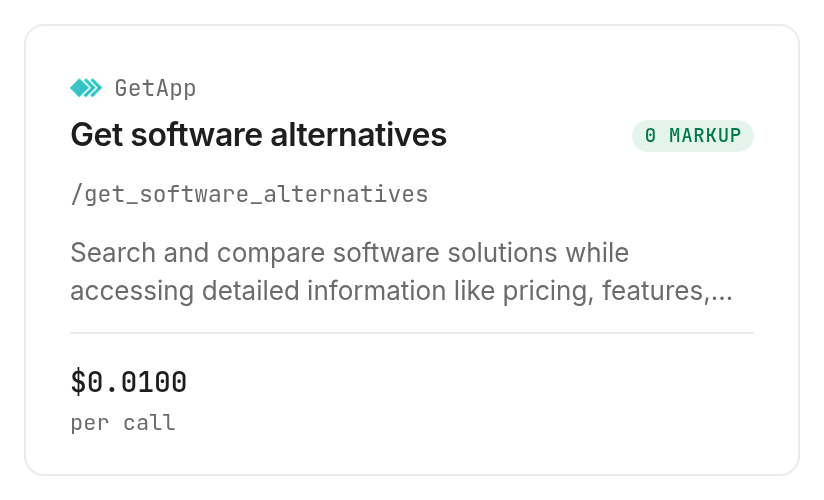
For an agent, get a key at app.monid.ai and use the opening prompt. For a terminal, install the CLI and add your key:
npm install -g @monid-ai/cli
monid keys add -k <your-api-key> -l main
monid discover -q "sora alternative" -l 5
monid inspect -p getapp -e /get_software_alternatives
The input is a product path, not an open-ended prompt. Use the exact path for the product you intend to research. A product with a similar name can be a different company or category, so check the source page before running a lookup.
Step 3. Retrieve a small research sample
Run the lookup once for the source listing. This call returned ten entries in alternatives_comparisons; it did not take a limit parameter, so the example uses one product path rather than sending a batch.
monid run -p getapp -e /get_software_alternatives --query '{"slug":"all-software/a/sora-alternative"}' -w
The November 19 run completed with a provider response of 200 in about 30 seconds and cost $0.01, Verified 2026-11-19. One call returned one response containing the ten entries. The response's source listing had zero reviews, so its own rating cannot support a quality judgment.
Step 4. Make a usable shortlist
Keep the product name, source description, review count and link to the listing for each candidate. Add your own columns for required input, expected output, export, test status and decision. Treat blank fields as missing data, not as evidence that a feature is absent.
Read descriptions as leads to investigate. The response included an empty description for Xelta AI, so its review count alone does not establish what it makes. AVATAi's description points to enterprise digital employees, a different first job from the example cinematic shot. Mark it out of scope for that brief without treating it as a verdict on the product.
What did the shortlist return?
The response returned ten alternatives associated with the GetApp listing named Sora Alternative, plus the source listing's own fields. The full response also contains repeated groups under alternatives_by_section; use one group for a working list and deduplicate by product identity before counting entries. Repeated appearances in sections are not independent recommendations.
Read the source fields before scoring
name identifies a listed product, description summarizes its listing, and num_reviews gives the review count returned for that product. slug and the detail path help locate the corresponding listing again. The source listing also included its own category, feature list and update timestamp. Those fields describe the source record, not a hands-on video test.
Review counts require context. A count measures how many reviews the source reports, not how well a specific shot will render. A zero is a lack of reviews in this response, not a zero quality score. Similarly, an empty description is missing information. Keep those distinctions visible in the table so that a downstream agent does not convert missing evidence into a false negative.
Decide what the list can and cannot prove
The lookup creates a set of leads. It does not compare any of them directly with OpenAI Sora, verify feature claims, run prompts or produce a clip. Because the input names a different product, describing the ten results as direct competitors selected by OpenAI would be incorrect. Use them as candidates to investigate, and add other candidates from relevant primary sources if the source list misses your workflow.
The result also demonstrates why a category label is only a starting point. A broad video category can include generating a new scene, animating a face, clipping existing footage or creating a digital presenter. These are related tasks with different inputs and evaluation criteria. Do not ask a clipping tool to pass a text-to-video test, or treat its failure to do so as proof that it is a poor clipping tool.
How do you screen the list?
Screen each candidate by the task it performs before comparing visual quality. A two-pass process saves the detailed test for products that meet your non-negotiable requirements.
Pass one: match the workflow
Read the product's own description and documentation. Record whether you start with text, an image, existing footage or a script, and whether the output is a generated scene, an edited clip or a presenter. For the mug example, a candidate needs to generate or animate the requested scene; an application described only as a digital employee does not meet that first filter.
Next, check where the result goes. A production team needs a usable file and enough control to hand the clip to its editor. A social team also needs the right orientation and a clear path to captions or publishing. Ask the vendor for the current details instead of inferring those capabilities from a category name.
Pass two: check the constraints
Record the applicable usage terms, access conditions, output dimensions and commercial requirements for each finalist. Do this at the product's own source and date your notes. The GetApp response is a research starting point; it does not settle your contract or usage rights.
For each hard requirement, use three labels: confirmed, not confirmed, and fails the brief. A missing answer stays in the middle column until you check it. This simple distinction is useful when a source contains an empty field, because a missing description and an explicitly unsupported feature require different next steps.
For a specific generation route, the Seedance access guide explains how to separate free inspection from a paid clip and prepare a brief before submitting.
How do you test the finalists?
Give each finalist the same brief, inspect the actual clip and record the result alongside the source data. The point is a repeatable decision, not a universal leaderboard.
Make one controlled comparison
Use the same prompt and reference asset wherever the input format allows it. Record the settings you change, the date and the resulting file. When a product requires a different input, note that difference beside the result rather than presenting the two outputs as identical tests. Keep a copy of the original brief so a polished prompt revision does not silently change the comparison.
Review the clip at its intended size. Look for the specific motion, objects and framing requested by the brief, then watch for continuity issues from frame to frame. If text, faces or a logo are essential to the job, check those separately. A beautiful opening frame cannot compensate for a shot that fails later in the sequence.
Score the work, not the marketing page
Use a compact scorecard: brief adherence, motion consistency, editability and delivery fit. Add a notes column for a reason a reviewer can see in the file. A pass on delivery fit means the output is usable in your actual workflow, not merely that it plays in a browser. A failed export or missing control belongs in the record even if the scene looks good.
Ask the same person to assess all finalists against the same criteria, then have the editor who will use the file inspect the leading result. Keep the generated files and the scorecard together. If the brief changes, rerun the test for the new job rather than carrying forward an old winner automatically.
Treat cost and access as part of the test
For an agent workflow, the MiniMax integration guide explains how to prepare a generation request. Track what each actual test costs and what access it requires in your own notes. Include the amount of iteration needed to get a usable shot, because a single generation and a finished deliverable are different units of work. Vendor prices and terms change, so use the current source when making the purchase decision.
This guide measured only the lookup charge. It did not run any video generator, so there is no measured generation cost, success rate or output quality to compare here. The lookup helps you organize the candidates; your own clip test supplies the missing evidence.
When should you use another route?
Use a video generator directly when you need a clip now. OpenAI Sora is a direct option for creating video, while the GetApp lookup is a way to collect software listing data for research. A finished video requires a generation tool and a separate test; the lookup cannot render or edit it.
Use GetApp's website directly if you prefer to browse and inspect listings yourself. The agent route is useful when you want the response in a script or a repeatable research workflow. You are reading the Monid blog, and Monid provides access to the lookup used in this article; that is our interest in the choice.
The lookup is limited by the specific source product and the data GetApp returns. It is neither an exhaustive survey of video generators nor a substitute for a vendor's current documentation. Choose the direct route when browsing or generating is the immediate job, and the data route when you need a reproducible source record to add to your evaluation.
Which tool for which job?
The tested lookup addresses one research job. It does not replace the later production test.
| Use case | Best endpoint | Why? |
|---|---|---|
| Retrieve software leads for a known GetApp listing | getapp /get_software_alternatives | One listing response with related products; $0.01 per call, Verified 2026-11-19. |
The GetApp tool page shows the current listing and billing shape. Discover and inspect do not incur a run charge; the successful call above was billed once. This test does not establish how an empty or failed result is billed.
Conclusion
You now have a real ten-entry source list, a way to separate unrelated jobs and a repeatable brief for testing finalists. Use the lookup again when researching a different known listing, then compare actual outputs and current terms against your requirements. The best alternative is the one that delivers the shot and file your project needs.
FAQ
What is a Sora alternative for video?
A Sora alternative is another tool you evaluate for the video task you need to complete. Compare actual output and workflow against the same brief before choosing.
Does this lookup generate video?
No. It returns GetApp software listing data and related products; generating and assessing a clip is a separate step.
Is the GetApp listing the same as OpenAI Sora?
No. The tested path refers to a separate product named Sora Alternative, so its related listings are research leads rather than a direct comparison with OpenAI Sora.
Is the lookup free?
Discover and inspect are free; the tested lookup costs $0.01 per call, Verified 2026-11-19, on the current GetApp listing. Video generation has its own costs and access conditions.
Do I need to write code?
No. You can give an agent the opening prompt and a key; the terminal commands are included for readers who prefer the CLI.
How many products did the test return?
The single response returned ten entries in its alternatives comparison list. It also repeated entries in other groupings, so count unique products rather than summing those groups.
Does a high review count mean the video will be better?
No. A review count is source data, not a test of your prompt, motion, export or delivery requirements.
Can I use generated video commercially?
Rules and terms differ by location and product, so check the applicable terms and local rules for your use.
Published November 2026.