How to Set Up an Email Validation API in 5 Minutes
Set up an email validation API with your agent, run your list through it, and get a table that says which addresses to send to, drop or review.

Sort a list of a few hundred email addresses into send, drop and review before you hit send. Paste this into your agent:
Set up https://monid.ai/SKILL.md, and then use Monid to validate each address in my emails.txt, one call per address, and give me a table with the address, the verdict and what to do with it: send, drop or review.
One prompt cleans a list of hundreds. 1 min setup · 3-6 hrs saved.
If you run marketing, sales or operations, you probably own a spreadsheet of email addresses and a campaign that goes out soon. Checking them by hand means looking up or test-sending each one at 30 to 60 seconds an address, so a list of 500 eats 4 to 8 hours, and a list that has not been checked will bounce.
The usual fixes each have a catch. A standalone verifier wants an account, an upload and a pack of credits. An API wants a developer and a script. A script covers syntax and domain, not the mailbox.
This guide shows how to set up an email validation API in about five minutes with Monid, the OpenRouter for agent tools, and ends with a table that tells you which addresses to send to, drop or review. We compare four routes first, so you can pick the right one for your list:
- The four routes, with a table of cost and limits.
- Four steps with Monid, using a real check from 2026-10-23.
- When to use something else, because some lists need a dedicated verifier.
Why should you validate email addresses before you send?
Because every bounce counts against your sending reputation, and a damaged reputation sends the next campaign to spam, good addresses included. An email validation API takes one address and answers whether mail sent to it is likely to arrive. It runs up to three checks, in order:
- The shape. Is it written like an address at all.
name@gmial.comhas a valid shape and a typo in the domain. - The domain. Does the part after the
@exist and accept mail. A domain that does not exist cannot receive anything. - The mailbox. Does the mail server say this specific address is real. Some servers answer yes to everything, which is called a catch-all or
accept_alldomain, and no outside check can tell a real address from an invented one there.
So a verdict says whether the address can receive mail, not whether the person will read it. What a good verdict still misses is covered in bounce rates and spam traps when validating email. This guide is written for the person with a list; developers get a short section further down.
What are the four ways to validate an email list?
You can use a standalone verifier, an API inside your own pipeline, a script you write yourself, or a pay-per-call tool such as Monid. Each fits a different list size and a different person.
1. Upload the list to a standalone verifier
You sign up with a verification vendor, upload a CSV and download a cleaned file with a status per row. This is the right shape for a big list. The costs are an account and often a credit pack.
2. Call a validation API from your own pipeline
You get a key from a vendor and your code makes one request per address, or per batch where the vendor allows it. This is what developers mean by "email validation API". It fits a signup form or a nightly job, and it needs someone to build and maintain it.
3. Write your own check
A regular expression for the shape, a DNS lookup for the mail servers and a list of disposable domains can be put together in an afternoon. The part it cannot do is ask the mail server whether the mailbox exists. That conversation is called an SMTP check, it comes from your IP address, and servers that see many probes from one address slow or block you.
4. Ask your agent to call a validator through Monid
Monid is a catalogue of data tools that your agent calls with one key and one balance. Your agent sends one address per call to the ContactOut or Hunter verifier, reads the verdict and builds the table. There is no upload and no vendor account. The trade is scale: each call takes seconds and handles one address.
| Route | How you pay | Best for | Limit |
|---|---|---|---|
| Monid, ContactOut or Hunter verifier | Per call, $0.01 or $0.01225 per definitive verdict (Verified 2026-10-23) | Lists of hundreds, checked from your agent | One address per call, 1 to 3 seconds each, no file upload |
| Standalone verifier | Credit pack or subscription, set by the vendor | Large lists and a click-through screen | An account per vendor; accuracy is the vendor's own claim |
| Validation API in your pipeline | Per request or per tier, set by the vendor | Signup forms and nightly jobs | Needs a developer to build and maintain |
| Your own script | Your time | One form you keep for years | No mailbox check without your own SMTP setup |
Here is the Monid route in four steps.
How do you set up an email validation API with Monid?
Install the CLI once, add a key, and give your agent the list. About a minute of setup, then a few minutes to test on ten addresses.
Step 1. Install and add your key
Get an API key at app.monid.ai. Discovery and inspection are free; only a run bills.
For agents. Paste this to your agent and hand it the key:
set up https://monid.ai/SKILL.md
It learns the workflow itself. More in the agent quickstart.
For humans.
npm install -g @monid-ai/cli
monid keys add -k <your-api-key> -l main

Step 2. Give your agent the list
Put one address per line in emails.txt and paste the prompt from the top of this guide. The agent makes one call per address on the ContactOut verifier, chosen for the first pass because it returns a verdict alone in about a second.
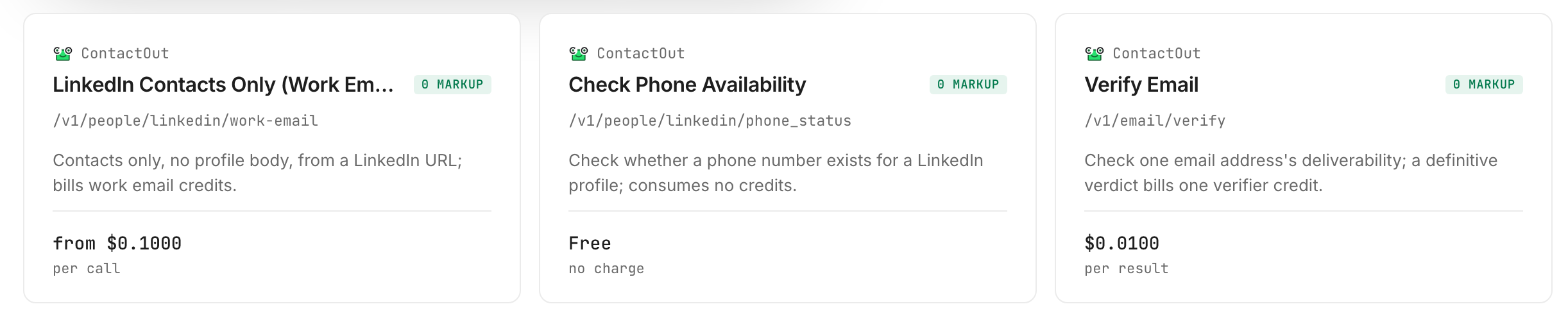
Test with ten addresses first, including a few whose answer you know, such as a typo domain. Ten checks cost up to $0.10 (Verified 2026-10-23).
Step 3. Run the check, and a second opinion on the doubtful ones
The first pass runs on its own. Our three ContactOut runs each finished in 1.0 to 1.3 seconds and billed $0.01 (Verified 2026-10-23). For rows that come back accept_all, ask your agent to run the same address through the Hunter verifier, which returns the verdict plus the checks behind it, in about 2.5 seconds per address in our runs.

Step 4. Read and export the table
Your agent writes a table with one row per address. Ask it to save a CSV and keep only the send rows for the campaign. Here is ours. The first six rows are real runs from 2026-10-23, with personal parts of any real company address left out. The last two are invented examples of a real list's shape, not run.
| Address | ContactOut verdict | Hunter verdict | Action | Source |
|---|---|---|---|---|
| name@gmial.com | invalid | not run | Drop | Run today |
| person@no-such-domain-48213.com | invalid | not run | Drop | Run today |
| test-7731@mailinator.com | accept_all | not run | Drop: a throwaway provider | Run today |
| someone@mailinator.com | accept_all | disposable | Drop | Run today |
| an invented name at a large company's domain | accept_all | invalid | Drop | Run today |
| a real-looking name at the same domain | accept_all | not run | Review | Run today |
| info@example-co.com | not run | not run | Review: a shared inbox, send only if it is the contact you want | Shape only |
| a.sample@example-co.com | not run | not run | Send, when the verdict is valid | Shape only |
The verdicts in the first six rows are as the tools returned them; the Action column is our reading. The table merges two same-day passes.
How do you read the results?
Each verdict maps to one action. The labels came back in our runs; the actions are our advice.
What do you do with an invalid or disposable address?
Drop it. invalid means the mail server or the domain says the address does not receive mail: a mistyped provider (gmial.com) and a domain that does not exist both came back invalid, and those rows would bounce. Disposable providers hand out inboxes that expire. Our mailinator address came back accept_all on ContactOut and disposable on Hunter, so when a row says accept_all, look at the domain yourself.
What do you do with an accept_all address?
Review it, and send only with a reason to trust it. accept_all describes the mail server, not the person: the server says yes to every address. On the same large-company domain, ContactOut returned accept_all for a real-looking name and for an invented one. Send anyway only with a past reply, a purchase or a signup you recorded yourself.
What do you do with a valid or unknown address?
Send valid addresses; it means the mailbox exists today, not that the person wants the message. None of our runs returned valid, because we ran test and invented addresses. For unknown, try again later or leave it out.
Do two validators agree?
Not always. For the same invented address, ContactOut said accept_all and Hunter said invalid: one said "cannot tell" and the other "no such mailbox". A second opinion on accept_all rows is worth the extra cent.
How big a list can you validate this way, and what does it cost?
A list of hundreds, one address at a time. That is what this route is shaped for, and the limit is arithmetic.
Each address is its own call. At one to three seconds each, 500 addresses take roughly 8 to 25 minutes, and 100,000 would take about 28 hours at one second each. There is no file upload and no cleaned file coming back, so the ceiling is a list you or your agent can supervise.
On cost, one definitive verdict is $0.01 on ContactOut or $0.01225 on Hunter (Verified 2026-10-23). For 100 addresses that is up to $1.00 or $1.225, and for 500 addresses up to $5.00 or $6.125, because every address that returns a definitive verdict bills. ContactOut billed an accept_all verdict in our runs, so plan for the full amount.
A signup form is a different job: it needs an answer in a fraction of a second. A common pattern is to accept the address, validate in the background and ask the visitor to confirm; an email verification gate for a signup form walks through it.
How do you build an email validation call into your own code?
Call one endpoint per address and route on the verdict. This section is for developers.
Run one address
monid inspect -p contactout -e /v1/email/verify
monid run -p contactout -e /v1/email/verify -w --query '{"email":"name@gmial.com"}'
The response is the verdict alone: {"status":"invalid"}. The Hunter verifier takes the same input and returns the verdict plus the checks behind it:
monid run -p hunterio -e /email-verifier -w --query '{"email":"name@gmial.com"}'
The -w flag makes the CLI wait for the result. For the invented company address, Hunter returned status invalid with smtp_check false: the mail server answered, then refused that mailbox.
One row per address, then an action
mkdir -p out
while read -r e; do
  monid run -p contactout -e /v1/email/verify -w --query "{\"email\": \"$e\"}" > "out/$e.json"
done < emails.txt
ACTION = {"valid": "send", "invalid": "drop", "disposable": "drop",
          "accept_all": "review", "unknown": "review"}

def action(verdict: str) -> str:
    return ACTION.get(verdict, "review")
Unknown labels go to review. When a credit pack beats a loop of calls for very large scrubs is covered in ZeroBounce, NeverBounce or one call on Monid.
When should you use a standalone verifier instead?
When the list is large, when you need a file in and a file out, or when you need a signed accuracy guarantee. We sell access to these endpoints, and for those jobs a dedicated verifier is the better fit.
Your list has hundreds of thousands of addresses. Dedicated verifiers such as ZeroBounce or NeverBounce sell volume tiers and file upload. A loop of single calls is the wrong shape for that size.
You want to drag in a CSV and download a file. Monid returns the table inside your agent's chat, so give the person cleaning the list a tool built for files.
You need a check inside a signup form. That needs a fast local check, with the slower mailbox check done after the visitor has moved on.
You need a contractual accuracy guarantee. Accuracy of these endpoints belongs to their providers; read the terms of the one you pick.
You need to confirm that a person owns the address. Send a confirmation link; validation cannot show who controls a mailbox.
Whoever you buy from, test ten known addresses before a validator touches a send.
Which endpoint for which job?
Use ContactOut for a fast first pass and Hunter when you want the reason behind a verdict.
| Use case | Best endpoint | Why? |
|---|---|---|
| A fast first pass over a list | contactout/v1/email/verify | A verdict alone in about a second. $0.01 per definitive verdict |
A second opinion on accept_all rows | hunterio/email-verifier | Verdict, 0-100 score and the check breakdown; disposable addresses were free in our run. $0.01225 per definitive verdict |
| A third verdict source to try | anyapi/email.verify | Good, risky or bad verdict with catch-all and role signals; median run time about 15 seconds. $0.0066 per call (Verified 2026-10-23) |
| A syntax and DNS check with a typo suggestion | api.strale.io/x402/email-validate | Closer to a signup form than a pre-send scrub. $0.0324 per call |
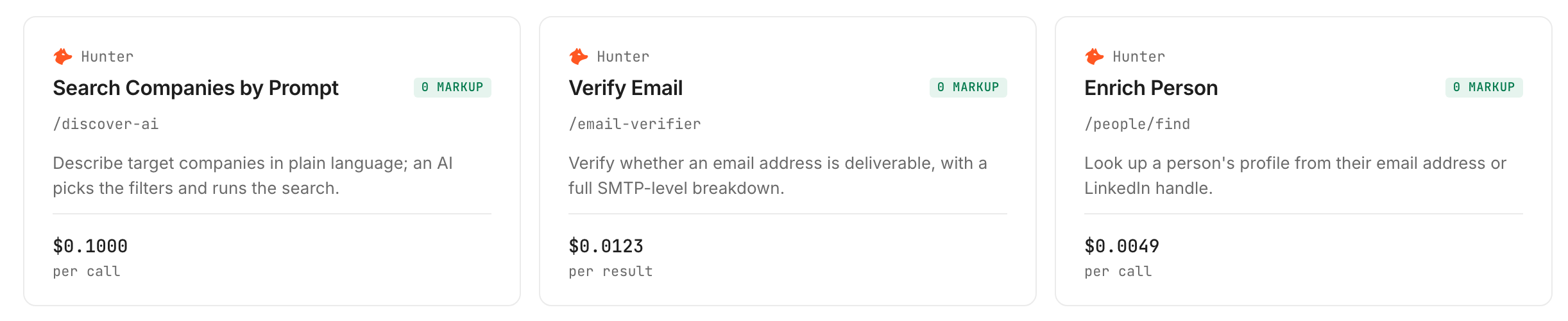
The first two are the ones we ran; the card above rounds the Hunter price, whose exact listed price is $0.01225 (Verified 2026-10-23). Inspect the other two for free before you build on them. The vendor comparison is in email verification API: check any address, billed per call.
Conclusion
Two routes, one decision: use Monid when your list has hundreds of addresses and you want the table inside your agent, and use a dedicated verifier when it has hundreds of thousands. For the first case you pay $0.01 for a verdict or $0.01225 for a verdict with the checks behind it (Verified 2026-10-23), with one key and about a minute of setup. How we estimated the time saved: 500 addresses by hand take 30 to 60 seconds each, 4 to 8 hours; your agent's pass plus a read of the review rows leaves about an hour, so 3 to 6 hours saved; the 1 minute is install, key and first call once you hold a key. Re-run the same prompt on a new file before every send and you have a send, drop and review table before the campaign goes out; for the contacts you keep, a reverse email lookup shows what an address resolves to.
FAQ
Is there a free email validation API?
Not free, but small jobs cost little: through Monid a check is $0.01 on ContactOut or $0.01225 on Hunter (Verified 2026-10-23), with no monthly plan and no minimum top-up. Discovery and inspection cost nothing.
How many addresses can I validate at once?
Hundreds, one call per address. Calls run one after another at one to three seconds each, so 500 addresses take about 8 to 25 minutes. A list of hundreds of thousands needs a validator with file upload and volume pricing.
Does a failed or unknown check cost anything?
The listings say a definitive verdict bills and an unknown result does not. In our runs (Verified 2026-10-23) every definitive ContactOut verdict billed $0.01, and Hunter billed nothing for a disposable address.
What should I do with accept_all addresses?
Review them and decide per campaign. An accept_all verdict means the mail server says yes to every address, so the check cannot tell a real mailbox from an invented one. Send only with another reason, such as a past reply or a signup you recorded yourself.
Can an email validation API send a confirmation code?
No. Validation checks whether an address can receive mail; a confirmation or one-time code is a separate message you send and the visitor reads. Validate first so you do not send codes to addresses that bounce.
Is it accurate, and is it legal to validate a list?
Accuracy is each provider's own; our two verifiers disagreed on one invented address, so treat accept_all as a review. Rules for emailing a list differ by country, so check the ones that apply to you.
Published October 2026.