How to Compare ZoomInfo Alternatives for Sales
Compare sales data workflows and build an account search and enrichment evaluation around the fields your team needs.
Compare sales data tools against the list your team actually needs. Paste this into your agent:
Set up https://monid.ai/SKILL.md, then help me compare company search, people search, and company enrichment for a small sales prospecting workflow. Inspect each tool's fields and price before making any paid calls.
One prompt helps you prepare a focused evaluation.
Sales operations leaders, founders, and recruiters looking at ZoomInfo alternatives often start with a familiar problem: a prospecting list needs more accounts, more context, or a different workflow. A search page with a fixed number of results tells you little about whether those records fit your market or whether your team can use them.
Comparing vendor names alone does not answer that question. An account list, a list of people, verified contact details, and a system for sending outreach are different deliverables. A tool can help with one and still leave work elsewhere in the process.
This guide builds a practical scorecard and shows how Monid, a tool layer for agents, can supply company search, people search, and company enrichment through one key. Those data tools cover part of the job: your team must assess coverage, verify the contacts it needs, and choose its outreach and CRM workflow separately.
Start with four criteria:
- The account filters and geography that define your market.
- The people and contact fields needed for your actual workflow.
- How records reach the CRM and who reviews them.
- The billing unit and your budget for a representative evaluation.
The preview below is a decision framework, not a set of measured results. Fill its evidence cells after evaluating your own sample.
| Decision axis | What to compare | Decision to make |
|---|---|---|
| Account search | Industry, location and employee range filters | Can you define your target market? |
| Company enrichment | Domain input and firmographic fields | Can you qualify existing accounts? |
| People search | Role and seniority filters | Can you map the right buying roles? |
| Workflow | Outreach and CRM handoff | Who owns the next action? |
How to compare ZoomInfo alternatives for your team
Choose the workflow that produces the records your team can act on, then compare providers against it. A product demonstration is useful only when you bring a specific market and a clear definition of a usable record.
Start with a market slice
Write down one industry, a geography, a company size range, and the roles your team wants to reach. For example, define software companies headquartered in California and a sales leadership role. Keep those criteria stable across evaluations so a difference in the resulting list is not simply a difference in the question.
Separate coverage from fit. Coverage asks whether a source contains records in the segment; fit asks whether those records match your criteria and can be used by the team. A large undifferentiated list does not answer the second question. Record exclusions, duplicates and missing fields as well as matches.
Choose the output before the vendor
If you already have company domains, you need enrichment. If you have a market definition but no list, you need account search. If you have target accounts but lack role coverage, you need people search. If you need an inbox sequence and CRM workflow, you need a sales application or an integration that provides those steps.
The existing comparison of People Data Labs, Apollo and ZoomInfo examines provider choice. This guide takes the narrower angle of selecting the jobs and evidence for an evaluation, including what an agent can and cannot do with the inspected tools.
Set an acceptance rule
Pick the fields your sales team must see before a record can enter its queue. A useful company review sheet contains domain, company identity, industry, location, size and an explicit review status. For a person, add the relevant role and a separate contact verification status. A blank field should stay blank; it should not be filled by guessing from a company name.
Write down who decides a match and who handles conflicts with an existing CRM record. This makes the evaluation operational: a source wins your test only when its output supports your actual acceptance rule, not when its presentation looks impressive.
Which alternatives fit each sales job?
The best alternatives are different for account research, profile search, and a complete sales engagement workflow. These options are not interchangeable subscriptions or identical datasets.
1. Company search through Monid
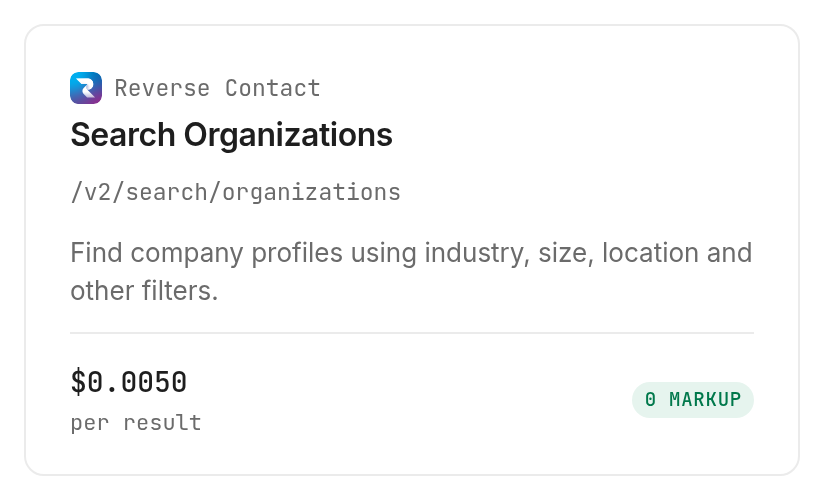
Reverse Contact company search takes structured filters for industry, company size, headquarters and other characteristics. The inspected endpoint is reversecontact /v2/search/organizations; it returns organization profiles and a pagination cursor according to its description. It is a practical starting point when you need to define a new account list from criteria.
Pricing: $0.005 per delivered result, Verified 2026-11-23. Inspect is free. A page can request from 1 to 100 results; the price is per result, not per page.
Features: Exact industry taxonomy values, employee range and location filters; a cursor for the next page; a small page size for a controlled evaluation. This search does not itself send outreach or decide which company belongs in your CRM.
2. Apollo for an integrated sales workflow
Apollo describes a platform combining a business database with sales engagement and workflow automation. That combination is relevant when the buyer wants a shared interface for prospecting and follow-up, rather than building the handoff between data and sales activities.
Pricing: Consult the provider for its current commercial terms and the features available to your team. No vendor price is assumed in this comparison.
Features: A combined prospecting and engagement workflow; a sales application for teams; automation described by the provider. Evaluate its actual coverage against your sample and confirm that its workflow fits the team before making a decision. A polished workflow cannot compensate for a market segment missing from the sample.
3. Domain enrichment through Monid
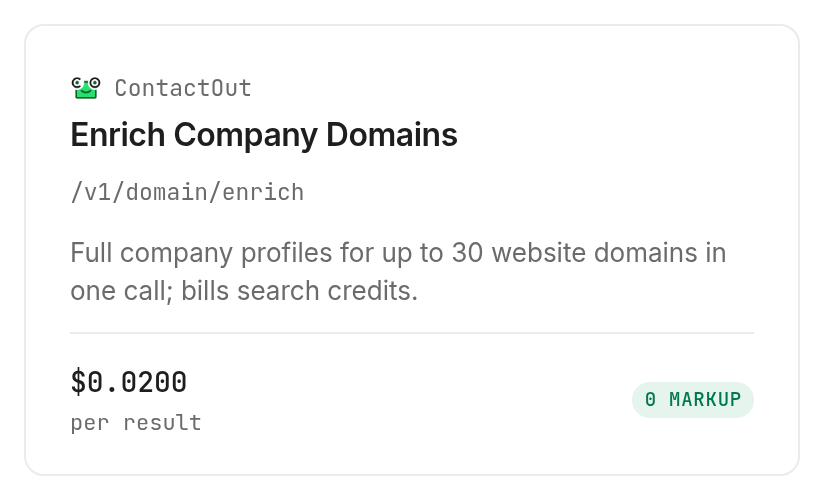
ContactOut domain enrichment accepts a list of company domains and describes company profiles containing fields such as website, industry, headquarters, size and funding summary. The inspected contactout /v1/domain/enrich endpoint is useful when the company list already exists and the missing piece is firmographic context.
Pricing: $0.02 per company found, Verified 2026-11-23. The inspected pricing notes say unmatched domains are free. A request accepts up to 30 domains; use a small sample when evaluating.
Features: Domain-based input, company details and size context, and a stated unmatched-domain billing rule. This endpoint enriches companies; it does not produce a complete sales engagement workflow or guarantee a contact for each company.
4. People search for role mapping
Reverse Contact people search describes professional profiles filtered by current title, function, seniority, company and location. It is an option for mapping roles after the account criteria are clear. Its declared filters are useful for prospecting and recruiting, but a profile search is not the same thing as a verified email or phone lookup.
Pricing: $0.005 per delivered result, Verified 2026-11-23. Inspect is free; requests allow 1 to 100 results per page.
Features: Current role and seniority filters, company and location filters, and paginated profile search. Decide independently which contact fields and verification steps are required before any outreach. For a closer look at contact-finding choices, see how to compare RocketReach alternatives for sales.
How to build a small account evaluation
Build one small, repeatable evaluation before committing to a larger list. Monid provides free discovery and inspection, then charges according to the selected tool's billing rule when you run it. An endpoint is a particular tool operation with its own input and output contract.
For agents
Get a key at app.monid.ai and give your agent the setup instruction in the opening prompt. The agent quickstart explains the setup.
For humans
Install the CLI and add your key, then follow the CLI quickstart:
npm install -g @monid-ai/cli
monid keys add -k <your-api-key> -l main
Step 1. Write the account criteria
Give your agent an industry, location, size range, and a small requested page size. Reverse Contact uses exact industry taxonomy values: Software Development is a documented example, while a broad label such as SaaS is not a substitute for an accepted taxonomy value. Headquarters location is a company filter, not a guarantee that every employee works there.
Keep a record of the filters beside the eventual export. If a later query changes size or geography, label it as a new sample. That lets sales operations explain why two lists differ without treating every difference as a data quality problem.
Step 2. Inspect the company search
Ask your agent to discover company search, then inspect the Reverse Contact operation. Confirm the input fields, price and perPage limit before asking for a paid search. A returned cursor belongs to the same filters; use it unchanged to request the next page, and account for each additional delivered record.
The search description declares organization profiles and data.metadata.nextCursor. The inspection does not provide a full response schema for individual company fields, so do not assume that every column in your review sheet is present. Treat the review sheet as your requirement and map only actual returned fields after a call.
Step 3. Enrich known domains
For a list you already own, ask the agent to inspect the ContactOut domain operation and send a small set of company website domains. Its input is a domains array with a maximum of 30 entries. Do not use a personal email address or a guessed domain as a stand-in for a company website.
The inspection describes company name, website, industry, headquarters, size, founding year, technologies and funding summary among its output. These are declared fields, not observations from a run. In particular, its size is described as the lower bound of a LinkedIn size band, while its employee count is associated profile count; neither is a direct audited headcount.
Step 4. Review and hand off
Match each returned company to the source domain, preserve the original input, and flag missing matches for review. A missing enrichment result is not proof that the company does not exist. Record the date, source and decision alongside each accepted record so a colleague can understand why it entered the CRM.
Set a separate review stage for people and contact details. Search results, company enrichment and an outreach-ready contact are different artifacts. If you combine sources, establish fallback rules and preserve the source of each field.
How do you evaluate the results fairly?
Compare each source against the same written criteria and review both matching and missing records. A disciplined sample gives you a more useful decision than a feature checklist alone.
Measure usable records
For each company, review identity, domain, segment fit and the fields your workflow requires. Count duplicates and mismatches separately from missing fields. A record with an industry but no reliable domain has a different problem from a duplicate company already present in your CRM.
For people, check whether the profile matches the intended company and current role before considering it a prospect. Set your own definitions for a usable record and a match, and have the same reviewer apply them across sources. Keep contact information out of shared test reports unless the people handling the report need it.
Compare the handoff, not just the list
Trace a record from search to review to the CRM. Note which transformations are manual, who resolves duplicates, and how a team member knows whether a record has already been contacted. A source that returns useful company context still needs an owner for those decisions.
Use a holdout slice of accounts for a later check. A source selected on one narrow segment has earned a decision for that segment; it has not established coverage everywhere. Repeat the same process for another region or vertical before extending the workflow to it.
Keep the budget legible
Per-result billing means page size affects the cost of a search, and pagination can add more billable records. Domain enrichment bills for companies found according to the inspected pricing note. Review the current tool prices and set a spending limit before the first paid call; do not infer failed-call billing from an untested example.
When should you use something else?
Use an integrated sales platform when your team wants prospecting, sales engagement and workflow automation in one application. Apollo's description explicitly includes those capabilities, making it a meaningful option for that job. Ask the vendor how its product handles the specific CRM, permissions and operating process your team uses.
This is the Monid blog, and Monid provides access to the data tools described here. The inspected company search, people search and domain enrichment operations do not themselves replace a sales engagement application, validate every contact, or establish which vendor has the best coverage for your market. Your own sample and workflow review decide those questions.
Choose a managed workflow when ownership matters
If nobody on the team owns data mapping, retries, deduplication and CRM handoff, a shared application with those processes built into your chosen setup can be a better fit. Assigning an agent a prompt does not remove the need for an accountable owner. Decide who checks records and resolves conflicts before increasing the volume.
Choose a data operation when the job is narrow
If the CRM and outreach process already work, an individual account search or enrichment operation can fill a specific gap. Keep the input and output contract explicit, and measure the handoff with your team. This route gives you a discrete data step, not a complete replacement for every sales tool.
Which tool should you use for each job?
Choose the operation from the input you already have and the output you need. Prices below are from inspection on 2026-11-23; these operations were not run for this guide.
| Use case | Best tool | Why? |
|---|---|---|
| Find companies by firmographics | Reverse Contact company search | Filters industry, size and headquarters; per delivered result, $0.005 Verified 2026-11-23. |
| Map professional roles | Reverse Contact people search | Filters current role and seniority; per delivered result, $0.005 Verified 2026-11-23. |
| Add context to known domains | ContactOut domain lookup | Accepts domain lists; per company found, $0.02 Verified 2026-11-23. |
Keep the source alongside the record
Save the query criteria, request date and source with each evaluation. Those details help a reviewer distinguish a changed search definition from a changed company record. They also make the eventual decision repeatable when the team revisits a segment.
Conclusion
You now have a scorecard for comparing account search, enrichment, people search and sales workflow, plus a way to evaluate a small sample against your own criteria. Repeat the same review across your target segments and choose the tool that delivers usable records and fits the way your team works, so your sales team spends its time on accounts it can actually pursue.
FAQ
What is a good ZoomInfo alternative for account research?
A good alternative supports the company filters and fields your team needs for its target market. Reverse Contact company search is one option for structured company filters; compare its results with your account criteria before selecting a source.
Can I compare ZoomInfo alternatives without writing code?
Yes. An agent can discover and inspect tools from a plain-language request, while your team defines the criteria and reviews the resulting records. You still need a process for handling CRM matches and missing fields.
Is company search free?
Discovery and inspection are free, while the company search described here bills per delivered result. See the current Reverse Contact tool page for its price and billing details before running a search.
How many companies can I request at once?
The inspected company search accepts a page size from 1 to 100. ContactOut domain enrichment accepts up to 30 domains in a request. Both are billed per result under the inspected rules, so start with a small sample.
Does a people search include verified contact details?
The inspected people search describes professional profiles and role filters; it does not establish that every result includes a verified email or phone number. Treat contact lookup and verification as separate requirements in your scorecard.
What happens if a search fails?
The inspected information does not establish a general failed-call billing rule for these searches. Review the applicable tool details and your run record before deciding how to handle retries.
Can I schedule a recurring evaluation?
A recurring evaluation needs a scheduler or workflow that invokes the chosen tools and handles results. Define review, deduplication and spending controls before automating repeated searches.
Can I use prospect data for outreach?
Rules vary by jurisdiction and use, so check the requirements that apply to your team and intended outreach. Record your review process and use only the fields needed for the task.
Published November 2026.