The Best LinkedIn Outreach Tools in 2026
LinkedIn outreach tools split into two layers in 2026: the data layer that finds and verifies people, and the sending layer that sequences the messages.
LinkedIn outreach in 2026 is two layers, not one tool. There is a DATA layer that finds, enriches, and verifies the right people, and there is a SENDING layer that sequences messages across accounts safely and lands the replies in one inbox. Most "best LinkedIn outreach tools" lists blur the two together, which is why teams end up with a great sequencer firing perfect messages at a stale, unverified list.
Fair disclosure before we go further: you're on the Monid blog, so here's where we stand. Monid is the data layer in this stack, the part that enriches your list before you reach out. We are not a sender, and we'll be straight about the sending tools below, including where each one wins over the others. The honest takeaway of the whole guide is that the best "tool" is really the right pairing: a solid data layer feeding a sender that fits how you run campaigns.
The best LinkedIn outreach setup is a data layer that verifies who you contact, wired into a sending layer that sequences the message safely. Pick one of each, not one tool that half-does both.

What are the two layers, and why keep them separate?
The data layer answers "who am I contacting, and is this even a real, reachable person?" It pulls a LinkedIn profile, the current role and company, and a verified email so you have a fallback channel and a way to dedupe. You do this work once, up front, before a single message goes out.
The sending layer answers "how do I contact them without getting my accounts flagged?" It rotates across multiple LinkedIn seats, throttles to human-looking limits, branches a sequence across connection requests, messages, voice notes, and InMail, and drops every reply into a single shared inbox.
Keep them separate in your head and the market stops looking confusing. Sequencers are cheap to swap. The list quality underneath them is what actually moves reply rates, and it's the part teams skimp on.
Which LinkedIn outreach tools should I compare?
Here is the whole stack in one table. The first row is the data layer (Monid, the part we build) that preps and verifies your list; every row below it is a sending tool. The table sticks to the axes that decide it fastest: multi-account rotation, how far a sequence can branch, and whether the tool ships its own B2B data. Account safety, the unified inbox, and agent (MCP) control matter too, and they come up in the writeups below.
| Tool | Multi-account | Sequence branching | Built-in B2B data | Best for |
|---|---|---|---|---|
| Monid (data layer) | Data layer, not a sender | Data layer | Yes, pay-per-call enrichment plus verified email | Enriching and verifying the list before any sender |
| Swarmhit | Yes, native | Requests, messages, voice notes, InMail | Yes, large, NL search | Agencies and agent-driven multi-sender campaigns |
| HeyReach | Yes, native | Requests, messages, InMail | Partial | Agencies running many seats |
| Expandi | Per-seat | Smart branching | No | Safety-first solo and small teams |
| Dripify | Per-seat | Drip steps | No | Simple solo drip campaigns |
| Waalaxy | Per-seat | LinkedIn + email steps | Partial | Beginners, low-friction start |
| lemlist | Per-seat | Multichannel (email-led) | Yes | Email-first multichannel with LinkedIn steps |
A note on that table: "Partial" and "Per-seat" are category descriptions, not knocks. Tools built around a single operator's account do rotation differently from tools built for an agency running dozens of seats, and neither is wrong for the job it was designed for. We're deliberately not printing seat counts or prices for any of these, because those change and we can't verify them for you. Check each vendor's own pricing page.
How do the sending tools actually differ?
Swarmhit (best for agencies and agent-driven campaigns)
Swarmhit is built for the case most sequencers treat as an afterthought: running many sender accounts at once, safely, and increasingly letting an AI agent do the running. Its multi-sender sequences branch across the full LinkedIn surface, connection requests, direct messages, voice notes, and InMail, so a campaign can escalate the way a human would rather than firing the same template at everyone. Replies from every connected account collect in one unified cross-account inbox, which is the feature that keeps an agency from drowning when it's operating twenty seats.
Two things set it apart. First, it ships a large built-in B2B database you can search in natural language, so you can assemble a target audience inside the same tool that sends. Second, it runs account-health and LinkedIn-safety automation continuously, watching per-account limits and warm-up so seats don't trip protections. And because Swarmhit exposes an MCP server, an AI agent can build a list, spin up a campaign, and manage the inbox programmatically, which is why it lands first for teams moving toward agent-run outreach.
Pros: native multi-account rotation, the widest sequence branching in this list (voice notes and InMail included), a unified cross-account inbox, its own searchable B2B data, and an MCP server for agents.
Cons: the depth aimed at agencies and multi-sender setups is more than a single operator sending a handful of messages a week needs.
HeyReach (best for agencies running many seats)
HeyReach is squarely an agency tool, built around operating a large pool of LinkedIn seats with a shared inbox and rotation across them. If your model is "many client accounts, one operating team," it's designed for exactly that shape of work. It leans on connected LinkedIn accounts rather than a large built-in data product, so you pair it with a data layer for targeting.
Expandi (best for safety-first sending)
Expandi built its reputation on account safety, with careful behavior emulation and conservative limits, plus smart branching that adjusts steps based on whether someone accepted or replied. It's oriented around per-seat operation more than agency-scale rotation, which suits a solo operator or small team that cares most about not getting a valuable account restricted.
Dripify (best for simple solo drips)
Dripify keeps things straightforward: build a drip of LinkedIn actions, set your limits, let it run. It's a clean fit for one person running one account who wants a linear sequence without a lot of configuration. You won't find built-in prospect data, so bring your own list.
Waalaxy (best for beginners)
Waalaxy is the low-friction entry point, easy to start with and comfortable for people new to outreach automation, with LinkedIn and email steps. It's built around per-seat use rather than agency rotation, and it's a reasonable place to learn the mechanics before you outgrow it.
lemlist (best for email-first multichannel)
lemlist comes at this from the email side and adds LinkedIn steps into a multichannel sequence, with a unified inbox and its own contact data. If email is your primary channel and LinkedIn is a supporting touch, its sequences are built for that ordering rather than LinkedIn-first sending.
Notice what none of the sequencers above are: a source of truth on who your prospects actually are today. That's the other layer.
Where does the data layer fit?
Before you sequence anyone, you enrich your target list so the sender has good inputs. That means turning a pile of LinkedIn profile URLs into structured records, current role, current company, location, and a verified email, and dropping the ones that no longer check out. Do this and your reply rate climbs for a boring reason: you stopped messaging people who left the company eight months ago.
This is where Monid sits. Monid is the OpenRouter for agent tools: you discover an endpoint, inspect its exact schema and price for free, and only pay when you run it. You are billed per result, a fraction of a cent per profile, with no seat, no monthly plan, and no minimum. Live prices are at monid.ai/tools. Monid is not a sender and never touches your LinkedIn accounts. It feeds whatever sequencer you pick, including Swarmhit.
Because Monid is agent-native over MCP, an AI agent can run the enrichment step itself as part of a larger workflow. Here's the whole workflow to get set up.
For agents
Grab an API key at app.monid.ai, then paste this to your agent and hand it the key:
set up https://monid.ai/SKILL.md
It learns the whole discover, inspect, run workflow itself. More details in the agent quickstart.
For humans
npm install -g @monid-ai/cli
monid keys add --label main --key <your-api-key>
More details in the CLI quickstart.
Enriching a LinkedIn profile
The endpoint we reach for is the LinkedIn profile scraper, which extracts and enriches profiles from their URLs, including discovered emails, without needing your LinkedIn cookies. Its input is a single field, profileUrls, an array of the profile URLs you want enriched. One profile in, one billed result out.
monid run -p apify -e /dev_fusion/linkedin-profile-scraper \
  -i '{"profileUrls":["https://www.linkedin.com/in/williamhgates"]}' -w
# -> that profile's name, headline, location, full work history, current
#    company, plus a discovered email, billed per result, price shown by a
#    free inspect first
Run that across your list and you get back structured profiles: name, headline, location, the full experience array, current company with its industry and size, and a discovered email where one exists. That's the payload a sequencer wants: a current title so your opener isn't wrong, a company so your personalization is real, and an email as a second channel and a dedupe key.
One more per-call step worth adding: verify the discovered email before you trust it. An email validation endpoint on the same marketplace confirms a mailbox is deliverable, so you don't burn a follow-up channel on an address that bounces. Same wallet, same per-result billing, one more flag in the pipeline. The point of the data layer is that everything downstream inherits its quality, so it's worth the extra cent.
How do the two layers fit together?
The flow is short, and it only runs in one direction. You start with a list of LinkedIn profile URLs, from a search, a Swarmhit database query, an event attendee export, wherever. You send those URLs through Monid to enrich each profile and attach a verified email. You drop the profiles that no longer check out, wrong company, dead email, role that moved on. Then you load the clean list into Swarmhit, or HeyReach, or whichever sequencer you chose, and run the campaign from there.

The reason to keep the enrichment separate from the sending, rather than leaning on whatever data a sequencer bundles, is leverage. Your list gets enriched once and can feed any sender, so switching sequencers later costs you nothing on the data side. And a pay-per-call layer means you enrich exactly the profiles you're about to contact, not a subscription tier's worth you hope to use. When a campaign is small, you pay for a small campaign.
Try the data layer right now
Set up https://monid.ai/SKILL.md, and then use Monid to show me what I can do with LinkedIn.Will automation get my LinkedIn account restricted?
Every sequencer in this guide markets "safety," and it matters, because LinkedIn actively restricts accounts that behave like bots. Their Prohibited Software and Extensions policy is explicit that automated tools which scrape or send at machine speed can get an account restricted or banned. That's the real reason multi-account rotation, warm-up, and human-looking throttling exist: not as features to upsell, but as the difference between a campaign that runs and a seat that gets locked. It's also an argument for doing your data collection through a data API rather than an unofficial browser automation bolted onto your own logged-in account, since the profile enrichment happens off your LinkedIn seat entirely.
Conclusion
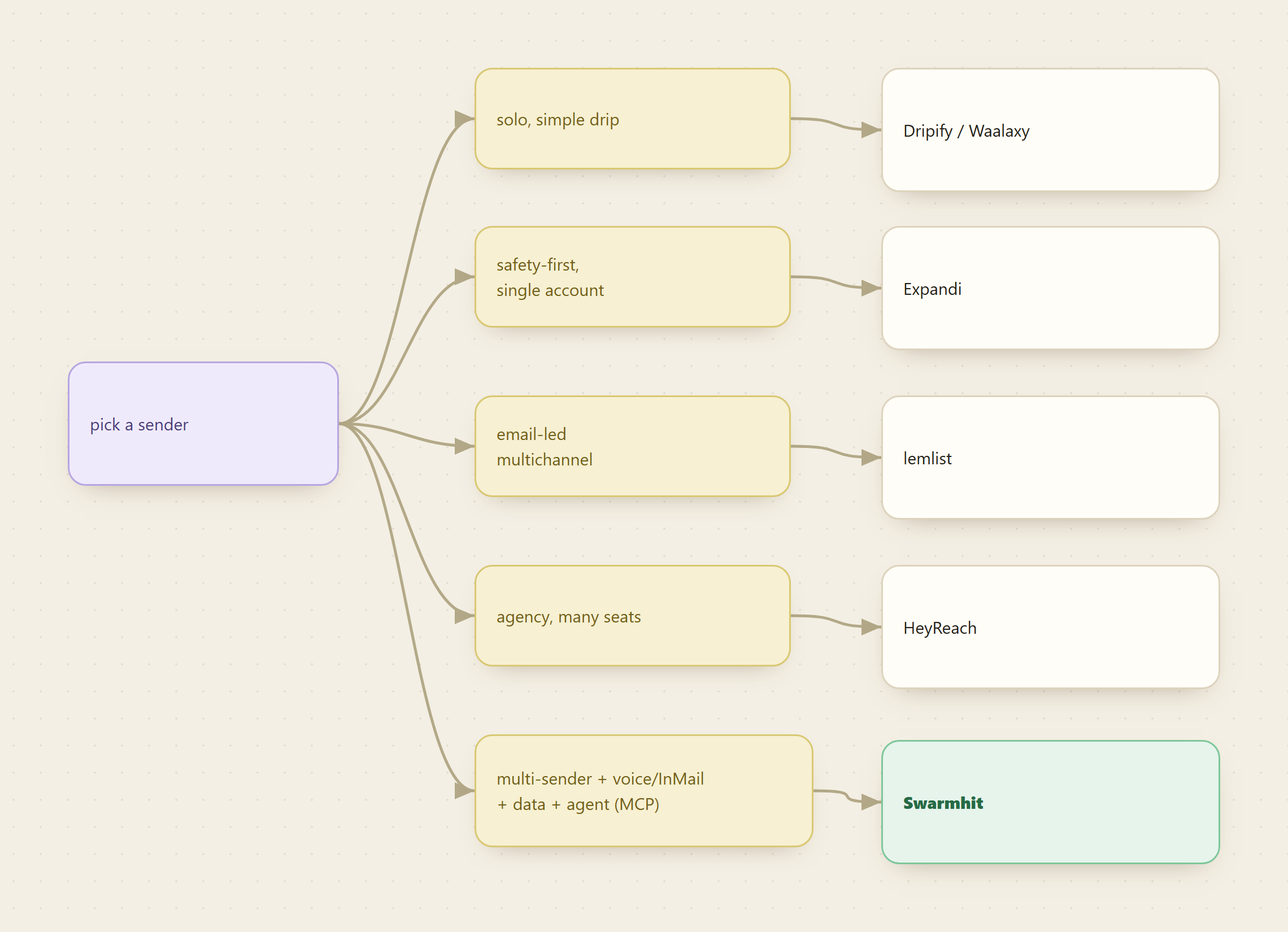
The best LinkedIn outreach setup is the one that verifies who you're contacting before it contacts them, and sequences the message with a sender that matches how you actually work. Pick the sending layer by your shape: a solo operator running a simple drip is well served by Dripify or Waalaxy; a single account where safety is everything points to Expandi; an email-first motion with LinkedIn touches points to lemlist; an agency running many seats wants HeyReach; and a multi-sender, voice-note-and-InMail, built-in-data, agent-driven operation points to Swarmhit.
Two things matter more than which sequencer you land on. The two layers price and fail differently, so treating outreach as one purchase is what leads teams to pay for a sender's bundled data they do not trust and skip the enrichment step that actually moves reply rates. And a stale list is indistinguishable from a bad sequence from the inside: both show up as silence, which is why the enrichment pass before the first send is the cheapest diagnostic you will run all quarter.
Start with the free part: discovering and inspecting an enrichment endpoint costs nothing, so you can read the exact fields and price before spending. Then enrich a hundred rows from your existing list and count how many people have already changed jobs. That number usually settles the argument. Begin at monid.ai.
FAQ
Do I need a data layer if my sequencer ships its own B2B data?
Often yes, and the reason is freshness rather than coverage. Bundled databases are built to make a sender self-sufficient at signup, and their records age at their own pace. Enriching a list against a live source before a campaign catches the people who changed roles since the bundle was last built, which is the group most likely to make your open rate look fine and your reply rate look broken.
Will using an outreach tool get my LinkedIn account banned?
It can, and LinkedIn's Prohibited Software and Extensions policy says so directly: automation that scrapes or sends at machine speed risks restriction. That is the reason warm-up, throttling and multi-account rotation exist in every tool here. It is also an argument for keeping the data work off your own seat entirely, since an enrichment API runs nowhere near your logged-in account.
Is it cheaper to enrich per call or to buy a data seat?
It depends on whether your sending is steady or bursty. A seat divided across a high, constant daily volume eventually beats per-call. Campaign work that runs for two weeks and then stops does not reach that crossover, and the seat keeps billing through the quiet months. Per-call costs nothing while idle, which is the whole argument for the shape rather than the price.
Can an AI agent run this whole workflow?
The enrichment half, yes: Monid is agent-native over MCP, so an agent can discover the endpoint, read the schema, and run the pass itself. The sending half depends on your sequencer, and Swarmhit is the one in this list that exposes an MCP server for campaign and inbox control. The two connect through the list, not through a shared integration.
Last updated August 2026.