How to Download YouTube Transcript Files as Text
Get timestamped YouTube transcript segments, save the original JSON, and export readable text with a source link for every video.
Save a video's captions as readable text with its timestamps intact. Paste this into your agent:
Set up https://monid.ai/SKILL.md, and then use Monid to download the YouTube transcript for https://www.youtube.com/watch?v=jNQXAC9IVRw in English. Inspect the price first. Save the original JSON, export the caption snippets to a UTF-8 text file, and report the segment count. Stop if no transcript comes back; do not invent the missing words.
Planning example: 1 min setup · 0.3 hrs saved across 20 files, assuming one minute less handling per file.
Content researchers and editors who need to download YouTube transcript files face a small but repetitive handoff: copy captions, keep the source URL, then turn the copied material into a useful document. For a 20-video assignment, that means doing the source-to-file step 20 times.
Reading captions in a browser solves the reading task. It leaves the filing task to you: naming documents, preserving timestamps, and separating a successful extraction from a page with no usable transcript. A text file without its source also creates extra work when an editor asks where a passage came from.
We'll use Monid, the OpenRouter for agent tools, to retrieve caption segments and then save them locally. Monid covers retrieval; your agent or script creates the downloadable text file. This workflow does not generate captions for a video without them. You'll retrieve one video, check the returned segments, and export text alongside the original JSON.
Here is the finished manifest from our short-video test on November 8, 2026. The timing columns describe returned segment starts, not the video's length.
| Export check | Measured value |
|---|---|
| Video ID | jNQXAC9IVRw |
| Retrieval status | Success |
| Transcript segments | 3 |
| First segment start | 1,000 milliseconds |
| Last segment start | 16,000 milliseconds |
| Chapter entries returned | 3 |
How to download YouTube transcript files with Monid
Give your agent one video URL, ask for the original response, and specify the text file you want it to write. Monid provides one key and one balance for tool calls; the agent handles the file conversion after retrieval.
An endpoint is a specific callable tool. Here, the tested choice is SerpApi's /youtube/transcript on Monid, which accepts a video ID and returns caption segments. Start with one short video before handing the agent a research list.
Step 1. Install and add your key
For agents: get an API key at app.monid.ai and give it to your agent through its credential setup. Paste the opening prompt; it requests retrieval and local export as separate actions.
set up https://monid.ai/SKILL.md
For humans: install the CLI and add your key using these commands. The CLI quickstart explains the setup flow.
npm install -g @monid-ai/cli
monid keys add --label main --key <your-api-key>
Step 2. Give your agent one video and one language
Use a complete watch URL in your request, then ask the agent to pass its video ID as v and English as language_code: "en". Choose English because it is the requested output language, and require the agent to report the actual language information returned instead of silently claiming a translation.
Use only this video: https://www.youtube.com/watch?v=jNQXAC9IVRw.
Request English captions. Keep each returned start_ms and snippet.
Save the original result before making a readable text version.
The inspected language setting falls back to the first available transcript when the requested language is absent. A request for English therefore does not establish that the returned words are English; review the text before sending it into an English-only research folder.
Step 3. Retrieve the captions
Ask your agent to inspect the tool and make one call after reading its billing rule. Our test returned Success, three transcript segments, and three chapter entries; the run completed in 9.471 seconds from its recorded creation and completion times.
Inspect SerpApi's YouTube transcript tool, then retrieve this one video.
Show the returned retrieval status and transcript segment count.
Do not summarize or rewrite the captions before saving them.
Step 4. Export text and keep the original
Have your agent join each snippet in transcript order and save that text as jNQXAC9IVRw.txt, alongside the source JSON. Ask for a second timestamped version when you need to jump back to the video; preserve start_ms in the original either way.
Create a UTF-8 TXT file from the transcript snippets, one segment per line.
Also create a timestamped TXT version using start_time_text.
Keep the original JSON and report the filenames you actually wrote.
That final instruction matters: a chat reply containing captions is different from a file written to disk. In an agent interface with downloadable attachments, request the saved file as an attachment. In a terminal workflow, open the output directory and confirm that both files exist.
For background on choosing repeatable retrieval over one-off copying, see free transcript extraction versus a repeatable API workflow.
How do you read the downloaded transcript?
Read the transcript as timed caption segments, with separate chapter data. A segment's start tells you where its text begins; it does not tell you how long the words remain on screen.
Keep source timing separate from formatting
Our response contained start_ms, snippet, start_time_text, and start_time_label within each transcript item. It did not include an end time in those items, so this guide does not manufacture subtitle durations.
| Segment position | Returned start_ms | Returned start_time_text |
|---|---|---|
| First | 1000 | 0:01 |
| Second | 7000 | 0:07 |
| Third | 16000 | 0:16 |
These are real returned values, with the spoken text omitted. Three transcript segments are three caption chunks within one video response; they are not three downloaded videos or three billable searches.
For reading, joining snippets into paragraphs is useful. For quotation review, retain a timestamped copy. Treat punctuation cleanup as an editorial operation and preserve the original words so the edited version remains traceable.
Keep chapters outside the transcript body
The same response returned three chapter entries, each with chapter, start_ms, and start_time_text. Keep those entries in a separate section or file instead of inserting their labels into the spoken transcript.
A chapter boundary and a caption boundary serve different purposes. Our first chapter began at zero milliseconds while the first caption began at 1,000 milliseconds. Using chapter starts as caption starts would change the source timing.
The editorial rule is straightforward: use captions for the words and chapters for navigation. If the next task is question answering over many videos, the guide to timestamped YouTube citations in a RAG store explains why keeping those positions is useful.
How much does a transcript download cost?
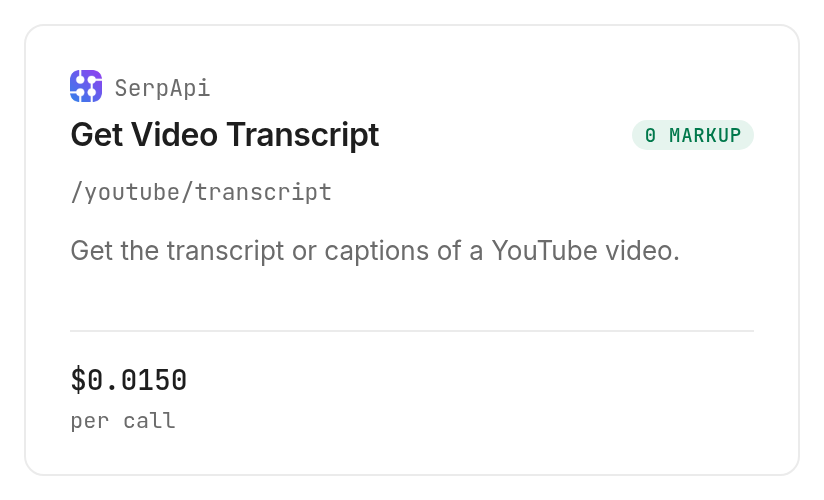
The tested SerpApi transcript tool costs $0.015 per successful call, Verified 2026-11-08. Our successful request returned one billed unit at that rate, regardless of the three caption segments inside the response.
Read the billing unit before sending a list
Discovery and inspection through Monid are free; executing the tool is the paid step. The inspected rule bills successful searches, including empty result sets, and lists HTTP errors and failed searches as free.
That billing rule is different from paying for every caption line. A video with many segments remains a single search under this tool's per-call model. Keep the distinction in your research manifest so a row count does not become a mistaken cost forecast.
Use the YouTube tools catalog to inspect the current tool choices before scaling up. Changing tools also means rechecking the input schema and billing shape; a familiar platform name does not establish identical behavior.
Put a stopping rule in the agent request
Tell the agent to make one test call, save the result, and stop before processing the remaining URLs. For a later batch, set an explicit maximum number of calls and require the agent to skip video IDs already saved successfully.
Do not use repeated downloads as a substitute for checking the local files. Retrieval and export are separate stages: if JSON is already saved, rewriting a TXT file from it requires no new transcript request. This is the most direct way to avoid paying again for a formatting change.
How do you save the transcript in your own code?
Save the CLI response as JSON, then convert its transcript array locally. The SerpApi tool on Monid takes query parameters, so use --query rather than sending a JSON body with -i.
Retrieve one response from the terminal
These discovery and inspection commands show the same workflow used for this guide. The final command uses the video ID and language setting from our successful test, with a local output filename added.
monid discover -q "download youtube transcript" -l 5 --include-unavailable -j
monid inspect -p serpapi -e /youtube/transcript -j
monid run -p serpapi -e /youtube/transcript \
  --query '{"v":"jNQXAC9IVRw","language_code":"en"}' \
  -w -j -o transcript-run.json
A completed CLI operation alone is insufficient for a usable text export. Check the returned transcript array before writing a success row. Keep a missing transcript separate from an empty document so downstream readers do not mistake absence for silence.
Convert saved segments into two text files
This Node.js example accepts either the saved run wrapper or its extracted output object. It refuses an absent or empty transcript and uses the returned timestamps directly.
const fs = require('node:fs');
const saved = JSON.parse(fs.readFileSync('transcript-run.json', 'utf8'));
const output = saved.output ?? saved;
const segments = output.transcript;
if (!Array.isArray(segments) || segments.length === 0) {
  throw new Error('No transcript segments to export');
}
for (const segment of segments) {
  if (typeof segment.snippet !== 'string') {
    throw new Error('Caption text is missing');
  }
}
fs.writeFileSync('transcript.txt',
  segments.map(s => s.snippet).join('\n') + '\n', 'utf8');
fs.writeFileSync('transcript-timed.txt',
  segments.map(s => `[${s.start_time_text}] ${s.snippet}`).join('\n') + '\n',
  'utf8');
console.log({ segment_count: segments.length });
Keep the original response beside these derived files. The text version is for reading; the JSON is for reformatting, source checks, and future processing. Avoid overwriting the original when you remove repeated spaces or combine caption lines.
If the text is going into a model context window, decide how to split and label it after export. Preparing YouTube transcript text for an LLM develops that next step without changing the source retrieval task.
When should you use something else?
Use YouTube's own transcript panel when you only need to read a captioned video and jump to a passage. YouTube's transcript help explains opening Show transcript from the description and selecting a caption line to navigate.
Choose reading, retrieval, or transcription deliberately
You're on the Monid blog, and Monid routes paid calls to the tool used here. For a single reading session, a key and a saved JSON file add work that the browser panel avoids.
Choose SerpApi directly when you want to integrate with that provider itself. Choose the routed version here when transcript retrieval belongs inside an agent workflow that already uses a shared tool balance.
Choose audio transcription when your source has no usable caption text. Retrieving captions does not create missing speech recognition output, and the tested workflow does not promise full coverage of every video URL.
Use a subtitle editor when your deliverable is an SRT or VTT file with validated cue durations. Our response gave segment starts without caption end times. A readable TXT export is supported by those fields; a complete subtitle timing claim requires more information.
Which tool should you use for each job?
Choose the tested retrieval tool for caption data and local file processing for the export. The table separates the paid request from the formatting operation that follows it.
| Use case | Best endpoint | Why? |
|---|---|---|
| Retrieve one video's existing caption segments | SerpApi /youtube/transcript | Returned three timed segments in our test; per successful call, Verified 2026-11-08: $0.015 |
The local converter writes TXT files from that response. It does not call another endpoint, infer missing words, or turn chapter boundaries into subtitle durations. Keep these responsibilities separate when you hand the task to an agent.
Conclusion
You now have a repeatable path from one video ID to saved caption JSON and readable text, with timing retained for source checks. Use Monid for retrieval and your agent for file creation; keep captionless videos out of the successful-export list. The opening planning example assumes one minute of setup and one minute less file handling across 20 videos, leaving roughly 19 minutes, or 0.3 hours, saved; it is a workload assumption, not a measured setup promise. Your research folder stays readable, traceable, and ready for the next editing pass.
FAQ
Can I download a YouTube transcript for free?
You can read available captions through YouTube's transcript panel without using this paid tool. The workflow here charges for successful retrieval calls; saving already retrieved JSON as text is a local operation.
Do I need to install a YouTube transcript downloader?
You do not need a separate browser downloader for this workflow. Give the task to an agent with Monid configured, or install the CLI for the terminal commands above. Your agent or local script writes the downloadable file.
Can I download YouTube transcript text without writing code?
Yes, an agent can retrieve the captions and create the TXT file. Ask it to return the actual saved file and original JSON. Verify that it reports a nonempty transcript rather than only saying the request completed.
How many videos can I download at once?
The tested request accepts one video ID. Process a list through separate requests with a call cap and a saved-file check. This guide tested one successful video, so it does not establish batch throughput.
Does an empty transcript request cost money?
The inspected SerpApi billing rule charges for successful searches even when the result set is empty; it lists failed searches and HTTP errors as free. Our tested search returned caption data. Apply the rule for the selected tool rather than assuming no text means no charge.
Can I download the transcript with timestamps?
Yes, retain start_ms or start_time_text with each caption snippet. Our response returned three segment starts and no caption end times. The timestamped TXT version preserves those starts without inventing subtitle durations.
Is downloading YouTube transcripts legal?
Rules vary by location; check the rules that apply to your use. Access to a transcript does not establish permission to republish its contents.
Published November 2026.


