How to Use the Bing Search API in Your Agent
Get Bing search results into your agent as a table of positions, titles, URLs and snippets, then filter the links before using them.

Give your agent Bing results it can sort and inspect. Paste this into your agent:
Set up https://monid.ai/SKILL.md, and then use Monid to search Bing for "NASA Artemis" through SerpApi. Return the position, title, link and snippet for each organic result. Keep the query and market with the table, and do not treat snippets as full articles. Inspect the price before making one search call.
Planning estimate: 1 min setup · 1-2 hrs saved across 20 repeated searches.
If you're an agent developer looking for a Bing Search API, copying links from a browser stops being useful when you need the same search again tomorrow. You need each position attached to its URL, plus enough context to reproduce the request. A page with 10 results is your starting batch, not a complete research corpus.
Pasting a results page into a model loses the boundary between the result, the preview text and your own instructions. Building around whatever text appeared first also hides an important decision: which returned links deserve to become sources?
We'll use Monid, the OpenRouter for agent tools, to retrieve Bing results through one key and balance. You'll finish with a table of search rows, the parameters that produced them, and a rule for accepting links before your agent uses them. We'll make one search, read its output, then separate discovery from evidence.
Here's the finished batch preview from two calls on November 4, 2026. Elapsed time is calculated from each run's creation and completion timestamps.
| Measurement | Broad query | Domain-qualified query |
|---|---|---|
| Query | NASA Artemis | site:nasa.gov Artemis |
| Organic rows returned | 10 | 7 |
| Run elapsed time | 6.779 seconds | 10.933 seconds |
| Provider-reported processing time | 5.52 seconds | 9.75 seconds |
| Next first-result offset | 11 | 8 |
How to use the Bing Search API with Monid
Use Monid to discover a Bing search tool, inspect its input, and send one query through SerpApi's Bing search tool. An endpoint is the particular callable tool you select; here it returns a structured search-results page rather than an answer written by a model.
Step 1. Install and add your key
For agents: Get a key at app.monid.ai, then give it to your agent through your environment's secret-handling mechanism and paste the setup instruction. The agent quickstart explains the connection.
set up https://monid.ai/SKILL.md
For humans: Install the CLI and save your key locally. The CLI quickstart covers the terminal workflow.
npm install -g @monid-ai/cli
monid keys add -k <your-api-key> -l main
Step 2. Choose Bing and read the input
Search the catalog and inspect the SerpApi Bing tool before sending a paid request. Discovery and inspection are free; the input schema tells you to use query parameters rather than a JSON request body.
monid discover -q "bing search api" -l 5 -j --include-unavailable
monid inspect -p serpapi -e /bing/search
Step 3. Send one small search
Use one query and the first page when testing, and set a small limit whenever a tool exposes one; this inspected input has no result-count control. Here mkt selects the market, device fixes the layout, and first chooses the first result offset.
monid run -p serpapi -e /bing/search \
  --query '{"q":"NASA Artemis","mkt":"en-US","first":1,"device":"desktop"}' \
  -w 45 -j
Step 4. Read the rows before exporting
Read output.organic_results in the JSON response and retain position, title, link and snippet for your table. Keep the complete response separately so search parameters, timing and pagination remain attached to the batch.
| Returned position | Returned title | Destination host | Suggested handling |
|---|---|---|---|
| 1 | NASA | www.nasa.gov | Review the homepage before using it as evidence |
| 2 | NASA - Wikipedia | en.wikipedia.org | Separate secondary reference from primary sources |
| 4 | NASA Science | science.nasa.gov | Check whether the page answers the research question |
| 6 | Mars - NASA Science | mars.nasa.gov | Review topical relevance before reading further |
These are four selected rows from the ten-row response, not the complete batch. The handling column is editorial advice; the tool did not classify these sources for us. For ongoing checks of Bing positions, our Bing position-tracking guide covers the monitoring workflow after you have a search batch.
The 3 ways to get Bing results into your agent
Choose the route around the artifact you need: a browser view, a structured batch, or an integration you already maintain. This is the Monid blog, and we sell access to the provider used here; that does not make another connection unnecessary when it already works for you.
| Route | Billing approach | Fits | Work you keep |
|---|---|---|---|
| Monid with SerpApi | Per successful search call | An agent using multiple tools under one balance | Filtering, source review and storage |
| Existing direct SerpApi connection | Your existing provider arrangement | A working integration you already operate | Your current client and credentials |
| Bing in a browser | Manual workflow | A one-off search with human review | Copying and organizing links |
Use a structured tool for repeatable batches
The tested Bing search call returns rows with named fields, which gives your program a stable place to look for each URL. It also returns the search parameters beside the rows. You still decide what a useful source looks like, and which links merit a second step.
Keep a direct integration that already works
An existing SerpApi client is a sensible choice when Bing search is already wired into your application. Moving an established connection creates work; sharing one balance matters most when your agent also needs other tools. SerpApi's documentation is the provider reference, while this guide follows the input exposed through Monid.
Use the browser for a one-off judgment
A browser is enough when you want to inspect a single result page yourself. The structured route becomes useful when another program must consume the same columns repeatedly. For the broader migration question, read our guide to replacing an old Bing search integration.
How to turn Bing results into a useful table
Treat the returned rows as candidates, then apply your own relevance and destination checks before giving them to the agent. The two tested searches produced different batches, and neither search response contained full article text.
Separate returned rows from total matches
The broad search reported search_information.total_results as 193000 but returned ten organic entries. The domain-qualified search reported 120000 and returned seven. Count organic_results to size your batch; do not reserve storage, promise coverage or calculate progress from the reported search total.
The run envelope also reported resultCount: 1 and billedUnits: 1 for each call. Those values describe the run and its billing unit, not the number of organic links inside the response. Keep that distinction in monitoring dashboards so a successful ten-link search does not appear to contain only one link.
Check the actual destination hostname
For a source-restricted workflow, validate the host in link locally. Our site:nasa.gov Artemis call returned seven links, of which two had a nasa.gov destination; five did not. Only the two matching links belong in a NASA-only output table.
| Measurement | Domain-qualified batch |
|---|---|
| Returned organic rows | 7 |
| Links under nasa.gov | 2 |
| Outside-domain links | 5 |
| Matching original positions | 2 and 6 |
| Rows retained for NASA-only review | 2 |
Use the exact hostname or a hostname ending in .nasa.gov as the acceptance rule. Avoid a substring check on the entire URL, because a domain name can appear in a path or query string. Preserve the original positions after filtering; renumbering the two survivors as first and second would change what the search returned.
Keep snippets separate from source text
A snippet is useful for choosing what to open next, but it does not replace the page. In these runs, titles, destination links and snippets appeared on every organic row; date strings appeared on only some rows. Store a missing date as missing, and keep relative dates as returned strings rather than converting them into publication timestamps.
The integration covers search discovery. It does not read each destination, check a claim against the page, or produce a finished research answer. Make those explicit downstream jobs instead of asking a language model to infer the missing evidence from a short preview.
How do you handle paging and repeated searches?
Follow the returned continuation parameters and keep the query context fixed between pages. Monid returns the provider response along with the run identifier, so you can retain both the search data and the execution record.
Follow the returned offset
The broad batch's serpapi_pagination.next.queryParams contained first: "11"; the seven-row batch's next offset was "8". Do not assume that every page contains ten rows or that the next offset is always eleven. Read the continuation data from the actual response and apply a page budget before requesting more.
The ordinary pagination.next field is a Bing web URL. The serpapi_pagination object supplies a tool path and query parameters. Keep those representations separate: a web navigation link is not the command you send through the CLI.
Store context with every batch
Save the run ID, query, market, device and returned timestamp beside the rows. Deduplicate using destination links while retaining the raw records; the broad query included both a NASA homepage URL and a homepage variant with a query string. Removing variants is your normalization policy, not something to hide inside the raw search archive.
For repeated keyword checks, compare equivalent requests rather than changing market and device between observations. Keep organic positions attached to their original queries and observation times, so later checks compare the same Bing search context.
How much does a Bing search cost?
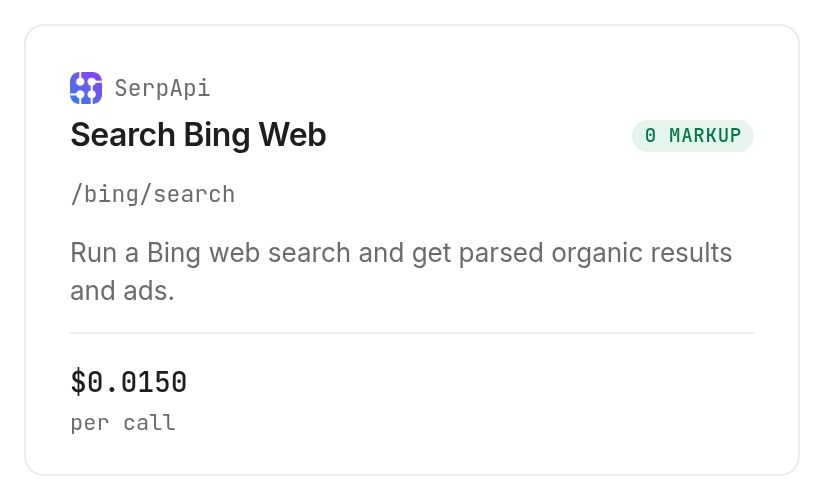
The tested SerpApi search tool costs $0.015 per call, Verified 2026-11-04. Both successful runs reported one billed unit despite returning different organic row counts.
Budget calls rather than links
The two calls together reported a charge of $0.03, Verified 2026-11-04. That is the measured total for this article, not a guarantee about the cost of an entire research pipeline. Another page is another search call, and any later page-reading tool has its own price.
The inspected billing notes state that a successful empty search is billed and that HTTP errors and failed searches are free. Our two runs were successful and nonempty; the empty and failure rules come from the tool's billing policy rather than an empty-result experiment.
Discovery and inspection do not spend your balance. Use the search tools catalog when the task changes, then inspect the specific tool before buying more calls. Reusing the same key does not make different providers return the same engine or the same fields.
When should you use something else?
Use your existing direct SerpApi connection when it already delivers the search rows your application needs. Use Bing in a browser when a human wants a one-off visual review. Monid fits the shared-tool workflow; it does not remove source selection, pagination logic or downstream reading from your application.
Choose page reading for a finished answer
A search batch is the wrong final artifact when the reader expects a cited explanation based on full documents. Start with candidate discovery, accept the relevant URLs, and then read those pages before writing the answer. A search response containing links and snippets does not establish that the linked pages support your conclusion.
There is also no accuracy score from this two-query test. We observed working calls, concrete fields and a domain-qualified batch needing filtering. Use that evidence to design checks, rather than treating a provider's successful response as a quality guarantee for every topic.
Which search option fits which job?
Use the tested SerpApi Bing search tool when you need Bing organic rows; adjust your local processing to the task. These are three uses of one tested tool, not three additional products.
| Use case | Best endpoint | Why? |
|---|---|---|
| Give an agent candidate links | serpapi /bing/search | Returns positions, titles, destination links and snippets; Verified 2026-11-04, $0.015 |
| Review NASA-only destinations | serpapi /bing/search plus local hostname validation | Retain matching hosts after searching; Verified 2026-11-04, $0.015 |
| Prepare continuation through more pages | serpapi /bing/search | Returns next-request parameters; later pages require separate calls; Verified 2026-11-04, $0.015 |
Conclusion
You now have a reproducible Bing search command, a real table of returned rows, and checks that keep result counts, domains and snippets in their proper roles. Use Monid for the calls, then keep source acceptance and storage explicit in your application. The opening's 1 min setup is a planning estimate for an installed environment with a key ready; its 1-2 hrs saved assumes twenty searches that otherwise take three to six minutes each to copy and organize, before review time. Choose the route that leaves you with reusable source candidates and a clear record of why each link was kept.
FAQ
Is Bing search free here?
Discovery and inspection are free; search calls are paid.
Do I need a Bing API key?
This workflow uses your Monid key.
What must I install?
Use the Monid skill or the CLI.
How many results come back?
Our first-page calls returned ten and seven organic rows.
Are failed searches charged?
The inspected policy bills successful empty searches; HTTP errors and failed searches are free.
Does site search enforce domains?
Local filtering kept two of seven links in our test.
Published November 2026.