How to Use an Automated Valuation Model for Homes
Build a property review sheet that separates automated home estimates from evidence, with a five-step process and a property-ID lookup.
Prepare a home-value review before treating an estimate as a decision. Paste this into your agent:
Set up https://monid.ai/SKILL.md, and then use Monid to inspect the Zillow home-estimate lookup. Explain the required property ID and price. Prepare a review sheet separating retrieved estimates from my notes. Stop before any paid call and never invent a value or confidence score.
Inspect first, approve retrieval second. No min setup or hrs saved estimate is claimed.
Property acquisition analysts and buyer's agents face a familiar problem with an automated valuation model: one number looks easier to compare than the evidence behind it. On an illustrative shortlist of 10 homes, copying estimates produces 10 numbers without explaining which properties need more research.
A spreadsheet does not fix that gap by itself. Mixing asking prices, automated estimates and personal judgments in one value column hides how each number was produced and what question it answers.
This guide gives you a review-sheet design and a five-step process for deciding what to collect, what to compare and when to stop. First understand the estimate, then choose evidence, then connect the narrow retrieval step to your workflow.
Review-sheet preview, structure only: use the columns below for your own records. This is a worksheet design, not returned property data.
| Worksheet column | Purpose |
|---|---|
| Local property reference | Connect the review to your shortlist |
| Confirmed property identifier | Keep the estimate attached to the right home |
| Retrieved estimate | Store a source value without changing its meaning |
| Retrieval time | Record when your workflow collected it |
| Evidence gap | Explain what still needs investigation |
| Review action | Assign the next human task |
What is an automated valuation model?
An automated valuation model, or AVM, uses data and mathematical modeling to estimate a property's value. The Consumer Financial Protection Bureau explains AVMs as computer-generated valuations that compare home information with sales and local market information.
Separate the model from its estimate
The model is the process; the estimate is an output from that process. Retrieving an existing estimate does not give you the model's training data, its calculations or an independent evaluation of its performance.
For your worksheet, keep the source attached to the value. A column labeled simply “value” encourages later readers to treat unlike measurements as interchangeable. A source-specific label preserves the distinction when the sheet is copied into another report.
Separate the question from the number
Start by writing the question you need answered. “Which homes need closer investigation?” is a different task from “What price should I offer?” or “How should I build a prediction model?”
For this guide, the task is research triage. You are organizing evidence for further review. The finished sheet should tell a colleague what to investigate next without requiring them to reconstruct your reasoning from a bare number.
Why does an estimate need a separate review?
An estimate needs a separate review because a calculated value does not explain whether you have identified the right property or gathered the evidence your decision requires. Treat review as an explicit task with an owner.
Check identity before comparing values
Match the home before interpreting its estimate. Record the unit, property type and land arrangement in your working notes, then confirm that the source record refers to the same property.
Consider a manufactured home sold with land versus a home in a park where land is leased. Your comparison question changes when those arrangements differ. The mobile home value calculator guide develops that property-type distinction and the limits of a property-ID estimate.
Do not use a familiar street name as your only identity check. An apartment unit, adjacent parcel or duplicate record deserves a deliberate resolution before its value enters a comparison sheet.
Keep missing evidence visible
Use an evidence-gap column instead of silently assuming that all homes are equally documented. A useful note names the missing item: condition review, confirmed unit, comparable-sale research or land arrangement.
These notes are your assessment, not a confidence score supplied by a valuation service. Keep them in a separate column so your software cannot accidentally present an analyst's judgment as a provider's measurement.
The practical conclusion is simple: sort by unresolved review work as well as by estimated value. A clean-looking number should not move an unresolved property to the top of a shortlist.
How to choose the right property evidence
Choose evidence according to the decision you intend to support. Collecting more numbers without a defined comparison question creates a larger sheet with the same ambiguity.
Distinguish estimates, asking prices and sales
Give each measure its own column and source. An asking price records a seller's request; an automated estimate records a model's assessment; a recorded sale describes a transaction.
Do not average these columns merely because they share a currency. First decide whether each measure belongs in your analysis and whether the property and observation dates match the task.
For example, a research shortlist needs a clear review priority. It does not need a single blended figure that hides disagreement among sources. Preserve disagreement and explain the next research step beside it.
Match evidence to the property's use
Separate sale-value questions from rental questions. A home-value estimate and a rent estimate serve different purposes, even when both refer to the same property.
For a purchase shortlist, organize the evidence needed to compare homes. For a rental investigation, create a separate worksheet that records the rental question and the assumptions you plan to examine. Do not rename a rent estimate as expected income or carry it directly into an investment conclusion.
Make dates explicit as well. Your retrieval time says when you collected information. It does not establish when the underlying source last updated its estimate.
How to build a five-step home valuation review
Build the review around property identity, source separation and an assigned next action. The following process works whether you collect values manually or retrieve them through software.
Step 1. Define the decision
Write one sentence describing the sheet's purpose, such as “prioritize homes for comparable-sale research.” Choose that purpose before choosing columns so the worksheet answers a real question.
Step 2. Confirm each property
Give each home a local reference and record its confirmed source identifier. Keep unresolved matches outside the comparison until someone resolves them; a missing estimate is preferable to a value attached to the wrong home.
Step 3. Collect values with provenance
Save the source, retrieved value and collection time separately. Preserve the original response or source reference alongside the sheet so a later reviewer can trace a value back to what you actually collected.
Step 4. Assign a review action
Turn every evidence gap into a concrete next step with an owner. “Confirm parcel” or “request condition review” gives the next person a task; “looks wrong” leaves them to guess.
Step 5. Preserve revisions
Add a new dated observation when refreshing your research instead of overwriting the previous record. Compare observations only after checking that the property, source and measure remain consistent.
Use this process to produce a queue of research tasks. It does not turn a retrieved estimate into a completed appraisal or a validated prediction model.
How to retrieve an existing home estimate with Monid
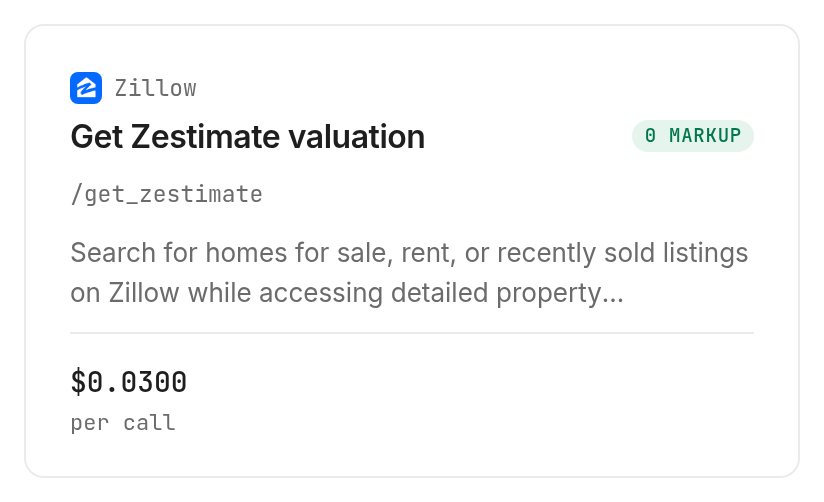
Monid covers the retrieval step: its Zillow estimate lookup, /get_zestimate, is described as returning a Zestimate and rent Zestimate for a property identified by zpid. It does not build an AVM, inspect a home or complete your valuation review.
Zillow calls its Zestimate a starting point rather than an appraisal. Keep that boundary in your worksheet: retrieving the figure supplies one source observation, while your evidence gaps and next actions remain separate work.
Step 1. Connect your agent or CLI
For agents, get an API key at app.monid.ai, give it to your agent through your normal secret-handling process, and paste the setup instruction:
set up https://monid.ai/SKILL.md
For humans, install the CLI and add your key locally:
npm install -g @monid-ai/cli
monid keys add -k <your-api-key> -l main
Step 2. Inspect the required property ID
Use the free discovery and inspection commands to read the contract before approving a purchase:
monid discover -q "automated valuation model" -l 5 --include-unavailable -j
monid inspect -p zillow -e /get_zestimate -j
An endpoint is a callable operation. This operation declares a required query parameter named zpid, typed as a string, and rejects additional query properties; it declares no address input, property array or result-limit option.
Choose one confirmed property for your first retrieval. Do not pass a street address in the ID field or add a guessed limit parameter to control spending.
Step 3. Keep the response contract honest
Inspection supplies an input schema and capability description, but no declared response-field schema. The table describes what the documentation states about the return, without inventing JSON keys or property values.
| Return-contract item | What inspection declares |
|---|---|
| Described information | Zestimate and rent Zestimate |
| Response field names | No output-field schema declared |
| Confidence interval | No response field declared |
| Model update timestamp | No response field declared |
| Comparable-sale records | No response field declared |
This guide uses inspection only and contains no real-data result table. After your own retrieval, map only the fields actually present in the response, and keep any worksheet notes outside the provider data.
Step 4. Approve one retrieval and save the response
The schema-derived command below shows the documented example ID; replace it with your confirmed property's ID before executing the paid call:
monid run -p zillow -e /get_zestimate \
  --query '{"zpid":"2080998636"}' -w -o estimate.json
The parameter belongs in --query because inspection declares query parameters, rather than a request body. Save the response, examine its actual keys, then fill the supported worksheet columns without guessing missing values.
For a broader integration after that first lookup, use the property-agent implementation guide. Keep model evaluation separate from the mechanics of calling a tool.
Step 5. Check the price before repeating
The Zillow lookup price is $0.03 per call, Verified 2026-11-03. Discovery and inspection are free; retrieval is the paid operation, and per-call billing is not a successful-estimate guarantee.
Set a call-count budget and stop on an unresolved identity or unexpected response. Do not retry automatically on the assumption that failures or missing estimates are free: the inspected contract does not define those billing outcomes.
When should you use something else?
Use a manual property page for an isolated check, a real estate professional for local interpretation, and an appraiser when the job requires inspection-based valuation. This is the Monid blog, and we offer access to a lookup, not an independent assessment of your home.
Choose the route that matches the work
For one home, Zillow's own Zestimate page explains the estimate directly. An automated workflow earns its complexity when you need repeatable collection and a record of what your agent retrieved.
For comparing a few homes, the narrower guide to checking a Zestimate before comparing homes focuses on separating asking prices, estimates and review notes. That task differs from validating an AVM across a market.
Building your own model requires a separate dataset, a modeling method and an evaluation design. Decide how to separate training observations from evaluation observations and how to compare predictions with later outcomes; this lookup supplies no such evaluation process.
Choose a professional review when the missing evidence concerns the home itself. Automating collection does not resolve a condition question, confirm a parcel boundary or explain which nearby sale belongs in your comparison.
Which lookup fits each valuation task?
Use the inspected lookup for an existing estimate attached to a confirmed property ID. The real estate tools inventory is the place to explore separate property-data needs without treating this one operation as a complete valuation system.
| Use case | Best endpoint | Why? |
|---|---|---|
| Retrieve a described home-value and rent estimate by confirmed ID | zillow/get_zestimate, inspect only | GET with required string zpid; per call, $0.03, Verified 2026-11-03 |
Keep your worksheet contract separate from the tool contract. Property references, retrieval times, review owners and evidence gaps belong to your workflow unless an actual response explicitly supplies corresponding information.
Conclusion
You now have a five-step review process, a worksheet structure and a documented retrieval route through Monid. The next paid step begins with one confirmed property; preserve its source response and your review notes when you repeat the process. Keep estimates attached to their sources and every unresolved question attached to a review action, so your next property discussion starts with evidence you can trace.
FAQ
What does an AVM do?
An AVM estimates property value from data.
Is a Zestimate an appraisal?
No. A Zestimate is not an appraisal.
Is inspection free?
Discovery and inspection are free; retrieval is paid.
Do I need code?
An agent can retrieve it after setup.
Can I submit several homes?
Submit one property ID per request.
Is accuracy guaranteed?
Inspection declares no accuracy guarantee.
Is every use allowed?
Rules vary; check your local requirements.
Published November 2026.