How to Check a Zestimate Before Comparing Homes
Build a home-value comparison sheet that separates estimates, asking prices and review notes, with a property-ID lookup for repeat checks.
Keep home-value estimates separate from the price you decide to offer. Paste this into your agent:
Set up https://monid.ai/SKILL.md, and then use Monid to inspect the Zillow Zestimate lookup for the property IDs I supply. Show the price before any paid call. After I approve a lookup, preserve its original response and help me build a comparison sheet. Leave missing values empty and keep asking prices separate.
One prompt prepares the comparison. 1 min setup target · hrs saved depend on your existing sheet.
As a buyer's agent or homeowner, you start with a Zestimate and end up switching between property tabs. For a shortlist of ten homes, copying ten values is the easy part. Remembering which home, date and kind of price each value belongs to is the harder part.
A screenshot leaves you with a number but no repeatable comparison. An asking price belongs to a seller's listing, an automated estimate belongs to a model, and your offer belongs to your own decision process. Putting them in one unlabeled column hides those differences.
We'll build a comparison method that preserves those distinctions, then show how to retrieve an estimate by property ID for repeat checks. Start with what the estimate means, prepare a review sheet, and add a lookup only after you know which property and value you need.
The preview below is a sheet design, not a property result or API response. No sample property values are supplied.
| Comparison column | What you put there | Why keep it separate? |
|---|---|---|
| Property reference | Your internal reference and confirmed property ID | Prevents mixing homes |
| Home-value estimate | Value actually supplied by the source | Keeps model output identifiable |
| Monthly rent estimate | Rental estimate, when supplied | Separates rent from sale value |
| Asking price | Current listing price from a separate source | Records the seller's position |
| Retrieval date | Your collection date | Makes later comparisons traceable |
| Review action | Your next research step | Turns a lookup into a decision aid |
What is a Zestimate and what does it tell you?
A Zestimate is Zillow's automated estimate of a home's market value. Zillow's explanation identifies it as a starting point and explicitly distinguishes it from an appraisal.
Read the estimate as a starting point
Use the estimate to frame a question about a home, then collect the evidence needed to answer it. A buyer asks whether the property deserves a closer look; an owner asks whether the available home facts describe the property correctly.
Neither question is answered by copying the number alone. Your sheet should make room for the reason you accept, investigate or set aside the estimate. That note is your assessment, separate from the source's output.
Keep the property and the figure together
Confirm the exact property before comparing any values. A building, a unit and a neighboring parcel are different subjects even when their addresses look similar.
Give each home a persistent row reference in your own sheet. Keep the source link beside that reference so a later reviewer can return to the same property rather than repeat an address search and choose a different result.
Why separate a Zillow estimate from an asking price?
A Zillow estimate and an asking price answer different questions: one is a model's estimate, while the other is the seller's stated price. Comparing them is useful only after you label both sources and dates.
Compare like with like
Keep sale-value estimates, rent estimates and asking prices in separate columns. A monthly rental amount does not belong in a sale-value column, and an absent estimate does not mean the home has no value.
Before calculating any difference, confirm both inputs refer to the same property. Record the collection dates alongside the figures. A comparison that silently mixes an older saved value with a newly collected asking price conceals a timing difference.
Choose a review action before a score
Decide what a difference will cause you to investigate. Useful actions include reviewing property facts, examining recent comparable sales with a professional, or requesting information about condition.
Avoid assigning a buy or sell label from an estimate gap alone. A spreadsheet formula is a calculation on its inputs; it does not establish why those inputs differ. Keep the raw figures available even after adding your own ranking column.
For an initial shortlist, use a simple action vocabulary: research property facts, research pricing evidence, or hold for missing information. These are suggested workflow labels, not classifications supplied by the valuation source.
How to compare Zillow estimates of home values
Build a consistent review process before choosing a collection tool. The following five steps work for a manual sheet and for a later automated refresh.
Step 1. Define the homes you are comparing
Choose a bounded shortlist, such as ten homes you are already considering, rather than collecting an entire city. Write down the decision the sheet supports so your later filters serve that decision.
Step 2. Confirm each property reference
Match each row to the correct home and retain its source link or property identifier. Stop unresolved matches here instead of attaching a confident-looking number to the wrong row.
Step 3. Record each kind of price separately
Create distinct columns for the home-value estimate, monthly rent estimate and asking price. Fill a cell only from the corresponding source, and preserve the original label when transferring it.
Step 4. Add dates and research notes
Record when you collected the information and any source date actually provided. A collection date is your observation time; it is not proof that the underlying estimate was recalculated that day.
Step 5. Review gaps before ranking homes
Read missing values and large differences as prompts for further research, then assign your review action. Keep unresolved rows visible instead of deleting them from the shortlist.
These steps produce an auditable sheet because someone else can follow each figure back to its source. They also make a refresh safer: new observations can be added without erasing what you previously saw.
For repeat comparisons, preserve snapshots rather than overwriting every cell. Your own stored history answers what your process observed on each date; it should not be labeled as the source's historical valuation series.
How to check a home value with Monid
Monid, the OpenRouter for agent tools, provides a catalog lookup described as retrieving home-value and rent estimates for a property ID. It covers that retrieval step; it does not inspect a home, supply your asking-price evidence, or produce an appraisal.
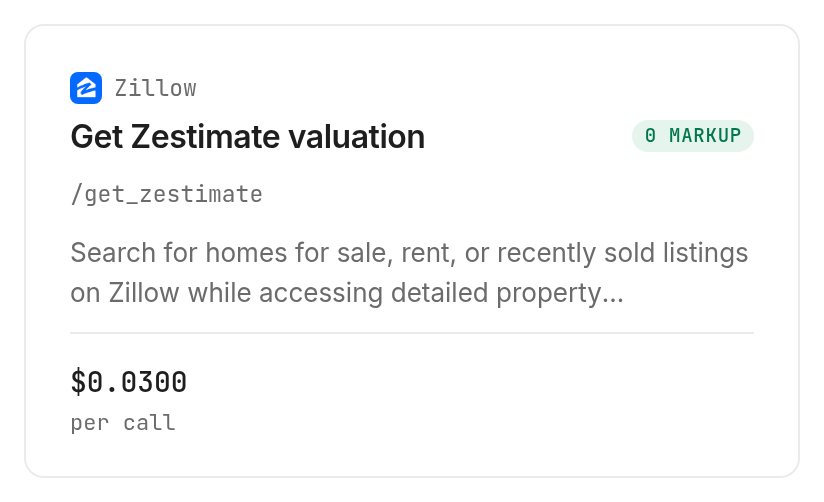
The Zillow estimate lookup, zillow/get_zestimate, takes one required zpid string. An endpoint is a callable tool operation; here, it is the operation for one identified property rather than an address search.
Prepare your agent or CLI
For agents: get a key at app.monid.ai, then give your agent this instruction and supply the key through your normal credential setup:
set up https://monid.ai/SKILL.md
For humans: install the CLI and save your key under a label:
npm install -g @monid-ai/cli
monid keys add -k <your-api-key> -l main
Keep credentials out of the comparison sheet and any exported report. The sheet needs property references and research notes, not access keys.
Inspect the lookup before paying
Discovery and inspection are free. Use them to read the accepted input and current billing shape before your agent submits any property:
monid discover -q "zestimate" -l 5 -j --include-unavailable
monid inspect -p zillow -e /get_zestimate -j
The lookup was listed as stable on October 25, 2026. Its inspected input accepts zpid as a numeric string, requires that parameter, and rejects additional query properties in the declared schema.
For the broader job of finding listings and working with property identifiers, read the Zillow property-data guide. This guide stays focused on interpreting and preserving an estimate after the property is identified.
Know what the documentation actually declares
The inspected description promises an automated home-value estimate and a rent Zestimate. The inspection response does not declare output field names, value types, currency fields, timestamps or a history array, so the table below describes the documentation rather than inventing JSON.
| Documentation item | What the lookup declares |
|---|---|
| Input field | Required query parameter zpid, type string |
| Request method | GET |
| Described returned information | Home-value estimate and rent Zestimate |
| Declared response fields | No response-field schema supplied in inspect |
| Billing shape | Per call |
This is an inspect-only guide: no paid property lookup or real-data result table is included. Treat the description as the capability statement and map actual response keys only after retrieving a response.
Retrieve one confirmed property when ready
The schema-derived command below uses the example numeric ID from inspection. Replace it with your confirmed property's ID, and approve the paid call before executing it:
monid run -p zillow -e /get_zestimate -w --query '{"zpid":"2080998636"}'
The input belongs in --query, because the operation declares query parameters. It does not declare an address parameter, batch array or result-limit setting.
Start with one property. Save the original response, examine its actual structure, then map the values it contains into your sheet. Leave unsupported columns blank and label any date you add yourself as a retrieval date.
Which lookup fits each property task?
Use the narrow estimate lookup for an already identified home, and choose a separate workflow when your task starts with a market or a list of addresses. Current options are grouped on the real estate tools page.
| Use case | Best endpoint | Why? |
|---|---|---|
| Retrieve an identified home's sale-value estimate | zillow/get_zestimate, inspect only | Description covers the estimate by zpid; per call, $0.03, Verified 2026-10-25 |
| Retrieve its rent estimate | The same Zillow lookup, inspect only | Description includes rent Zestimate; per call, $0.03, Verified 2026-10-25 |
The price is for a call, rather than an inspected list of returned records. Keep the current monid.ai/tools beside your budget, and do not assume missing information or unsuccessful requests are free.
For a listing-data pipeline, the guide to property data without MLS access explains the distinction between portal information and an MLS route. Retrieving an estimate does not turn it into a listing feed or provide access rights for another source.
When should you use something else?
Use Zillow directly for an occasional visual check, and use a local real estate professional or appraiser when the task requires a supported pricing judgment. An automated lookup is useful for retrieving a named estimate, not resolving every question about value.
Use the property page for a single check
If you only need to look at one home's displayed information, opening Zillow is a direct route. Adding a key, a command and an export process creates work when there is no repeated task to automate.
Use professional review for the decision
When condition, comparable properties or transaction requirements drive your decision, take the underlying evidence to the appropriate professional. An estimate lookup does not visit the home or explain every difference between two figures.
This is the Monid blog, and we sell access to the lookup described here. That makes the boundary worth stating plainly: retrieving an automated estimate is only part of building a useful home-value comparison.
Conclusion
You now have a repeatable method for separating estimates, asking prices, collection dates and review actions. Use Monid when retrieving an identified home's estimate belongs inside a recurring agent workflow, and use the property page when a single manual check is enough. The one-minute setup target assumes an installed CLI and a ready key; it excludes building your sheet and is not a measured duration. Hours saved depend on how often you would otherwise recopy values and reconstruct their sources. Keep the evidence attached to each figure so your next comparison starts with a traceable record.
FAQ
What does a Zillow Zestimate tell me?
It gives an automated home-value estimate to use as a starting point. Keep it separate from an asking price and your own pricing judgment.
Can a Zillow estimate home value lookup replace an appraisal?
No. Retrieving an automated estimate does not produce an appraisal or inspect the property's condition.
How do I move a Zestimate from Zillow into a sheet?
The estimate is the subject in both cases, but the workflow differs. A page serves a visual check; a sheet preserves property references, observations and review actions for later comparison.
How should I compare Zillow estimates across homes?
Confirm the properties first, then compare matching kinds of values with their collection dates. Keep unresolved matches and missing values visible rather than filling them with guesses.
Does the Zillow rent Zestimate belong in my sale-value column?
No. Keep a monthly rental estimate in its own column and preserve the source's label and units when mapping the response.
Is the lookup free, and are failed requests charged?
Discovery and inspection are free; execution is paid. The inspected billing shape is per call, and failure or missing-result charges are not specified in the input schema. See the current lookup listing before budgeting retries.
Can I check several homes without writing code?
An agent can work through property IDs using the same lookup. The declared input takes one string, not an array; instruct the agent to get approval for the number of calls and preserve each property's response separately.
Can I schedule repeated checks?
Use your own scheduler to invoke an approved workflow. Scheduling is separate from this lookup, and your stored observations should remain distinct from any historical data supplied by a source.
What rules apply to storing property estimates?
Rules differ by location and intended use. Check the applicable requirements and source terms for your own workflow.
Published October 2026.