How to Give Your AI Agent an Email Inbox with AgentMail
Mint a real email address your agent owns, send from it, read what comes back and reply in the thread, with the prices and the fields from a live run.
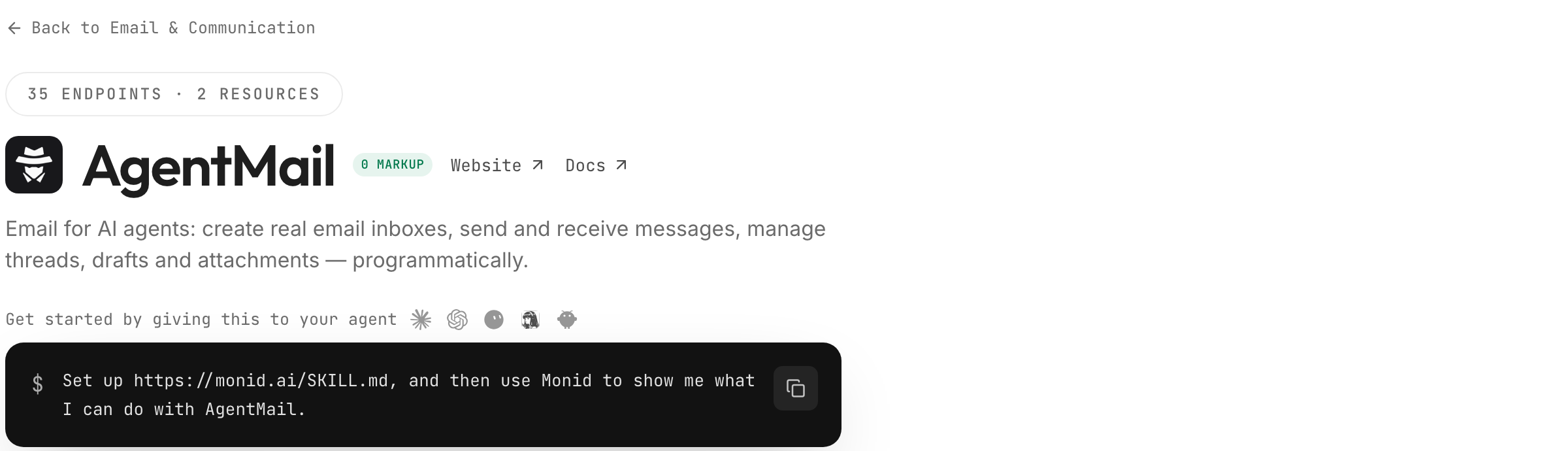
Give your agent an email address it owns, then send, read and reply from it. Paste this into your agent:
Set up https://monid.ai/SKILL.md, and then use Monid to create an email inbox for yourself with agentmail /create-inboxes, send a short test message from it to my address with /send-messages, wait ten seconds, list the newest messages in your inbox with /list-messages, and show me the from, subject, labels and authentication_results of each one. Tell me the inbox address and what each call cost.
One prompt gives the agent a working mailbox. 1 min setup · 5-10 hrs saved.
If you build agents, sooner or later one of them needs an email address. It has to sign up for a service and receive the confirmation code, it has to get the receipt for a purchase it made, or it has to answer a person who wrote back. The usual fix is to hand it a human's Gmail, and that is where the trouble starts: one mailbox per agent at a seat price, an OAuth consent screen for every account, and a sign-up form that rejects the agent as a bot at the first step.
The other shortcuts do not reach the inbox either. A transactional email API sends cleanly and receives nothing, so the agent never sees the reply. A shared team mailbox mixes the agent's mail with everyone else's, and an IMAP poller on a personal account breaks at the next password change.
This guide ends with an address the agent owns, a message sent from it, the inbox listing that proves the message arrived with SPF, DKIM and DMARC passing, the message read back as fields, and a reply in the same thread. It runs through Monid, the OpenRouter for agent tools: one key, one balance, every tool priced per call. AgentMail, whose inbox API does the work, is a content partner on this guide; the measurements are ours. Here is what the run returned on November 8, 2026.
| Measurement | Value |
|---|---|
| Inboxes we own, listed in one call | 7, all ACTIVE |
| Send one message, inbox to inbox | 1.8 s, $0.001 |
| Message visible in the recipient's list | 10 s after the send, labels received, unread |
| Authentication on arrival | SPF pass, DKIM pass, DMARC pass |
| Read the full message | 1.2 s, $0 |
| Reply in the same thread | 1.8 s, $0.001 |
| Spend for the whole run, Verified 2026-11-08 | $0.002 |
Why an agent needs its own address before it signs up for anything
An agent without an address cannot complete the simplest loop on the web: sign up, receive the code, confirm. Every service sends something back by email, and if it lands in a human's inbox the human becomes part of the agent's runtime: the agent waits, the person forwards, a one-minute task takes a day.
An address the agent owns closes the loop. The confirmation code arrives in a mailbox the agent can list and read, the receipt is a message with a thread id, and a reply from a person shows up as a row with unread on it. Its correspondence also stops mixing with yours, which matters when something has to be audited later. AgentMail's own guide on an email address for your AI agent's signups walks the sign-up case in detail.
The 4 ways to give an agent an email address
Four routes, and two of them give the agent a mailbox it actually owns.
A human mailbox through the Gmail API
Create a Google account for the agent, complete the OAuth consent flow, and let the agent read and send through the Gmail API. This works when the agent acts on behalf of one named person who already has the mailbox. For a fleet of agents it means one account, one consent screen and one seat per agent, and the sign-up forms the agent meets will treat a fresh Gmail the way they treat any bot.
A transactional email API
Send-only services give the agent a from address and good deliverability for outbound mail. They do not give it an inbox, so a reply, a receipt or a confirmation code has nowhere to land. Fine for notifications the agent emits; useless for anything the agent has to read. Whichever route sends, the email validation API guide covers checking the addresses an agent writes to before it writes.
AgentMail, direct
AgentMail sells inboxes built for agents: an address the agent owns on agentmail.to or on your own domain, with send, receive, threads, drafts, labels and webhooks behind one API key. Its quickstart even lets the agent sign itself up: it registers with a human's email, receives an API key, and verifies with a one-time code. On November 8, 2026 its pricing page listed a free plan with 3 inboxes, 1 custom domain and 3,000 emails a month and no card, with paid plans above it. This is the right route when the agent's mail is its main job and you want one vendor account with its own console.
Monid
The same AgentMail endpoints sit in the email tools on monid.ai/tools under the one key and one balance your agent already uses for search, scraping and enrichment, priced per call. The agent creates the inbox, sends, lists, reads and replies without a second signup, and the inbox is a resource it can release when the job is over. The AgentMail × Monid launch page shows twenty-one of these inboxes minted and mailed in one call.
| Route | How it bills | Fits | Limit to account for |
|---|---|---|---|
| Monid, AgentMail inboxes | $1 per inbox per month, $0.001 per recipient sent, reading free (Verified 2026-11-08) | An agent that already runs on Monid and needs one mailbox or a fleet | Inboxes on agentmail.to unless you register a domain |
| Gmail API | A Google account and a seat per agent | One agent acting for one named person | OAuth consent and bot checks per account |
| Transactional email API | Per email sent | Agents that only emit notifications | No inbox, nothing to read |
| AgentMail direct | Free tier, then plans and per-inbox add-ons | Email as the agent's main job, one vendor account | A separate account and key |
How to give your agent an inbox with Monid
Four steps: install, create the inbox, send, then read and reply. Monid supplies one key and one balance; an endpoint is the single operation you pick, here one of AgentMail's inbox calls.
Step 1. Install and add your key
For agents. Get an API key at app.monid.ai, then give your agent the key and this setup line. The agent quickstart explains the workflow.
set up https://monid.ai/SKILL.md
For humans. Install the CLI and save your key locally. The CLI quickstart covers the rest.
npm install -g @monid-ai/cli
monid keys add -k <your-api-key> -l main
Step 2. Create the inbox
Pick a username or let AgentMail generate one; names on agentmail.to are globally unique, and a taken one fails with already_exists plus alternatives. The address comes back as output.email and is the inboxId every other call takes.
monid run -p agentmail -e /create-inboxes \
  -i '{"username":"my-agent-ops","displayName":"Ops Agent"}' \
  -w -j
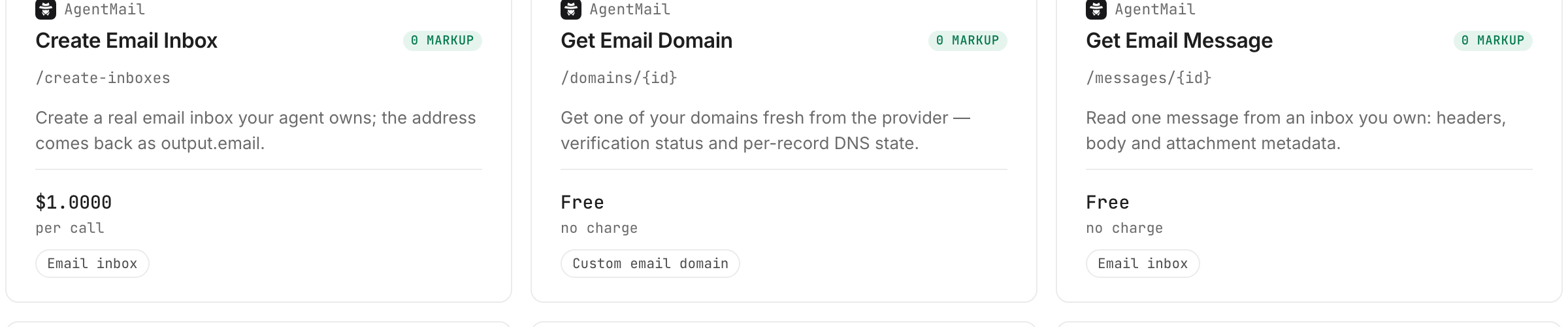
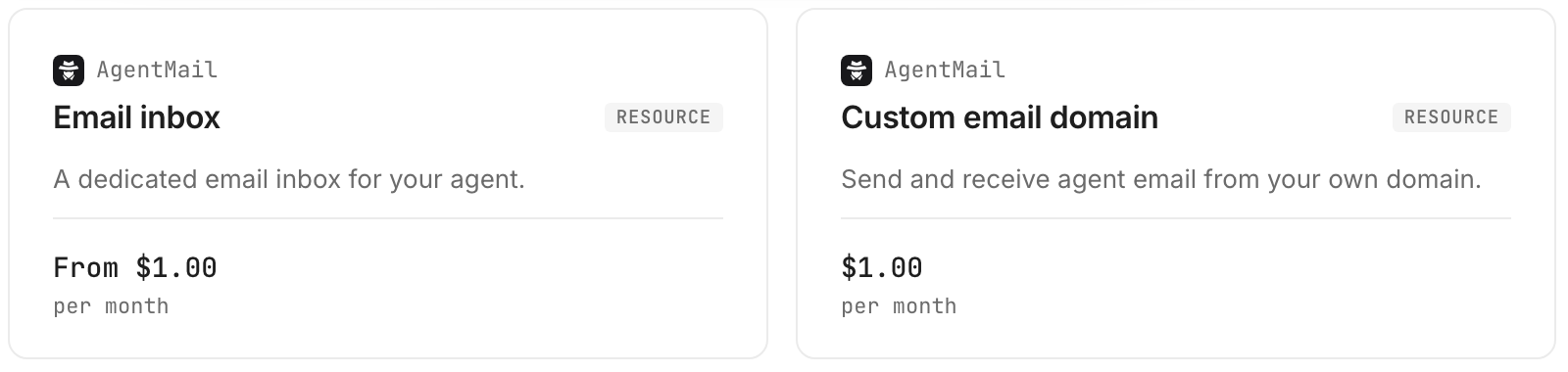
On September 23, 2026 this call created 23 inboxes for us at 1.1 to 3.0 seconds each. The inbox card on the AgentMail page lists $1.00 per call, Verified 2026-11-08; the inbox is a resource that renews at $1 a month until you release it, which is the billing rule to plan around. We did not create a new inbox for this guide; /list-inboxes returned the 7 we already own in 0.8 seconds, free, and two of them ran the steps below.
Step 3. Send a message from it
Recipients across to, cc and bcc are each one billed unit, so a fan-out to twenty people is one call and twenty units.
monid run -p agentmail -e /send-messages \
  -i '{"inboxId":"my-agent-ops@agentmail.to","to":"you@example.com","subject":"Hello from the agent","text":"Sent from an inbox the agent owns."}' \
  -w -j
On November 8, 2026 a send from one of our inboxes to another completed in 1.8 seconds and returned a message_id and a thread_id; the card lists $0.001 per recipient, Verified 2026-11-08. Ten seconds later the recipient inbox listed it with labels: ["received", "unread"] and authentication_results of SPF pass, DKIM pass, DMARC pass.
Step 4. Read what came back and reply
List the inbox, read the message, answer in the thread. All three take the inbox address; the reply also takes the message_id from the list.
monid run -p agentmail -e /list-messages -i '{"inboxId":"my-agent-ops@agentmail.to","limit":5}' -w -j
monid run -p agentmail -e "/messages/{id}" -i '{"inboxId":"my-agent-ops@agentmail.to","messageId":"<message-id>"}' -w -j
monid run -p agentmail -e "/reply-messages/{id}" -i '{"inboxId":"my-agent-ops@agentmail.to","messageId":"<message-id>","text":"Got it, handling this now."}' -w -j
The list and the read were free and took 1.1 and 1.2 seconds; the reply took 1.8 seconds and billed $0.001, Verified 2026-11-08. Back on the sending inbox, the list then showed two rows under one thread: the original with labels: ["sent"] and the reply with ["received", "unread"].
How do you read the results?
Read the inbox as rows with three fields that matter more than the body: labels, thread_id and authentication_results. Everything below comes from the November 8 run, with the September 23 fleet run where noted.
Labels tell the agent what to do next
Every message row carries labels. A message the agent sent shows sent; a message that arrived shows received and, until the agent reads it, unread. Filtering /list-messages on ["unread"] is the whole polling loop: anything in the result is new work. Our reply arrived on the sender's side as received, unread ten seconds after it was sent.
Thread ids are per inbox
The send returned thread 0ef3a4bf… on the sender's side; the same conversation listed as thread 15f9352e… in the recipient's inbox, and the reply came back under 0ef3a4bf… on the sender. Each inbox keeps its own thread id, so key the agent's memory by inbox plus thread.
Authentication results come with the message
Each received row carries authentication_results with spf, dkim and dmarc and the domains they were evaluated for. Ours read pass, pass, pass with spf_domain: mail.agentmail.to and dmarc_domain: agentmail.to, on a message that was 4,129 bytes. An agent that triages inbound mail can refuse anything that fails all three before it reads the body. The failure causes on the sending side are the subject of AgentMail's post on why an agent's mail lands in spam, and the SPF, DKIM and DMARC checks post automates the same three checks for a domain you send from.
What the full read adds
/messages/{id} returns the list row plus text, extracted_text and the headers block. extracted_text is the body with quoting stripped, the field to hand a model; text keeps the original.
How much does it cost?
Creating an inbox is $1.00 per call, Verified 2026-11-08 against the email tools page, and the inbox then renews at $1 a month as a resource until you release it. Sending is $0.001 per recipient, Verified 2026-11-08, and listing, reading, fetching an inbox and composing a draft are $0. Our four-call run cost $0.002.
Two billing rules matter more than the figures. First, the inbox is the recurring item, not the mail: twenty-one inboxes we kept for a film in September cost $21 a month until we released them on October 3, and monid resources release -r <resourceId> -y stops the charge the same day. Second, sending bills per recipient and not per call, so one call to 21 addresses billed 21 units, $0.021, in 1.7 seconds on September 23; reading the replies cost nothing. Those are billing records from 2026-09-23 at the per-call prices Verified 2026-11-08. Discovery and inspection are free, so an agent can look up these cards on every task without spending anything.
How do you do this in your own code?
Create the inbox once, store its address, and run the loop: list unread, read, act, reply. Through the CLI that is the four commands above; through the Monid MCP server at https://mcp.monid.ai/v1 the same four endpoints are tool calls.
monid run -p agentmail -e /list-messages -i '{"inboxId":"<address>","labels":["unread"],"limit":20}' -j
monid runs get -r <run-id> -o unread.json
Three habits keep the mailbox useful. Store the address and its resourceId together: the message calls take the address, release takes the resource id. Key memory by inbox and thread. Release inboxes a job no longer needs; the renewal is the only cost that accrues while the agent is idle.
Which endpoint for which job?
| Use case | Best endpoint | Why? |
|---|---|---|
| Give the agent an address | agentmail /create-inboxes | Tested 2026-09-23, 23 inboxes at 1.1 to 3.0 s each; $1.00 per call, Verified 2026-11-08, renews $1 a month |
| Send from the agent's address | agentmail /send-messages | Tested 2026-11-08, 1.8 s, ids returned; $0.001 per recipient, Verified 2026-11-08 |
| Poll for new mail | agentmail /list-messages | Tested 2026-11-08, 1.1 s, labels and authentication results per row; $0.00 per call, Verified 2026-11-08 |
| Read one message | agentmail /messages/{id} | Tested 2026-11-08, 1.2 s, adds text, extracted_text and headers; $0.00 per call, Verified 2026-11-08 |
| Answer in the thread | agentmail /reply-messages/{id} | Tested 2026-11-08, 1.8 s, threading handled by the provider; $0.001 per recipient, Verified 2026-11-08 |
| Your own domain on the agent's address | agentmail /create-domains | Inspect-only; returns the DNS records to add, inboxes on it wait for verification; $1.00 per call, Verified 2026-11-08, renews $1 a month |
When should you use AgentMail directly?
Use AgentMail directly if the agent's mail is its main job and you want one vendor account: the free tier of 3 inboxes and 3,000 emails a month on November 8, 2026, custom domains, IMAP, webhooks and a console all live there, and the agent can sign itself up from the quickstart. You are reading the Monid blog, and Monid resells access to the same endpoints; this guide shows what they returned, not that one route is cheaper than the other.
Use Monid when the inbox is one tool among the many the agent calls and you would rather not hold a separate key and balance for it: the agent that just enriched a lead and searched the web sends the email from the same key.
Two limits are ours to state. We did not create an inbox today, so the creation timing is from September and the renewal rule is from the resource record of that run; the per-call price was verified today. And every inbox in our runs lives on agentmail.to; a custom domain is one more resource, with DNS records to add and a verification step before the first inbox on it is accepted.
Conclusion
You now have a mailbox the agent owns and a four-call loop that sends from it, lists what arrived, reads the message with its authentication results and replies in the thread, all from the key and balance the agent already uses. Run the unread filter on a schedule through Monid, key the agent's memory by inbox and thread, and release the inboxes a job no longer needs. The 5 to 10 hours saved is our estimate for wiring Gmail OAuth plus a receive webhook for one agent and keeping it alive; the setup line is a one-minute target from key to first call. What you keep is an agent that can finish a sign-up, read a receipt and answer a person without you in the loop.
FAQ
What is AgentMail?
An email inbox API built for AI agents: an address the agent owns, with send, receive, threads, drafts, labels and webhooks behind one key, available on Monid under the same key as every other tool.
Do I need to write code?
No. The pitch prompt at the top does the whole loop from your agent; the CLI commands are there for developers who want the raw JSON.
How much does an agent inbox cost?
$1 per call to create, Verified 2026-11-08, and the inbox renews at $1 a month until you release it. Sending is $0.001 per recipient; listing and reading are free.
Can the agent receive email, not just send it?
Yes. Our test message arrived in the recipient inbox ten seconds after the send, listed with received and unread labels and SPF, DKIM and DMARC results, and the agent read it with a free call.
Can an agent use its inbox to sign up for services?
That is the main use. The confirmation code arrives as a message the agent can list and read; AgentMail's own quickstart lets the agent register itself and verify with a one-time code.
How do I stop paying for an inbox?
Release it: monid resources release -r <resourceId> -y. The renewal stops that day, and the address is no longer yours.
Published November 2026.


