How to Use the Kalshi API in a Research Agent
Build a Kalshi watchlist with market identifiers, activity fields, and recent trades your agent can save and revisit.
Give your agent a Kalshi watchlist with recent trading activity. Paste this into your agent:
Set up https://monid.ai/SKILL.md, and then use Monid to get three active Kalshi markets. Save their tickers, status, category and volume. For CONTROLH-2026-R, fetch three recent trades and show timestamps, sides and prices. Keep trade prices separate from current quotes.
Planning allowance: 1 min setup · 0 hrs saved assumed.
Developers searching for the Kalshi API often start with a browser tab and a short watchlist. Once you track three markets, copied titles are insufficient: your agent needs the identifier for each market and a repeatable way to retrieve its activity.
A market list alone does not finish that job. A title describes the question, while a trade record describes an observed transaction; treating them as interchangeable leaves a research summary without supporting evidence.
We'll build a market table and attach recent trades through Monid, the OpenRouter for agent tools: one key, one balance, and tools billed per call. The route is discover the reader, save market identifiers, then retrieve activity for one identifier.
Here is the finished market preview from our November 1, 2026 sample. These are public market identifiers and aggregate fields, with no personal data.
| market_ticker | status | category | total_volume |
|---|---|---|---|
| CONTROLH-2026-R | active | Politics | 63,221,773 |
| KXMVECROSSCATEGORY0-S2026L4CIDVO4HV6ZZPZP-5NG7Y5MNG | active | UNKNOWN | 46,758,300 |
| SENATETX-26-R | active | Politics | 43,473,322 |
How to use the Kalshi API with Monid
Use the Surf market reader to obtain identifiers, then its trade reader for transaction records. An endpoint is a callable tool with defined inputs and a response; these two tools serve different parts of the same research task.
Monid supplies tool access. Your script decides what to retain, which markets belong in the watchlist, and when to refresh them. These calls read data; they do not place orders or maintain an account portfolio.
For agents
Create a key at app.monid.ai, hand it to your agent, and paste:
set up https://monid.ai/SKILL.md
The agent quickstart describes setup.
For humans
Install the CLI and save your key:
npm install -g @monid-ai/cli
monid keys add -k <your-api-key> -l main
The CLI quickstart covers configuration. Keep credentials outside your watchlist file so sharing a research table never shares access to your balance.
Step 1. Discover and inspect the market reader
Read the schema before choosing filters; this sample uses query parameters rather than a request body.
monid discover -q "kalshi markets" -l 5 --include-unavailable
monid inspect -p surf -e /prediction-market/kalshi/markets
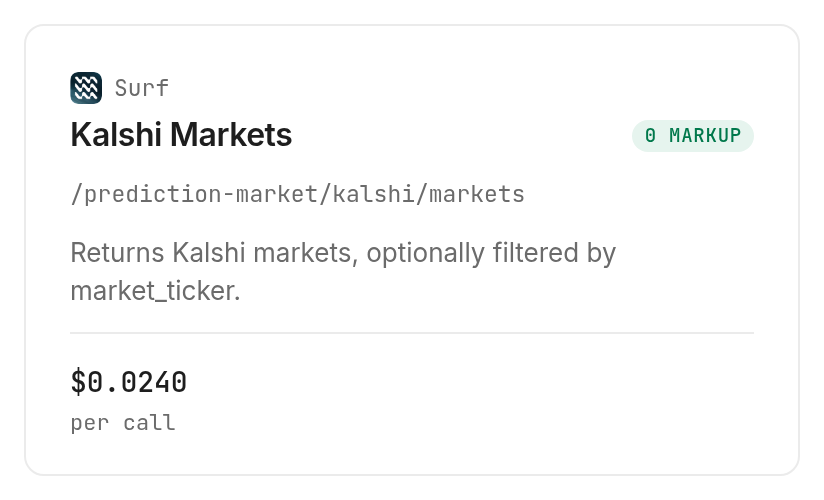
The market card lists $0.024 per call, Verified 2026-11-01. Start with a small limit when testing; three rows make the response easy to examine.
The 3 ways to keep a Kalshi watchlist
Choose the route according to where the data will be consumed. A saved table suits a fixed research question; a repeatable call suits an agent that revisits markets.
| Route | Billing shape | Best fit | Limitation |
|---|---|---|---|
| Monid tools in your agent | Per call | Repeatable research | You build storage and refresh logic |
| Saved JSON or spreadsheet | No new data call when reading your file | Rechecking the same sample | Values remain those of the saved sample |
| Your existing integration | Your existing arrangement | An established application | You maintain its field mapping |
Keep a saved sample for a fixed question
Save the raw response when your task is to review the same three records with several prompts. Re-reading that file preserves evidence behind the first summary and avoids requesting data again just because you changed the wording of a question.
Keep tool calls for recurring questions
Use Monid when the agent needs to revisit market status and retrieve activity during later tasks. Decide the refresh condition in your application, and distinguish a new observation from an old file every time you generate a summary.
Keep an existing client when it already fits
Retain an integration that supplies the required fields and meets your application requirements. Add another reader only when it fills a specific gap; count the additional storage, mapping and monitoring work before introducing it.
Our Polymarket and Kalshi comparison guide explains the cross-venue research angle. This guide stays with one venue and the identifier handoff between market and trade records.
How to connect markets to recent trades
Fetch a short market page, copy a returned ticker exactly, and pass it to the Surf trade reader. The parameter changes from market_ticker in market filtering to ticker in the trade request.
Step 2. Fetch three markets
Use limit: 3 for a small page and offset: 0 to start at the beginning; this is the successful request from our test.
monid run -p surf -e /prediction-market/kalshi/markets \
  --query '{"limit":3,"offset":0}' -w -j
The response contained three rows under output.data. All had status: "active", two had category Politics, and one had category UNKNOWN; keep that value visible rather than assigning a category from its title.
Step 3. Fetch activity for a returned ticker
Inspect the trade tool, then request three records for CONTROLH-2026-R, sorting by timestamp in descending order.
monid inspect -p surf -e /prediction-market/kalshi/trades
monid run -p surf -e /prediction-market/kalshi/trades \
  --query '{"ticker":"CONTROLH-2026-R","limit":3,"sort_by":"timestamp","order":"desc"}' -w -j
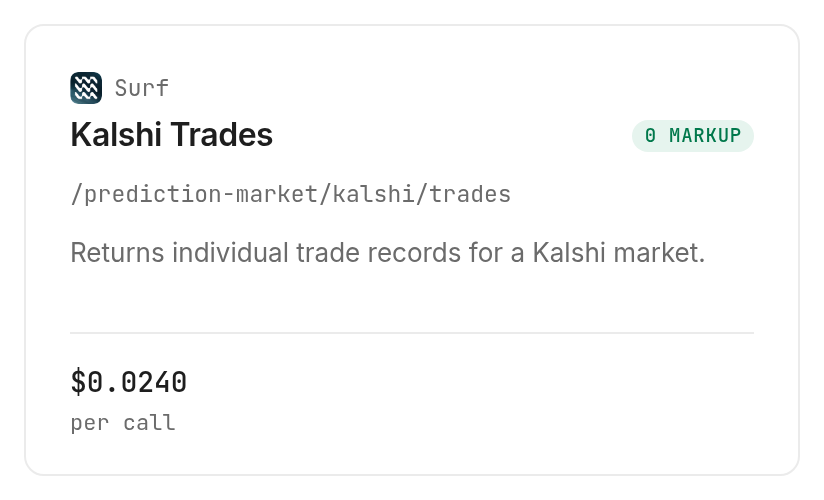
The trade card lists $0.024 per call, Verified 2026-11-01. Explicit sorting documents your intended order, while the small limit keeps the response suited to a first inspection.
Step 4. Read the joined evidence
Join the trade response's market_ticker to the market response's market_ticker; do not join on title text. These are the three real trade rows, with their common market ticker stated above and distinct trade identifiers omitted for readability.
| timestamp | taker_side | yes_price | no_price | notional_volume_usd |
|---|---|---|---|---|
| 1793544336 | yes | 0.068 | 0.932 | 87 |
| 1793544336 | yes | 0.068 | 0.932 | 250 |
| 1793544336 | yes | 0.068 | 0.932 | 1 |
The timestamps match, but these are separate records with distinct trade_id values. Timestamp alone is therefore an unsuitable deduplication key for this sample. Preserve the identifiers in your stored file even when the display table leaves them out.
How do you read and save the results?
Store market attributes separately from individual trades, and describe each price according to the record it came from. This sample supports a watchlist with activity evidence, not a claim about the price available for your next transaction.
Preserve meaning when selecting columns
Keep total_volume, notional_volume_usd and open_interest under their returned names. They are separate fields; changing all three headings to “volume” removes information your reader needs to interpret the table.
The market response contained no price field in this sample. The trade response supplied yes_price and no_price; those values belong to returned trades, so label them as observed trade prices rather than current quotes.
Save the original response before exporting
Retrieve the successful sample with Monid and save it for later inspection:
monid runs get -r 01M6BXV3KYXGY50V9GQXFAGEXH -o kalshi-markets.json
monid runs get -r 01M6BXVN708E56F7W2HZBYN10B -o kalshi-trades.json
Those IDs refer to this article's test runs; use your own returned run IDs in your workflow. Keep raw JSON alongside the exported table so a later summary can trace each selected value back to a source record.
Page deliberately and label the observation
The market schema allows limit from 1 to 100 and nonnegative offset; the trade schema allows limit from 1 to 500. These are documented input bounds, while our measured output is three rows from each tool.
Set a page budget before looping. Retain collection time in your own storage, preserve returned timestamps, and record an empty page rather than silently reusing the last successful page as new evidence.
Our practical conclusion: you can identify three active markets and inspect recent activity for one, but the market list itself is insufficient for a price summary. For matching events across venues, follow the guide to matched prediction-market data instead of joining titles yourself.
Keep the agent's conclusion proportional to the sample
A three-trade response answers a narrow question: what activity did this request return for this identifier? It does not describe every trade in the market, establish a trend, or prove that the displayed activity represents the whole day.
Instruct the agent to state the sample size before interpreting it. In this sample, all three returned trades have the same side and price, but that observation alone is not a reason to label the market one-sided. A wider analysis requires a defined collection window and more evidence.
How much does a watchlist refresh cost?
Both tested Surf readers bill per call, not per row. The market reader is $0.024 and the trade reader is $0.024, Verified 2026-11-01.
Separate rows from billed units
Each successful call returned three application rows and one billed unit. The market request took 1.092 seconds from creation to completion, and the trade request took 1.334 seconds by the same measure; these are observations, not latency guarantees.
The successful requests cost 0.048 dollars in total, Verified 2026-11-01. Discovery and inspection are free; executing tools is the paid step through Monid.
Budget pages and repeated checks
A larger requested page does not change the inspected PER_CALL billing shape. It changes how much data your application processes, and another page or refresh is another request.
Budget market pages and per-ticker activity calls separately. Save responses so a second explanation of the same sample does not require another retrieval. The successful calls establish their charges; they do not establish a general refund rule for empty responses or failures.
Which endpoint should you use for each job?
Use the market reader for the watchlist and the trade reader for activity evidence. Both rows describe tools inspected and successfully called on November 1, 2026.
| Use case | Best endpoint | Why? |
|---|---|---|
| Build the identifier table | Surf /prediction-market/kalshi/markets | Three active rows returned; per call, Verified 2026-11-01, $0.024 |
| Attach recent transactions | Surf /prediction-market/kalshi/trades | Three trades returned for a saved ticker; per call, Verified 2026-11-01, $0.024 |
When should you use something else?
Use Kalshi directly through your existing integration when the task is account operations, order placement or a streaming application. These two readers provide a read-only research path and do not deliver those outcomes.
This is the Monid blog, and we sell access to these tools. The limitation matters: Monid connects your agent to readers, while you supply persistence, scheduling and rules that decide when an observation is too old for the task.
Use local JSON when analyzing the same historical sample again. Choose another source when you require a guaranteed archive or execution-quality quote; this six-row test establishes neither capability.
Conclusion
You now have a repeatable way to save Kalshi market identifiers, retrieve trades for a selected ticker, and preserve evidence behind a watchlist summary. Monid handles tool access while your application controls refreshes and storage. The opening's one-minute setup is a planning allowance for an installed, authenticated environment; zero hours saved is assumed because we did not measure an alternative build. Keep market attributes, observed trades and current quotes distinct, and your next research summary will say exactly what its data supports.
FAQ
Is the Kalshi API free through Monid?
Discovery and inspection are free; the tested data calls are paid. The Surf readers each list $0.024 per call, Verified 2026-11-01. This guide describes access through Monid, not Kalshi's own plans.
What key do I need for this Kalshi API workflow?
You need a Monid API key for these commands. Save it with the CLI or configure it for your agent, and keep it outside exported research files.
Do I need Python to get Kalshi data?
No, the CLI and agent prompt handle both retrieval steps. Your application still needs to store results and apply your chosen watchlist rules.
How many Kalshi markets can I request at once?
The inspected market schema allows up to 100 rows per page; the trade schema allows up to 500. Our test requested and received three from each. An allowed limit does not promise that every request returns that many matches.
Does a failed request cost money?
This test does not establish a universal failure billing rule. Inspect each run's cost and billed units before retrying, and give automated retries a fixed budget.
Can I schedule the Kalshi watchlist to refresh?
Schedule the CLI calls in your own job runner. Save each observation, cap requests per refresh, and distinguish an unsuccessful refresh from a new successful sample.
Are these Kalshi prices live quotes?
The displayed prices come from returned trade records, not executable quotes. The market-reader documentation describes a refresh interval of about 30 minutes, distinct from how long a request takes to complete.
Can I use Kalshi data in any country?
Rules differ by location and intended use, so check the requirements that apply to you. Reading data and trading are separate activities.
Published November 2026.


