How to Compare Polymarket vs Kalshi Markets
Build a matched-market comparison sheet, separate missing quotes from real differences, and choose what to investigate next.
Compare the same event on both platforms before picking a market. Paste this into your agent:
Set up https://monid.ai/SKILL.md, and then use Monid to compare Polymarket vs Kalshi. Request three exact, active matches with confidence at least 90. Build a sheet showing categories, identifiers, activity and which price fields exist. Leave missing quotes blank. Do not label a pair a trading opportunity.
Budget 1 min setup as a planning estimate · no measured hrs saved.
Research analysts and newsletter editors comparing Polymarket vs Kalshi face a basic two-page problem: two similar headlines do not prove that the contracts resolve the same way. Copying a number from each page produces a comparison before it establishes what is being compared.
A broad platform ranking also misses the immediate job. You need to identify the same outcome, preserve each market's identifier, and separate usable observations from missing information before writing a conclusion.
We'll build that review sheet through Monid, the OpenRouter for agent tools. The calls cover market matching and Kalshi market context; they do not decide account eligibility, prove contract equivalence, or execute trades. First choose a comparison route, then collect a small sample, then decide which rows deserve further review.
Here is the finished sample from October 26, 2026. The row labels replace market titles so the table contains no personal names; price columns report field presence, not trade recommendations.
| Sample row | Category | Match label | Confidence | Polymarket price present | Kalshi price present | Review decision |
|---|---|---|---|---|---|---|
| Pair 1 | politics | exact | 100 | No | Yes | Incomplete quote pair |
| Pair 2 | politics | exact | 100 | No | Yes | Incomplete quote pair |
| Pair 3 | economics | exact | 100 | Yes | No | Incomplete quote pair |
Why Polymarket vs Kalshi needs a contract check
Compare contract meaning before comparing displayed numbers. A useful decision sheet answers whether the same outcome, deadline and resolution conditions are under review; a shared topic alone does not answer those questions.
Separate the platform decision from the market decision
Choosing where to research is different from choosing a particular contract. For research, ask which source gives you the questions and context you need. For a particular comparison, ask whether both rows represent the same outcome and whether the observations are complete.
Keep those decisions in separate columns. Otherwise a missing quote in one sample becomes a sweeping judgment about an entire platform. Our three rows support a finding about this response, not a ranking of Polymarket or Kalshi.
Read the rules behind the title
Polymarket states that markets resolve according to their predefined rules, available under the market's order book. That makes the rules part of the comparison, rather than optional background. See its market-resolution explanation.
Kalshi describes market-specific rules and a summary identifying the outcome verification source. Review that source alongside the event wording when checking a candidate pair. Its market-rules guide explains where this information belongs.
Editorial rule: treat a machine match as a shortlist entry until a reader has checked those conditions. Confidence describes the returned match label; it does not replace the contract text or certify a profitable action.
The 3 ways to compare prediction markets
Use native pages for a one-off contract decision, structured data for a repeatable review sheet, and your own integration when you need control of the collection process. The right route follows the deliverable.
| Route | Billing model | Best fit | Limitation |
|---|---|---|---|
| Monid structured calls | Per successful call at the inspected price | An agent building a repeatable shortlist | Matching data does not complete a trading decision |
| Native platform pages | No data-call purchase in this workflow | Reading a few contracts in context | You record and reconcile the comparison yourself |
| Your own collection script | Your infrastructure and source arrangements | A maintained internal data system | You own matching, storage and handling missing fields |
Use platform pages for a small review
Start with the original contract pages when your question concerns one event. Read the question, outcome and resolution conditions together, then record what supports your comparison. This keeps the source context beside your decision and avoids building automation for a task you do once.
Use structured calls for repeated research
Monid gives an agent a discovery, inspection and execution workflow under one key and balance. An endpoint is one callable data operation; here the matching operation supplies candidate cross-platform pairs. You still decide which observations belong in the final report.
The matched-market data guide covers the integration angle in more detail. This article focuses on accepting, rejecting and annotating comparison rows rather than building a general market-data client.
Maintain your own script when control is the job
Write your own collection layer when your deliverable includes custom storage, a particular update policy or a matching method you control. Keep original identifiers and preserve missing values. The script still needs an editorial rule for deciding when two contracts belong together.
How to compare matched markets with Monid
Ask for a small candidate set and export its completeness before requesting more data. The successful matching sample returned three rows in 1.042 seconds from run creation to completion; this measures the request lifecycle, not the age of the market observations.
Step 1. Set up access
For agents: get a key at app.monid.ai, then paste the setup instruction and provide the key through your agent's credential flow.
set up https://monid.ai/SKILL.md
For humans: install the CLI and save your key using the documented commands; the CLI quickstart explains the workflow.
npm install -g @monid-ai/cli
monid keys add -k <your-api-key> -l main
Step 2. Define a narrow comparison
Request match_type: exact, active_only: true, min_confidence: 90 and limit: 3: these settings select a small, clearly labelled review sample. Keep the default confidence ordering so the first experiment examines the strongest returned match labels, rather than chasing a spread.
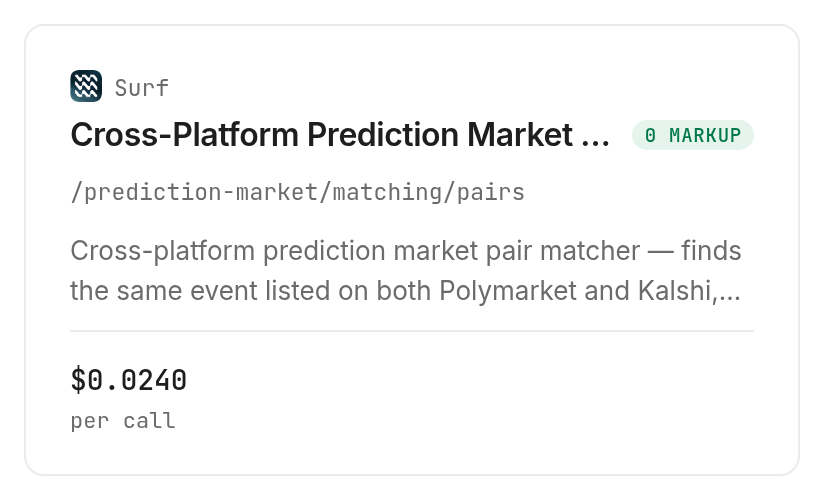
The Surf matching operation, /prediction-market/matching/pairs, costs $0.024 per call, Verified 2026-10-26. Discovery and inspection are free; execution is the paid step.
Step 3. Collect and preserve the response
Tell the agent to retain the complete response before building the sheet, including data and meta. Our response contained meta.limit: 3, meta.offset: 0 and meta.cached: false; these are collection context, not proof of quote freshness.
The rows included confidence, match_type, category, a polymarket object and a kalshi object. Preserve the returned identifiers inside those objects so later reviews do not depend on headline matching.
Step 4. Export a reviewable sheet
Ask the agent to export the preview columns as CSV, retaining identifiers in a separate working sheet. Count actual data rows and mark whether each price field exists; never fill an absent quote with zero.
The result is three candidates, three exact labels and zero complete two-price comparisons. That is a useful finished review: it tells an editor which claims the data supports and prevents an unsupported price-gap headline.
How do you read the comparison sheet?
Read match quality and quote completeness as separate dimensions. All three sample rows had confidence 100, yet none supplied both polymarket_price and kalshi_price; a strong match label did not produce a complete price comparison.
Keep missing distinct from zero
An absent field is missing information. Zero is a value. If your export converts both to the same cell, later calculations manufacture observations that the response never contained.
Use blank cells for absent prices and an explicit completeness column. The review decision in our table is editorial, derived from field presence; it is not a status returned by the provider. Retain that distinction when handing the sheet to another analyst.
Keep measurement units attached
The matched response included polymarket.volume_usd and kalshi.volume_contracts. Those names describe different units, so do not subtract the values or use them as a direct platform-size ranking.
Store each in its own labelled column. The Kalshi object also returned open_interest and status, while Polymarket returned is_active and outcome_label. A clean export preserves these source-specific meanings instead of forcing every value into a generic volume or status field.
Add Kalshi context without inventing a join
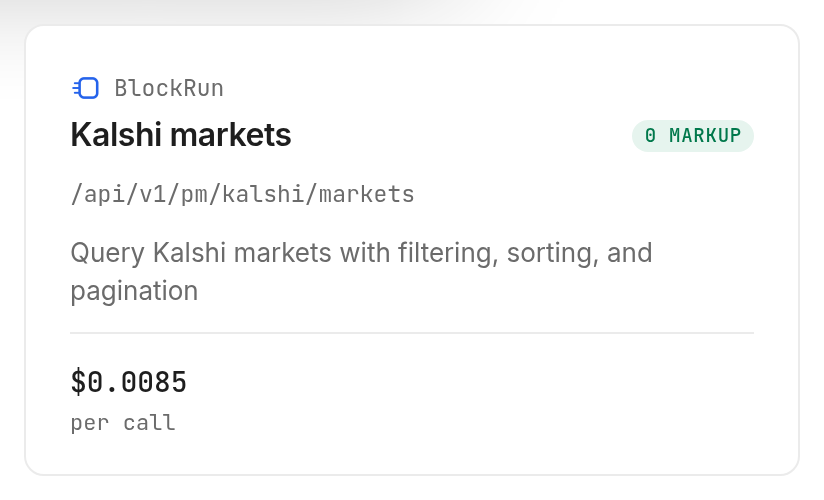
The BlockRun Kalshi markets operation, /api/v1/pm/kalshi/markets, returned a separate 20-market page in 2.673 seconds. Its response included ticker, event_ticker, status, outcomes, last_price, volume and series; the page reported has_more: true.
That page is context data, not an enrichment of our three matched rows. Join records only when the returned Kalshi ticker equals the pair's market_ticker. A shared category or similar title is insufficient.
How do you repeat the comparison in your own code?
Repeat the tested query and apply explicit completeness checks before any analysis. These commands reproduce the collection pattern; each execution buys another call at the current inspected price.
Discover and inspect before collecting
Use the free commands to confirm the operation and its parameters. For a deeper single-platform workflow, the Polymarket data walkthrough explains how to organize that research separately.
monid discover -q "polymarket vs kalshi" -l 8 -j --include-unavailable
monid inspect -p surf -e /prediction-market/matching/pairs
Repeat the small tested request
Query parameters belong in --query, rather than the body flag -i. The following request is the one that produced our three comparison rows.
monid run -p surf -e /prediction-market/matching/pairs \
  --query '{"match_type":"exact","active_only":true,"min_confidence":90,"limit":3}' -w -j
The separate context request used the BlockRun markets operation with this input. It returned 20 records despite the nested limit of one, so do not use this input as a working one-record limit.
monid run -p blockrun.ai -e /api/v1/pm/kalshi/markets \
  --query '{"query":{"limit":1}}' -w -j
Keep request parameters, run identifiers and observation dates with each saved response. For repeated reporting, compare the same identifiers over time and preserve both the original data and the derived review decisions. A later complete response does not retroactively fill an earlier blank.
When should you use something else?
Use Polymarket and Kalshi directly when the task is reading full contract rules, reviewing your account context or placing orders. This is the Monid blog, and our commercial interest is in tool calls; the native platforms are the better destination for those decisions.
Choose the original contract for resolution questions
Our matching response did not contain complete rule text for both sides. The native contract pages therefore win when the question is what qualifies as Yes, which source determines the outcome, or whether two descriptions hide a meaningful difference.
Choose execution infrastructure for trading
These tested calls retrieve data; they do not place orders. A shortlist with identifiers and incomplete prices is research material, not an execution system. If your requirement is synchronized tradable quotes and order handling, this workflow does not deliver it.
Which data source should you use for each job?
Choose the smallest operation that answers the next research question. Monid routes the calls; Surf and BlockRun supply the data operations, and the prediction-market tools page is the place to inspect alternatives.
| Use case | Best endpoint | Why? |
|---|---|---|
| Find candidate pairs | Surf /prediction-market/matching/pairs | Returned three exact active matches; per call, Verified 2026-10-26: $0.024 |
| Read a separate Kalshi market page | BlockRun /api/v1/pm/kalshi/markets | Returned market context and pagination; per call, Verified 2026-10-26: $0.0085 |
The two successful requests each billed one call, regardless of their different row counts. Those observations establish per-call billing for these samples; they do not establish a universal refund rule for empty or failed requests. Inspect the current operation before scheduling repeat collection.
Conclusion
You now have a repeatable comparison sheet that separates candidate matches, activity and missing prices. Our sample produced three exact matches but no complete quote pair, so the defensible next step is contract review and further data collection, not a platform winner. The pitch's one-minute setup budget is a planning estimate, and this test measured no hours saved. Choose native pages for a few contract decisions and structured calls for repeated research, so your report states what the evidence actually supports.
FAQ
Is the comparison free?
Discovery and inspection are free; data calls use catalog prices.
Do I need code?
No. Your agent can export the comparison sheet.
How many pairs can I request?
The schema accepts 1 to 100; we tested three.
Does confidence 100 prove equivalence?
No. Read both contracts' original resolution rules.
Does a missing price mean zero?
No. Leave absent quotes blank in your sheet.
Is using prediction markets legal?
Rules vary by location; check your requirements.
Published October 2026.


