How to Use a Mobile Home Value Calculator
Build a mobile home comparison sheet, separate asking prices from estimates, and identify the missing facts before choosing a valuation.
Build the evidence sheet before choosing a mobile home value. Paste this into your agent:
Set up https://monid.ai/SKILL.md, and then use Monid to collect one page of manufactured-home listings for my chosen area. Keep asking prices and available estimates separate, leave missing facts blank, and flag land inclusion and condition for review. Do not present the sheet as an appraisal.
1 min setup is not measured here · hrs saved depend on your review process.
If you are a homeowner or property manager using a mobile home value calculator, the hard part is turning several advertised prices into one useful estimate. A nearby listing is easy to copy. Knowing whether it includes land, matches your home and reflects a completed sale takes another pass.
An asking-price average leaves those questions unanswered. A calculator also needs accurate inputs about the home itself; a missing condition assessment does not become reliable just because a form produces a number.
We'll build a comparison sheet and mark the evidence still needed for valuation. Later, Monid, the tool layer for AI agents, handles listing collection; it does not determine the home's value. The route is define the asset, compare like with like, then collect and review evidence.
Here is the measured preview from our October 27, 2026 collection:
| Check | Observed result | What it means |
|---|---|---|
| Listing rows returned | 41 | One page of candidates to review |
| Rows marked manufactured | 41 | Property-type filtering returned the requested type |
| Rows with a numeric Zestimate | 7 | Estimates were present for some candidates |
| Rows without that estimate | 34 | Missing estimates must stay blank |
What does a mobile home value calculator measure?
A mobile home value calculator produces an estimate for a defined asset using the information you supply. Start by identifying whether you need a value for the structure alone or a property transaction that includes land.
Define the number you need
Write the purpose above the worksheet: preparing an asking price, screening a purchase, or gathering information for a professional valuation. Those jobs need different levels of support, so keep the purpose visible when you choose a source.
Also label every number by its meaning. An asking price records a seller's request. A completed sale records a transaction. A model estimate records a calculation. Combining them in a single column hides the distinction that your decision depends on.
Keep a comparison sheet beside the calculator
Your sheet should include candidate reference, price type, amount, home size, land inclusion, condition notes, evidence date and review action. Leave a cell empty when its source does not answer the question.
A useful sheet lets another person trace a number to its source and explain why a candidate belongs in the comparison. A long list without that explanation adds work instead of confidence.
Why separate the home from its land and condition?
Separate them because a comparison needs the same scope on both sides. A home-only figure and a land-inclusive asking price describe different things, even when the homes have similar floor areas.
Establish what transfers with the home
Before comparing prices, obtain the seller's description of what is included and the relevant property or community documents. Record land inclusion as confirmed, excluded or unresolved; do not infer it from an address or a lot-area field.
Ask separately about ongoing site costs and any movement requirement. Keep those answers in the decision notes rather than inventing a percentage adjustment to the home's value. This guide supplies a review process, not a formula for those adjustments.
Describe condition with observable facts
A condition label needs supporting observations. Record the visible issue, the inspection date and the document or person supplying the information, rather than writing only “good” beside every candidate.
J.D. Power's manufactured-home report form requests the home's year, dimensions, state and overall condition, alongside construction features. That input list is a practical preparation checklist before requesting a home-specific report.
For your own review, separate documented work from work that still needs investigation. A photograph, a seller's description and an inspection report are different kinds of evidence; preserve that distinction in the notes you hand to a specialist.
How to choose the evidence for a mobile home value estimator
Choose a mobile home value estimator by checking its inputs and the meaning of its output before using its result. A source that answers “what are sellers asking?” does not finish the task “what is this particular home worth?”
Use a home-specific report for home-specific inputs
A structured report is a useful route when you have the manufacturer, dimensions, year and condition information ready. Read the requested inputs before paying for a report so you can resolve gaps first.
Do not supply a precise answer merely to get through a required field. If you cannot establish a fact, return to the documents or ask the report provider how to handle the missing information.
Use market evidence for the comparison
MHVillage's valuation guide distinguishes market-based appraisal from a cost-based approach. Choose the evidence route that answers your purpose, then keep its result separate from your listing research.
Listing evidence helps you build questions: which homes compete with this one, what features differ, and what facts need confirmation? It does not establish a completed sale or an inspected condition assessment.
When a Zestimate appears, label it as an automated estimate. Zillow describes the Zestimate as a home-value estimate and says it is not an appraisal. Our guide to comparing a Zestimate with an asking price explains how to preserve that distinction in a property worksheet.
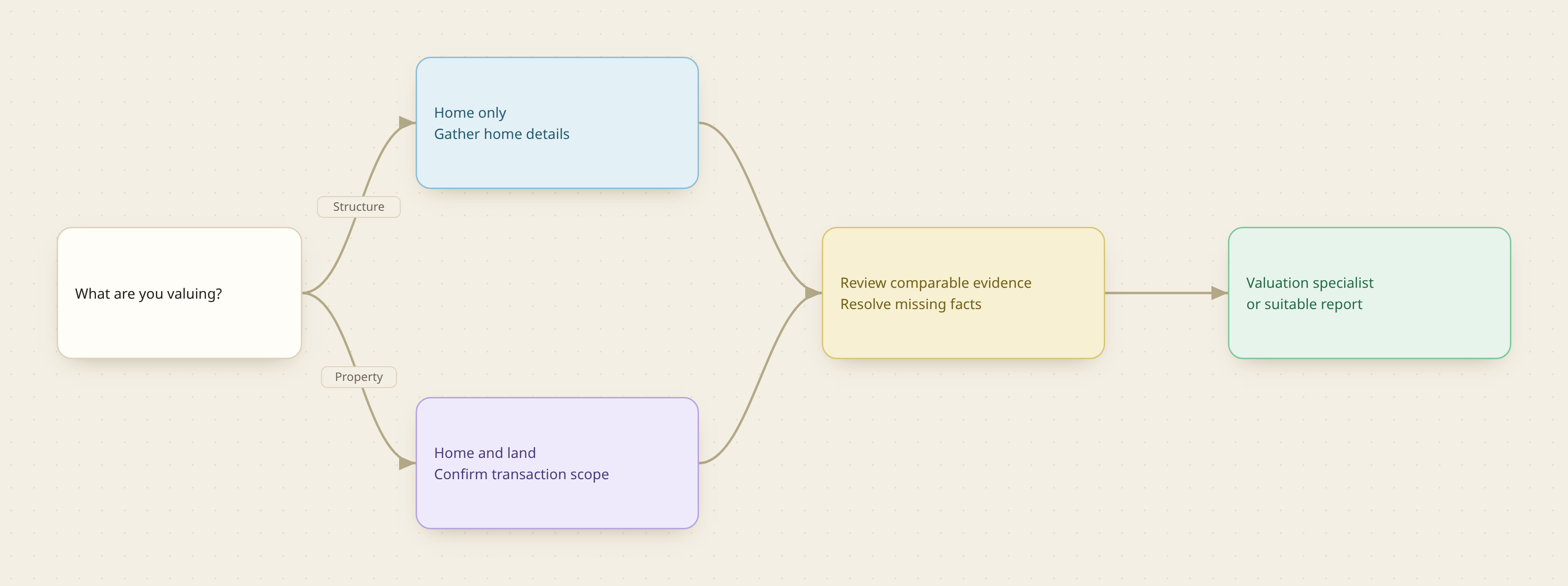
How to build a mobile home comparison in five steps
Build the sheet in a fixed order so a missing fact cannot quietly become an assumption. The following steps work whether you collect listings manually or ask an agent to collect them.
Step 1. Define the subject home
Create a subject-home record with its dimensions, year, location and documented condition, then state whether land belongs in the valuation. Add the purpose of the estimate and leave unresolved facts visible.
Step 2. Choose a comparison area
Choose an area you can explain to the person reviewing the sheet, and record its boundaries. Start with one page or a small manual shortlist when testing; collecting more rows does not resolve differences in ownership or condition.
Step 3. Collect candidate evidence
Keep the source reference, collection date, advertised amount, property type and available size information for each candidate. Put estimates in their own column and avoid filling blanks with an asking price.
Step 4. Review comparability
Review each candidate against the subject home's scope and known characteristics. Use a next-action label such as “confirm land,” “inspect condition” or “exclude,” and write the reason beside it.
Step 5. Assemble the handoff
Save the retained candidates, exclusions and unresolved questions together so the review is repeatable. Give that package to the valuation specialist or report provider before asking for a supported number.
The handoff is also useful when you disagree with an estimate. Instead of saying only that a number looks wrong, you can point to a mismatched asset, a missing fact or a candidate that needs investigation.
How to collect manufactured-home listings with Monid
Monid covers the listing-collection part of this workflow. The tested SerpApi property search returned manufactured-home candidates with asking prices and some automated estimates; it does not establish land inclusion, inspect condition or deliver a mobile-home valuation.
An endpoint is one callable tool operation. Here, the relevant operation is SerpApi's /zillow/search, rather than a vehicle payment calculator or a general mortgage-rate lookup.
For agents
Get a key at app.monid.ai, then give your agent the setup instruction below. Follow the agent quickstart for the connection steps.
set up https://monid.ai/SKILL.md
Ask for one manufactured-home page, separate estimate and asking-price columns, and an explicit list of missing valuation facts. Keep personal addresses and contact details out of any publicly shared version.
For humans
Install the CLI and add your key using the CLI quickstart.
npm install -g @monid-ai/cli
monid keys add --label main --key <your-api-key>
Discover and inspect are free. Read the current monid.ai/tools and input schema before making the paid call.
Step 6. Collect one page
The following is the command used for our test, with map bounds supplied in north, east, south, west order. The inspected schema puts these inputs in query parameters, so use --query.
monid discover -q "mobile home value calculator" -l 10 --include-unavailable -j
monid inspect -p serpapi -e /zillow/search
monid run -p serpapi -e /zillow/search \
  --query '{"map_bounds":"33.48,-111.6,33.30,-111.95","home_type":"manufactured","status_type":"sale","page":1}' \
  -w 45 -j
Our call completed successfully, returning 41 listing rows in 1.837 seconds of recorded execution time. That is execution time from this run, not setup time or a service guarantee.
Step 7. Read the returned rows
These are the first six returned candidates, identified only by their result position. Amounts are observed property figures in USD, Verified 2026-10-27; they are not tool fees or recommended values.
| Candidate position | Asking price USD | Square feet | Beds | Baths | Zestimate USD |
|---|---|---|---|---|---|
| 1 | 229000 | 1288 | 3 | 2 | Absent |
| 2 | 300000 | 1225 | 3 | 1 | Absent |
| 3 | 189000 | 1764 | 2 | 2 | 104800 |
| 4 | 145900 | 1716 | 2 | 2 | 113300 |
| 5 | 159000 | 1700 | 2 | 2 | Absent |
| 6 | 187000 | 1344 | 2 | 2 | Absent |
The business conclusion is to review these as candidates, rather than average them into a valuation. Across the full page, only seven rows contained a numeric estimate; the other 34 do not support an estimate-based comparison.
The response included extracted_price, currency, square_feet, beds, baths, home_type and status; zestimate appeared on some rows. All 41 rows carried the manufactured-home label, but that label alone does not establish comparability.
Step 8. Save evidence and add review columns
Save the original response, then export the selected fields into your worksheet. Add land inclusion, condition review and next action as your own columns, clearly separated from returned data.
For a broader property-data workflow, the Zillow listings and property-details guide explains the distinction between listing records and further property research. Keep the original evidence when you exclude a candidate so another reviewer can follow your reasoning.
Which data source fits each valuation task?
Use a listing search for collection and a valuation source for the value judgment. The real-estate tools catalog is a place to inspect collection options after you define the evidence you need.
| Use case | Best endpoint | Why? |
|---|---|---|
| Collect manufactured-home asking-price candidates | SerpApi /zillow/search | Tested with the manufactured filter; successful-search billing, independent of row count. Verified 2026-10-27: $0.015 |
| Establish land inclusion and condition | None in the tested workflow | Obtain documents and specialist review; listing fields do not finish this task |
The successful test was billed once at $0.015, Verified 2026-10-27. The inspected billing notes state that successful empty searches also incur the search charge, while HTTP errors and failed searches are free; our test covered a successful nonempty search only.
When should you use something else?
Use J.D. Power when you want its manufactured-home value report, and use a manufactured-housing valuation specialist when you need a supported judgment about a particular home. Ask the intended recipient what evidence they require before ordering a report.
You are reading the Monid blog, and Monid sells access to the tested collection tool. The limit matters: this collection workflow does not produce the reader's final valuation, even though it supplies useful preparation evidence.
For a single home, completing the report provider's form and gathering the requested documents is a direct route. Automating a listing search earns its place when you need a repeatable evidence sheet and will actually review the candidates.
Conclusion
You now have a repeatable way to prepare a mobile-home comparison, distinguish asking prices from estimates and identify the facts still needed for valuation. Monid can collect the listing evidence, while documents, inspection and a suitable valuation source complete the task. No setup time or hours saved were measured, so the pitch line makes no savings promise. Choose the route that matches the asset being valued, and you will hand over a clearer set of evidence instead of an unexplained number.
FAQ
Is there a free mobile home value calculator?
Free asking-price research is a starting point, not a supported valuation. For automated collection, discover and inspect are free; the tested search is paid at the dated price above.
What information does a mobile home value estimator need?
Start with the home's year, dimensions, manufacturer, location and condition, then establish whether land is included. Use the chosen report provider's required inputs rather than a generic checklist alone.
Does a mobile home value include the land?
The answer depends on the scope of the specific figure. Record land inclusion explicitly for each source, and do not interpret a lot-area field as proof that land transfers with the home.
Can I use a Zestimate as my mobile home's appraisal?
No, Zillow states that a Zestimate is not an appraisal. Keep it in a separate estimate column and obtain the evidence required for your actual transaction or decision.
Do I need to write code to collect comparison listings?
No, you can give the collection task to a configured agent. The CLI commands are an alternative for readers who want to make and inspect the call themselves.
How many mobile homes can I compare at once?
Our single-page test returned 41 candidates, with numeric estimates on seven. The number you retain depends on comparability review; a returned row is not automatically a suitable comparable.
Can I use collected property data for any purpose?
Rules differ by location, source and intended use; check the requirements that apply to your situation. Keep personal information out of public comparison sheets.
Published October 2026.